Last updated 2 April 2026
Each month we release improvements, new features and bug fixes to MYOB Business. You'll also notice these changes if you use AccountRight in a web browser. If you use AccountRight desktop software, see what's new.
See what's new without leaving MYOB Business
Click the help icon and look for the What's new link at the bottom of the help panel.
What we released in March
Payroll
Clearer pay run totals and next steps (Australia only)
The last step of a pay run now gives you a clear summary, including your TOTAL OUTGOINGS (the amount you need available for salary and super payments). There's also quick links under Your payments to action (near the bottom) so you can wrap things up by making those employee and super payments. From 1 July 2026, this summary will also help you meet the new Payday Super requirements where you need to pay super after each pay run.

Banking
Get connected faster - Open Banking is here for bank feeds (Australia only)
Open Banking is now available for new subscribers (from 1 March) when connecting to one of the following banks: ANZ, Bank of Melbourne, Bankwest, Bendigo Bank, CommBank, Macquarie, NAB, St. George, Westpac. This gives a more secure, modern connection method for bank feeds and allows users to connect to their bank or financial institution within minutes. More about Open Banking
Smarter category suggestions
We’ve improved the AI category suggestions on the Bank transactions page so it learns from recent activity more effectively, improving the accuracy and coverage.
Smart Reconciliation (Beta) - phase 1 enhancements
Deposits in the Amount column on the Bank transactions page now appear green to make it easier to distinguish them from withdrawals.
AI Business Insights (Beta)
Even more insights and new views
AI Business Insights is now available to more MYOB Business Pro and AccountRight browser customers, giving you a snapshot of cash, profit, income and expenses.
Bite-sized observations: Get key insights with short, easy-to-read observations that explain what’s driving the changes, so you can quickly decide what to do next.
Profit insights: Track profit and margins over time, see if revenue is outpacing costs, and spot early signs of margin squeeze or movement away from break-even.
Cash insights: See how much cash you have, how long it can cover regular bills, and how money is flowing in from customers and out to suppliers.
Your numbers: Use custom date ranges, open reports with your time filters automatically applied, and switch between cash or accrual views.
About AI Business Insights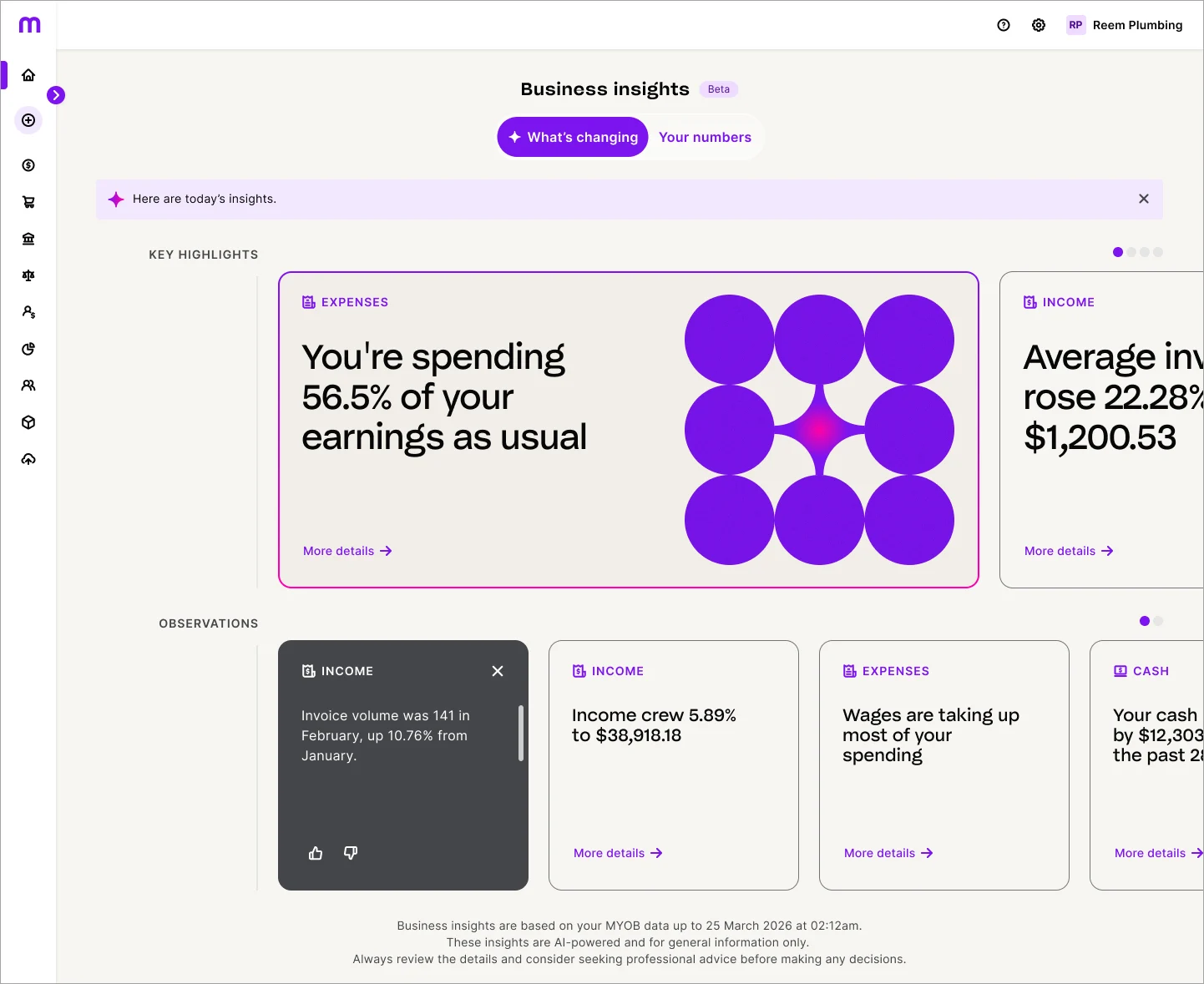

MYOB Assist mobile app
Australia only
MYOB Assist, the companion app for MYOB Business and AccountRight, keeps getting better.
Use a passcode to get into MYOB Assist faster
You can now use a 6-digit passcode to sign in quickly and securely without having to re-enter your email and password each time you re-open the app throughout the day. Stay signed in to get into the app faster, or sign out if you need to login with a different email address. You can change your passcode anytime via the app settings in the More hub.
Coming soon – invoice and quote attachments
Soon you’ll be able to attach files to your invoices and quotes (like images, PDFs and other supporting documents). When you send the invoice or quote, you can choose which attachments to include. This will make it easier for your customers to see all the details in one place and help you keep better records.
Bug fixes
When you change the description of a bank transaction on the Bank transactions page, hovering your mouse over the edited text now shows the original description in a pop-up.
When you tick or untick transactions on the Reconcile tab of the Bank transactions page, the transaction list no longer jumps back to the top. The screen now stays where you were.
Coming soon...
Open Banking is expanding to existing customers (Australia only)
Existing customers will soon be able to connect a bank account or credit card to MYOB via Open Banking. Users get access to fast set up times and an expanded network of banks and account types. Find out more
Previous releases
To learn about changes to MYOB Business in previous releases, see MYOB Business release history.
Each month, we release improvements, new features, and bug fixes. If your company file is online, you can also use AccountRight in a web browser – take a look at what's new in the browser.
What's new in AccountRight version 2026.3 - released 15 April
Payroll
Helping you stay super compliant (Australia only)
We’ve added a Pay Superannuation button at the end of the pay run as convenient way to make your super payments straight away. This will also help you meet the new Payday Super requirements from 1 July 2026, where you're required to pay super after each pay run.

Smart Invoice Reminders – now available
AccountRight browser only
Smart Invoice Reminders is the new AI-powered feature that helps you get paid on time, while keeping your customer relationships on track. With intelligent insights and suggested actions, the painful admin disappears while you stay in full control. Scheduling, and personalisation are all under your command - so it's always authentic and easy, with the support of automation.
Set up invoice reminders in AccountRight browser
When you go to set up invoice reminders from the Sales command centre or from emailing preferences (Setup menu > Preferences > Emailing), you're now taken to the web browser version of AccountRight. There, you can turn on invoice reminders and adjust the automated messaging.

More about smart invoice reminders
Reminder status visibility and overdue invoice suggestions
As part of these improvements, we've also updated the Invoices page in AccountRight browser to include better visibility of reminder status and activity. You'll also get suggested actions to follow up overdue invoices.

Turn on monthly invoice summaries in AccountRight browser
When you turn on monthly invoice summaries from emailing preferences (Setup menu > Preferences > Emailing) you now complete this step in the web browser version of AccountRight.
More about monthly invoice summaries
MYOB Assist mobile app
Australia only
MYOB Assist, the companion app for MYOB Business and AccountRight, keeps getting better.
Invoice and quote attachments
You can now attach files to your invoices and quotes (like images, PDFs and other supporting documents). When you send the invoice or quote, you can choose which attachments to include. This makes it easier for your customers to see all the details in one place and help you keep better records.
Bug fixes
(AccountRight Server Edition only) Fixed a bug that prevented online backup and restore functioning properly
Resolved an issue that could cause AccountRight to crash when matching or approving bank transactions
After each release, we retire an older version
We usually release an AccountRight update around the middle of the month with improvements and fixes.
As updates are released, older versions are decommissioned and no longer work online. If you're using an older version and your file's online, you must update to the latest AccountRight version to keep working.
If you're using AccountRight version 2026.2, you must update by 28 April*.
Shut down AccountRight when you're not using it. If you leave AccountRight open all the time, you may miss out on automatic updates.
* All dates are indicative only and subject to change.
How to get this update
If you use AccountRight PC Edition (version 2021.1 or later) or AccountRight Server Edition (version 2022.4 or later) you'll automatically be updated to the latest release of AccountRight. The next time you log in after that, you'll be prompted to restart AccountRight to complete the update.
If you use AccountRight Server Edition version 2022.3 or earlier you can download the latest version for your server (AccountRight subscription required). Learn more about updating an AccountRight network.
Not sure what edition you're using? If you can see SE in the desktop shortcut description, you're using Server Edition. Otherwise, you're probably using the PC Edition.

If you're updating from an older AccountRight version, like AccountRight Classic (v19), learn how to upgrade.
If you see a message that AccountRight needs updating when you open AccountRight, you need to restart AccountRight to install any pending updates. See Getting the latest version.
Previous releases
To learn about changes to AccountRight in previous releases, see the release history.