Each month we release improvements, new features and bug fixes to MYOB Business. Listed below are releases from previous months. If you want to find out about more recent releases, see what's new in MYOB Business.
2026
February 2026
Smarter workflows with AI
From helping you prepare BAS, creating invoice reminders, simplifying bank reconciliation to business insights that transform – AI is bringing in a new era for small businesses.
AI BAS (Beta) - Australia only
AI BAS is an agentic BAS preparation tool that helps get your Business Activity Statement ready to lodge. It reviews your transactions to detect GST, flag anomalies, find missing documents and explain its suggestions. This helps reduce errors and makes BAS preparation easier and less stressful.
AI BAS is currently in beta with selected GST‑registered Australian sole traders using MYOB Business Lite and Pro. We'll gradually roll this out to more businesses over the coming months.

AI Business Insights (Beta)
AI Business Insights (Beta) is an AI‑powered experience in MYOB Business Pro and AccountRight browser that helps you understand what’s happening in your business. It highlights key insights and trends about your income, expenses, cash management and profit. This helps you (and your advisor) quickly see what’s going on in your business without running multiple reports.
About AI Business Insights

Smart Reconciliation (Beta)
Smart Reconciliation is the new reconciliation experience coming to MYOB. In phase 1, you get a redesigned bank transactions page, automatching to categories using high-confidence logic, clear method labels so you can see how each match was made, and bulk accept to review and approve multiple transactions at once.
More of the matching work happens in the background, while you stay in control of the review - helping reduce manual effort and making it easier to keep your books accurate and up to date.

Smart Invoice Reminders (Beta)
Smart Invoice Reminders (Beta) is the new AI-powered feature that helps you get paid on time, while keeping your customer relationships on track. With intelligent insights and suggested actions, the painful admin disappears while you stay in full control. Scheduling, and personalisation are all under your command - so it's always authentic and easy, with the support of automation.
Smart Invoice Reminders is currently in beta with a handful of Australian businesses. We'll gradually roll it out to more businesses over the coming months.

Find transactions faster
We've added a Transactions tab with better search filters on the Find transactions screen. This gives you more precise search options and clearer results at a glance. Get in, find what you need, and move on! More about finding transactions

Manage app connections
If you've connected a third-party app to MYOB Business, we're rolling out the ability to manage those connections on the App Connections page. Just click your business name in MYOB Business > App Connections to see your connected apps. Until we finish rolling this out, not all apps will be available to manage – but it won't be too far away.
About managing app connections

Bug fixes
We fixed an issue that was causing the Reconcile accounts screen jumping back up to the top of the page when a line was ticked or unticked.
We fixed an issue in the Journal security audit report where some transactions were not being displayed.
January 2026
Banking
We've made some improvements on the Bank transactions page to make life a little easier:
Multiple records containing the same category no longer disappear when the page is refreshed.
Now when you unmatch or rematch a bank transaction, only transactions that were created by the match will be removed.
If you use the Tab key to focus on a transaction which isn't linked to a category, you'll no longer see an error.
Also, if a bank transaction is dated within a bank reconciliation period but it's matched to a future dated MYOB record, you can now select that transaction to be reconciled.
MYOB Assist mobile app
Australia only
MYOB Assist, the companion app for MYOB Business and AccountRight, keeps getting better.
Duplicate invoices and quotes to quickly create new ones
Instead of creating new invoices and quotes from scratch every time, you can now duplicate existing ones. This copies all the details into a new invoice or quote so all you need to do is make any required changes then save and send. Update to the latest version of the app to see this feature (if auto-update is turned off).

2025
December 2025
Payroll
More control over employee self-onboarding (Australia only)
When you set up new employees, by default they'll be sent an invitation to self-onboard to submit their own details into MYOB Business. This means all you need to do is add their payroll info. But if you prefer to manually add an employee and enter all of their details yourself, we've added a new payroll setting you can turn on to allow this (settings menu (⚙️) > Payroll settings > General payroll information tab > Employee self-onboarding). More about self-onboarding

Banking
An improved, smarter banking experience
We've finished rolling out the updated Bank transactions page. The refreshed design has several time-saving improvements, like artificial intelligence to learn from how you categorise transactions to help suggest more accurate category suggestions the next time similar transactions comes in. This saves you from searching for a category to match it to. More about working with bank transactions

Get things done faster
We've removed the spinning icon from each line when allocating transactions on the Bank transactions page. There's also more meaningful alerts shown on each line to help you quickly identify and fix any issues as you allocate.
MYOB Assist mobile app
Australia only
MYOB Assist, the companion app for MYOB Business, keeps getting better.
Quotes are now available
You can now create, send, and manage quotes on the go in the MYOB Assist app. This makes it easier for you to start a job in the field, send a quote straight from your phone, and turn it into an invoice when the work’s approved — all without leaving the app.

November 2025
Banking
Quickly add adjustments when categorising transactions
When you use the quick dropdown to see suggested matches, you can now easily add an adjustment if transaction amounts don't match exactly.

Save time with more accurate category suggestions
When your transactions come into MYOB Business from a connected bank account, we've improved the category suggestions to make them more accurate and useful.
Smarter matching of money transfers
When you transfer money from one related bank account to another, this will be automatically matched if both sides of the transfer are within 7 days.
Work faster with an improved Bank transactions page
Every moment counts when you're busy – so we've made several enhancements to speed things up. The Bank transactions page now loads quicker, and allocating single line transactions is faster.
Payroll
Payroll history at a glance (New Zealand only)
The new Pay run history report gives you details of past pay runs for a specified date range. This consolidated view provides quick access to historical payroll information, making auditing and reporting faster and more accurate.

MYOB Assist mobile app
Australia only
MYOB Assist, the companion app for MYOB Business, keeps getting better.
Let your team upload receipts – without full file access
You can now use the Contacts role in MYOB Business to let team members only capture and upload expenses using MYOB Assist, without giving them full access to your business file. This helps keep your reports, financials and other sensitive data protected. More about managing users
MYOB Business bug fixes
We fixed an issue that could cause duplicated bank transactions to show on the Bank transactions page.
October 2025
MYOB Assist mobile app
Australia only
We're refining the app to make it even easier to use:
Introducing Service invoices
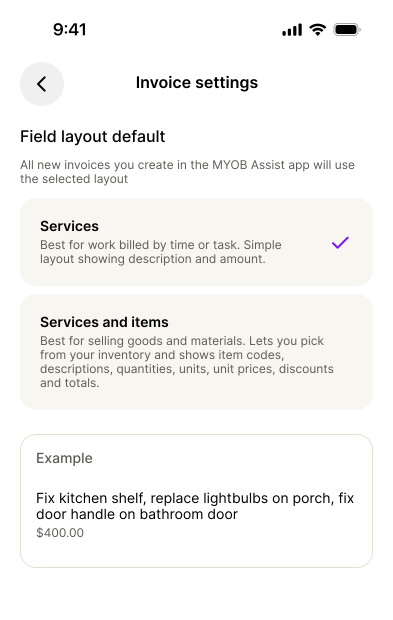
If your business provides services rather than products, you can now choose a Service layout when creating an invoice. This layout is designed for service-based work, where you bill for time, labour, or descriptions of work instead of items or quantities. These invoices are editable within AccountRight browser and MYOB Business.
Set your default invoice layout (Services or Services & Items) from the More menu.
(Online invoicing users) Send invoices with a payment link via SMS
If you use online payments, you can now send your customers a secure payment link by SMS — not just a PDF attachment. This makes it easier for customers to view and pay directly from their phone. You can send the SMS from the Save menu or by turning on the SMS option when emailing an invoice.
Automatically open your last business file
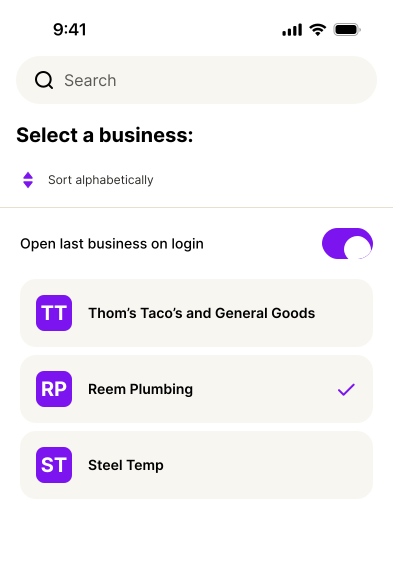
Save time every time you log in — the app now remembers the last business file you used and opens it automatically. If you usually work from one business file, you no longer need to select it from the list each time you sign in. Just select Open last business on login on the Switch business page, and each time you log in, you’ll go straight into the business file you last used.
You can still switch files anytime from More > Switch business..
MYOB Business bug fixes
We fixed an issue that could cause errors and poor performance when categorising transactions on the Bank transactions page.
We fixed a bug that could result in duplicate transactions when bank transfers are automatically matched.
September
The MYOB Assist mobile app is here (Australia)
This app is now live in Australia and replaces the existing MYOB Capture and Invoice apps. MYOB Assist helps you to unlock better cash flow. With the new app, you can:
Capture expenses – snap a photo of a bill or receipt and send it straight to your MYOB Business Uploads (or the In Tray for online AccountRight files). Capture single or multi-page documents (up to 20 pages), ready for uploading.
Create invoices – create, edit and send professional invoices in just a few taps – all synced in real-time with your online company file.

Banking
Smarter suggestions
We've improved the suggested matches on the Bank transactions page to make it quicker and easier to match your invoices and bills. MYOB Business now looks for full names in transaction descriptions, not just parts of names, so you get more accurate suggestions.
Improved auto-matching
Auto-matching no longer happens if the date of an MYOB transaction is later than the bank transaction date. Instead, you'll now see a suggestion.
Faster transaction allocation
We've made some performance improvements so that you can allocate transactions line by line faster using hot keys or moving quickly down the page.
Less clutter
We've removed some annoying success messages from the Bank transactions page so you can work with fewer disruptions.
August
Payroll (Australia)

See jobs in past pay runs
When you look at an employee's previous pay, you'll now see if any jobs were assigned and the job allocation.
Banking (New Zealand)
Quicker setup of BNZ bank feeds
BNZ improved how their bank and credit card accounts connect to MYOB. This means you can now connect a BNZ account to MYOB Business faster by applying online. Previously you needed to fill in and submit an application form. Connect a BNZ account

July
Banking
Save time with a smarter Bank transactions page
We’re gradually rolling out changes to the Bank transactions page to make matching faster, smarter and less manual. If you don’t see these changes yet, they’re not far away:
Category suggestions save you time and guesswork MYOB Business uses artificial intelligence to learn from how you previously matched a transaction to a category to suggest a matching category the next time a similar transaction comes in. This saves you from searching for a category to match it to.
You can accept the suggestion with one click (or easily choose another category from the list).
When you accept a category, MYOB Business creates the matching transaction record for you.
Simpler teminology With the introduction of category suggestions, we’ve replaced ‘categorising’ with ‘matching’. Now, you match bank transactions to a category.
Better searching We’ve simplified and improved the search filters. Use the Not matched filter to show all bank transactions waiting to be matched. You can also filter the transaction list by suggestions, automatches, or transaction types.
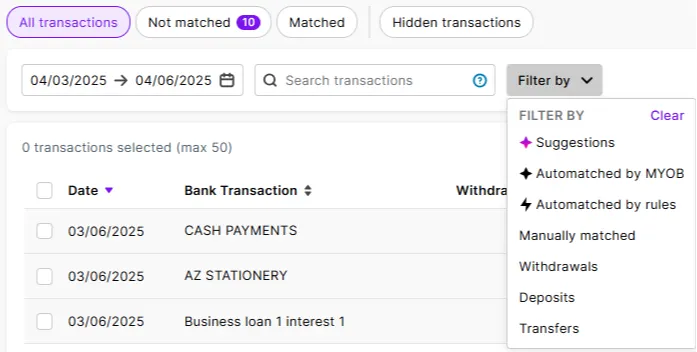
These changes are still being rolled out to all businesses, but here's how you work with the new design.

More reliable bank feed delivery times
The daily delivery of transactions from your connected bank accounts now happens by 11am each morning (Melbourne time). This gives you up-to-date banking data sooner, so you (or your automated bank rules) can take care of matching and categorising earlier.
June
Payroll
Reminder: Helping you stay compliant for the 25/26 payroll year (Australia only)
As we mentioned last month, we've taken care of all these changes for the 2025/26 payroll year:
Tax tables – the 2025/26 tax tables have been automatically updated and will apply for pays dated 1 July 2025 onwards. You'll see the new tax table date in your General payroll information after processing your first July pay (settings (⚙️) menu > Payroll settings > General payroll information tab).
Super rate increase to 12% – the super guarantee rate has gone up to 12% from 1 July, but there's an easy way to make sure this increase happens automatically.
Lump sum E threshold removal – From 1 July, any payment of back pay is considered a lump sum E. Previously this only applied to back pay exceeding $1200.
Undo manual changes to pay history (Australia only)
An employee's pay history shows what they've been paid in pay runs, so should never be tampered with. We've added the ability to Undo manual changes in an employee's Pay history to easily remove any changes that have been entered manually (maybe trying to fix a pay). Previously you needed to contact us for help to undo these changes.
New workers compensation report (Australia only)
We're adding a new report that helps prepare wage estimates and declarations required by workers compensation providers. Use the report to generate the payroll information needed when starting or renewing a workers compensation policy. You'll find the report via the Reporting menu > Reports > Payroll tab.
Account management
Easier MYOB account update processes
We've made it easier to update the relationship your business has with MYOB, whether you want to:
Clearer change of details forms and help topics guide you through what to do and what supporting documents you may need to provide.
Bug fixes
We fixed a bug that was preventing the tax amount from showing on general journal transactions in the General ledger report.
May
Payroll

Upload employee documents to stay organised
Store documents, like contracts, licences or certificates, in MYOB Business. This keeps all your employee information safely stored in one place where it's easily accessible. More about storing documents
Helping you stay compliant for the 25/26 payroll year (Australia only)
We've got you covered this EOFY by taking care of all these changes for the 2025/26 payroll year:
Tax tables – the 2025/26 tax tables have been automatically updated and will apply for pays dated 1 July 2025 onwards. You'll see the new tax table date in your General payroll information after processing your first July pay (settings (⚙️) menu > Payroll settings > General payroll information tab).

Super rate increase to 12% – the super guarantee rate goes up to 12% from 1 July, but there's an easy way to make sure this increase happens automatically.
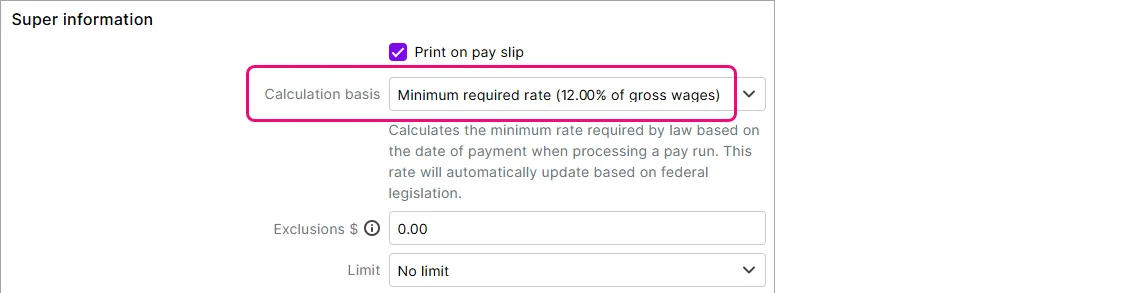
Lump sum E threshold removal – From 1 July, any payment of back pay is considered a lump sum E. Previously this only applied to back pay exceeding $1200.


Improved compliance for self-managed super funds (Australia only)
To pay contributions to a self-managed super fund (SMSF) from MYOB, your STP reports must have been successfully accepted by the ATO. This confirms your business is verified with the ATO and helps ensure SMSF payments are only made by legitimate, registered employers.
Banking
More matches, less admin with smart transaction matching (Early Access Program)
An early access program (EAP) has been launched for changes to the Bank transactions page to make matching faster, smarter and far less manual. A small cohort has been added to the EAP to try this new feature before it's rolled out to everyone.

AI smart-matching – AI will automatically suggest the best match for existing MYOB records or categories. If there's more than one suggestion, select a match, or multiple, from a list of suggestions. AI predictive learning means matching will improve over time based on your behaviour.
"Categorised" is now "matched" – We've simplified how we talk about matching. Bank transactions are now matched to an existing MYOB transaction or matched to a category.
Bug fixes
We fixed a bug that was preventing some users from seeing the dashboard. Previously, users with the Purchases, Banking or Contacts roles were seeing an error stating "You don't have permission to access this page."
April
Payroll
Simplifying STP compliance (Australia only)
When you create a new MYOB Business file, the ATO Reporting Category is now set for you in these pay items:
Base Hourly
Base Salary
Annual Leave Pay
Personal Leave Pay
Overtime (1.5)
Overtime (2x)
This speeds up STP setup and prevents these payments from being reported incorrectly to the ATO.

Helping you stay compliant with super calculations (Australia only)
When you set up a new type of wage payment, like a new allowance, there's a new option to exclude those payments from super guarantee calculations. To help you choose, there's some handy info – just click the blue question mark.

No longer lose a draft pay run when you update an employee (New Zealand only)
If you save changes to an employee who's included in a saved (draft) pay run, the draft pay run is no longer deleted. Instead, after saving the changes (which won't be reflected in the draft pay run), you'll see a message that explains it. It's then up to you whether you continue the draft pay run or create a new one. More about saving and resuming pay runs

Performance improvements
Smarter handling of uploaded documents
We're improving the Optical Character Recognition (OCR) that scans uploaded invoices and receipts to create new bills in MYOB Business. This improves the accuracy and processing times for uploads.
A fresh new colour
We've tweaked the purple colour you'll see in our logo and on images and buttons throughout MYOB Business.

March
Payroll
Helping you stay compliant for the 25/26 payroll year (New Zealand only)
We've updated the required rates and thresholds to keep you in the good books with Inland Revenue (and your employees) for the new payroll year. There's a change to the way extra payments are taxed – and we look after this for you too. See what's changed from 1 April.

More flexible pay distribution (New Zealand only)
You can now split an employee's pay across up to three bank accounts. This gives your employees more control over their funds. An employee can choose to split their pay by amount or percentage and they'll see the split on their pay slip. More about splitting pays.

Sales
Quicker access to online payment settings (Australia only)
Online payments in a popular feature that helps you get paid faster. So we've moved the online payment settings from the bottom to the top of the Payments tab in your Sales settings. This makes it easier to set up and manage online payments. More about online payments

Easier to identify different types of sales
AccountRight browser only
We released this for MYOB Business Pro and Lite last December and it's now available for AccountRight users accessing their online file in a browser. You can set up a different prefix and numbering sequence for your invoices, quotes and sales orders.

Bug fixes
We fixed an issue in the Job profit and loss report that was causing the error "Failed to load the report".
February
Payroll
Helping you stay compliant with Single Touch Payroll Phase 2 (Australia only)
STP Phase 1 was switched off 27 February. So, if you haven't switched to STP Phase 2, you need to do so now to continue reporting to the ATO. How to move
See outstanding PAYG withholding at a glance (Australia only)
There's a new widget on the dashboard that shows how much PAYG tax you've withheld from employee pays. This handy snapshot means you no longer need to go searching for this info when it's time to lodge your BAS.

Suppliers
Wise bank account numbers are now supported for suppliers (New Zealand only)
You can now enter a Wise bank account number in the supplier's contact record.
Invoicing
Get paid faster
Payment methods, like bank deposit and cheque, are now shown on customer's statements, making it easier for them to pay your invoices.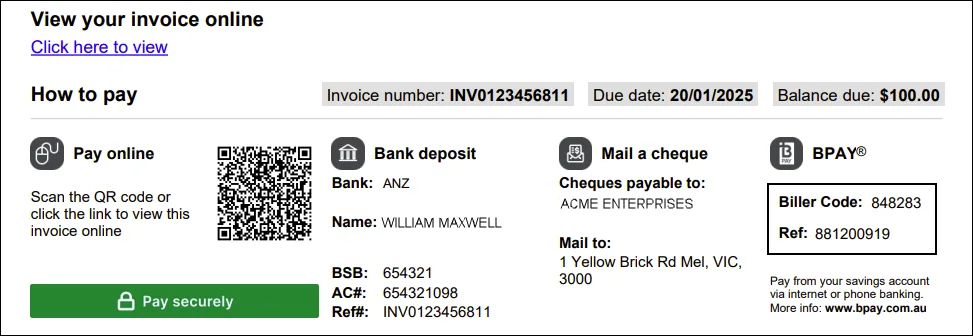
(Online Payments, Australia only) More control over payment methods
You can now enable or disable BPAY payments on recurring invoices.


Bug fixes
We fixed an issue where the bank reconciliation would freeze when trying to reconcile too many transactions. You'll now see a helpful message telling you to choose an earlier reconciliation date to reduce the number of transactions.
January
Payroll
Quicker employee setup (New Zealand only)
If your business is set up for payday filing, new employee details are now automatically sent to Inland Revenue. This means you no longer have to also set up new employees in your myIR portal. There's a new tab in the Payday filing page to see your employee submissions. More about sending employee details to IR.

Security
Helpful nudge in reports before screen locks saves you having to sign back in
Five minutes before the inactivity screen lock, a message will appear at the top of any report you have open. This gives you a chance to resume working before the screen locks.

Banking
Helping you keep bank details up to date
You'll now see reminders in the Banking hub if any details are missing for your bank accounts, like the financial institution. This helps to keep your account details up to date and provides better visibility of your bank accounts in the one place.

Connect your Great Southern Bank Business + accounts (Australia only)
If you have a Great Southern Bank Business + account, you can now set up bank feeds for it in MYOB Business. You can apply via your internet banking. How to apply

2024
December
Security
Helpful nudge before screen locks saves you having to sign back in
Five minutes before the inactivity screen lock, a message will appear at the top of any tab you have open. This gives you a chance to resume working before the screen locks:

Sales
Easier to identify different types of sales
MYOB Business Pro and Lite only
You can set up a different prefix and numbering sequence for your invoices, quotes and sales orders.
Banking
Smarter auto-matching of money transfers
If you transfer money from one account to another, the bank transaction will now be automatically matched to the relevant MYOB Business transaction.
Easily reconnect BNZ bank feeds
AccountRight browser users, New Zealand only
BNZ have changed their bank feeds to use a new API-based system. So you can continue using your BNZ bank feeds, we've released the ability to reconnect them.
Store more details about your bank accounts
When you create a new category that is a bank account type, you can now indicate what the account is for, like a savings account, and the financial institution. If you haven't entered these details for a bank account, you'll see a reminder in the Banking hub.
November
Security
Keeping your data safe when you're not around
Online data security is a big deal – so after 20-30 minutes of inactivity in MYOB Business, the screen will lock and become blurred. This prevents unauthorised access (and prying eyes) from your valuable business data. To keep working, just sign back in. More about the inactivity screen lock

Banking
One-stop shop for staying on top of your banking
The Banking hub is your starting point to make sure that your books reflect what's really going on in your accounts. Connect a bank account, manage your bank feeds and see if there are any bank transactions you need to categorise. This replaces the Manage bank accounts page. More about the Banking hub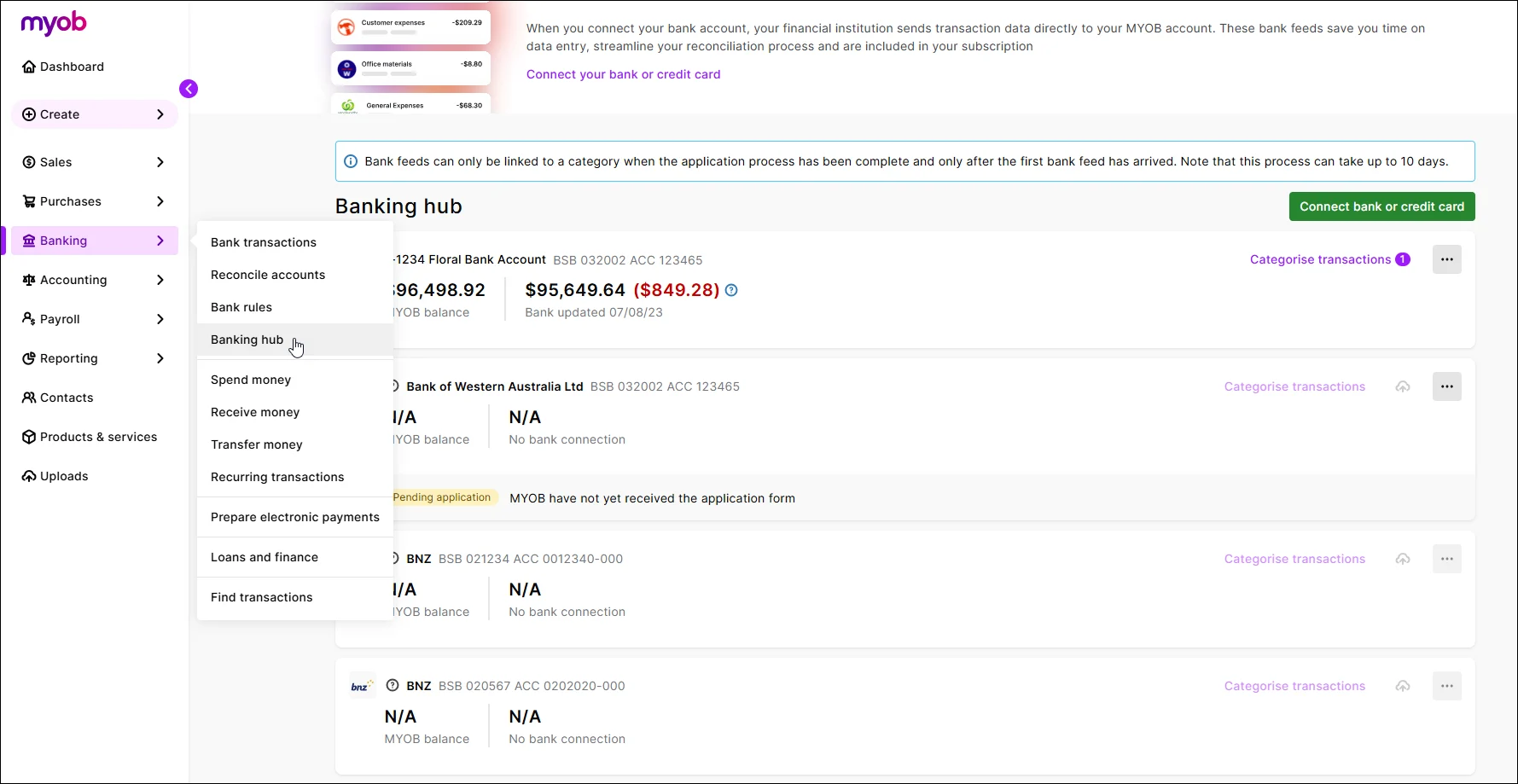
Smarter auto-matching of refunds
If you give or receive a refund from a customer or supplier, the bank transaction will now be automatically matched to the relevant MYOB Business transaction.

October
Payroll
Helping you stay compliant with Single Touch Payroll Phase 2
If you still report payroll using Single Touch Payroll Phase 1, you'll receive a reminder that STP Phase 1 is being retired and you'll need to move to STP Phase 2, including a link for more information: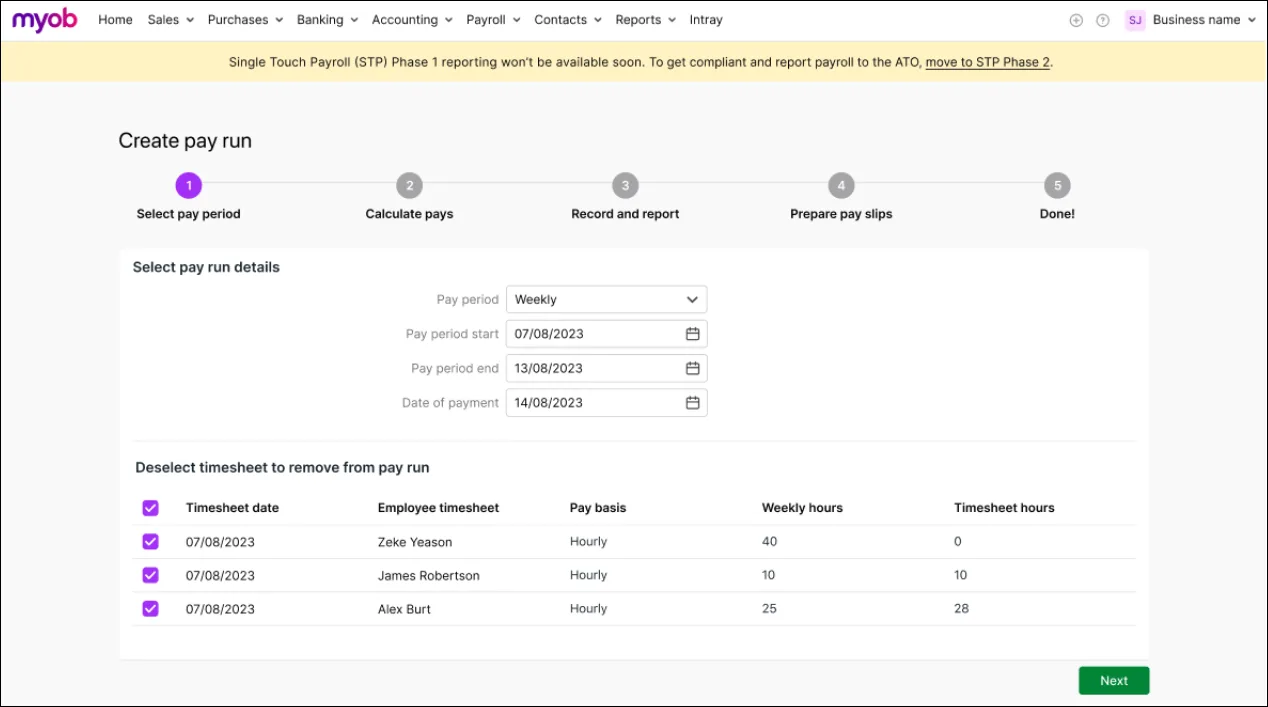

Banking
Smarter auto-matching of supplier bills
We've improved bank feed automatic matching to use the supplier invoice number in the bank transaction description to match the supplier invoice number entered in the bill payment in MYOB.
Business logo on new files
Making sure your new business file reflects your brand
You're now prompted to add your business logo via settings (⚙️) > Business settings > Brand settings when you start using a new MYOB Business file. This lets you communicate your brand and business details on your invoices, quotes and statements as well as brand your business reports. More about uploading a logo to represent your brand
Usability improvements
Sensible default when creating a new supplier
When you create a new supplier, the option to designate them as a Company or Individual is now selected as Company by default. This reflects that most suppliers are companies.
Bug fixes
Fixed an issue that prevented all lines in a general journal transaction appearing as possible matches in the Bank transaction page > Match transaction tab.
When you select Budget as a report option in the Profit and loss report, the figures in the Budget column are now aligned.
September
Security
Helping you keep your online data safer
Two-factor authentication (2FA) is a key way we keep your data safe. To meet the latest security challenges, we've removed the option to remember your device for 30 days when entering a 2FA code. Instead, you'll now need to sign in and enter a 2FA code at least once every 24 hours. So, if you work in MYOB Business daily, you now need to sign in and complete the 2FA check each day. More about security improvements.
Payroll
Helping you stay compliant with super guarantee rules
The ATO requires every business to have a default super fund. If you don't have one set in MYOB Business, when you send a new employee a self-onboarding request you'll now see a more prominent message to set your default super fund.
More control when updating hourly employees
When you update an hourly employee's pay rate or pay cycle and it affects their standard pay hours, you can now choose to revert or keep their current standard pay hours. For example, if you've set their standard pay hours to 0 (because they're a casual employee with varying hours), you can keep this if you change their pay cycle.


Bug fixes
Unprocessed timesheets are now automatically listed when you start a new pay run. Previously, you had to re-enter the Date of payment in the pay run to make them appear.
We fixed an issue where bank feed transactions were not appearing in AccountRight desktop but they were still appearing in the browser. Bank feeds are now consistently appearing in both the desktop and browser.
We fixed an issue that could have caused an out of balance in the General ledger report. Previously, a debit and a credit posted to the same category sometimes showed incorrectly as a one sided entry.
August
Payroll
Even easier final pays
Previously, we released the ability to pay unused annual leave in an employee's final pay. Now, you can also pay unused long service leave for employees who are leaving voluntarily. More about final pays.

Sales
More invoice customisation
Change the appearance of your invoices by hiding columns, changing the column headings and adjusting the display order. More about customising invoices.
More flexible surcharging with online payments
If you enable surcharging on your online payments, the 25c transaction fee will now also be passed on to your customers in addition to the 1.8% surcharge (excluding BPAY). Also, you can now exclude BPAY as a payment option, making online payments a cost-free option to your business. More about the changes to surcharging.

Banking
Easier to identify bank feeds
We've added a Reference column to the Bank transactions page to show the supplier invoice number or customer invoice number for your bank feed transactions. This makes it easier to identify the MYOB bill or invoice the transaction relates to.Smarter auto-matching
We've improved bank feed automatic matching to use the bank transaction description to match with invoice numbers and customer names more intuitively. There's more improvements to matching coming in future releases – so watch this space.More options for connecting credit cards
When you connect a credit card to MYOB, you can now link it to a liability category in your category list (chart of accounts).
Bug fixes
We fixed an issue that was causing superannuation transactions to appear doubled up on the Find transactions page
Users who are only assigned the Contacts role will no longer see the ‘Something went wrong' error when signing in.
Because of an issue preventing editing of the Tax code column heading is sales templates, we've turned off the ability to edit that column heading.
July
Payroll
Helping you move from Xero payroll
Within the first 30 days of moving from Xero (Payroll Only) to MYOB Business (Payroll Only), you'll have access to a handy migrator to bring across your employee information. You'll be guided through the process to quickly get your employees set up in MYOB without all the manual data entry. Tell me more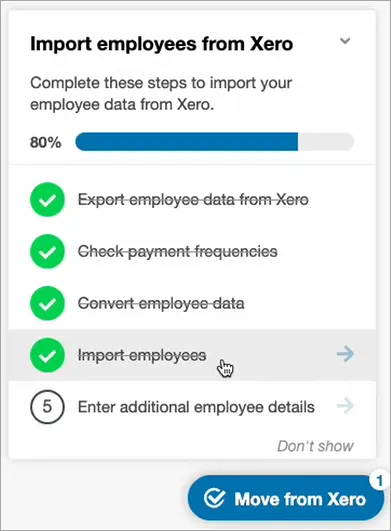

Sales
Easier to save and share quotes
We've moved the save and share options in quotes to the top of the screen. This simplified layout helps get your quotes created and sent faster. More about quotes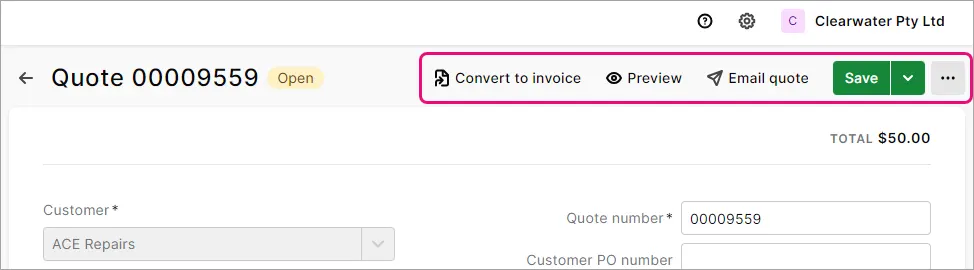
More sales template customisation options
Personalise your invoices, quotes and statements even more with the ability to add your business's terms and conditions. You can now also upload multiple business logos and header images so you can choose different ones for different templates. More about personalising invoices


Purchases
Avoid duplicate bills
If you're creating a bill manually or from an uploaded document, you'll now be warned if the Supplier invoice number has previously been used.

Banking
Faster bank transaction categorising
As you're categorising transactions, you can now refresh the Bank transactions page. This reduces the clutter by removing the transactions you've categorised, and leaving the ones you need to focus on.

June
Payroll
Keeping you compliant for the new payroll year
The tax tables have been automatically updated and will apply for pays dated 1 July 2024 onwards. After processing your first July pay, you'll see the new tax table date via the settings (⚙️) menu > Payroll settings.
Helping you automate the super rate increase
The super guarantee rate increased to 11.5% on 1 July 2024. Any super guarantee pay items with the calculation basis set to Minimum required rate will be automatically updated to 11.5% when you do your first pay with a payment date on or after 1 July 2024.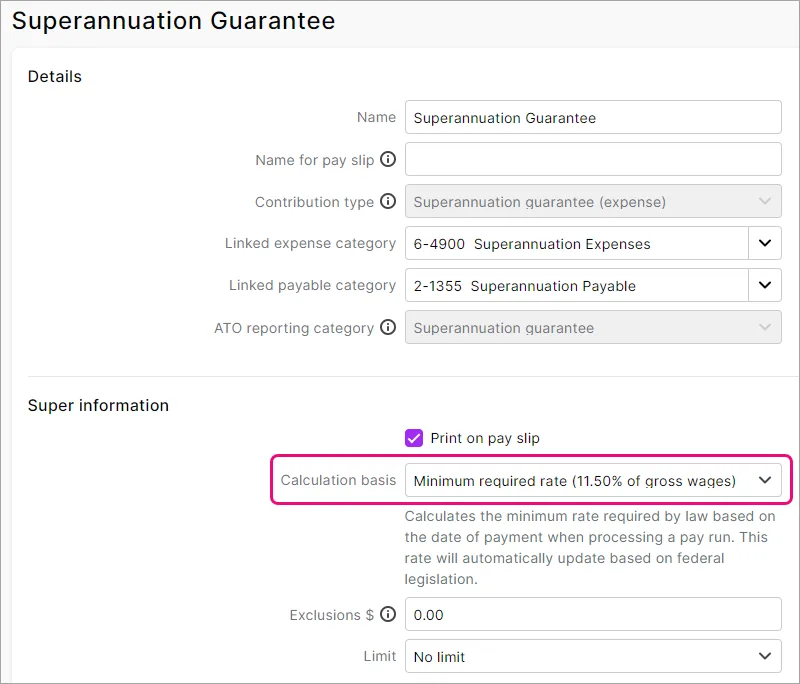
Easier Fair Work compliance
If your business isn't covered by the Fair Work System, you can now choose to prevent new employees being provided the Fair Work Information Statement when you invite them to self-onboard. You'll find this preference via the settings (⚙️) menu > Payroll settings.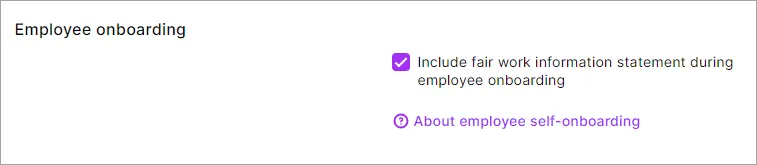
Helping you set a default super fund
When you send a request to an employee to enter or check their details and you haven't set a default superannuation fund in MYOB Business, you'll be prompted to do so.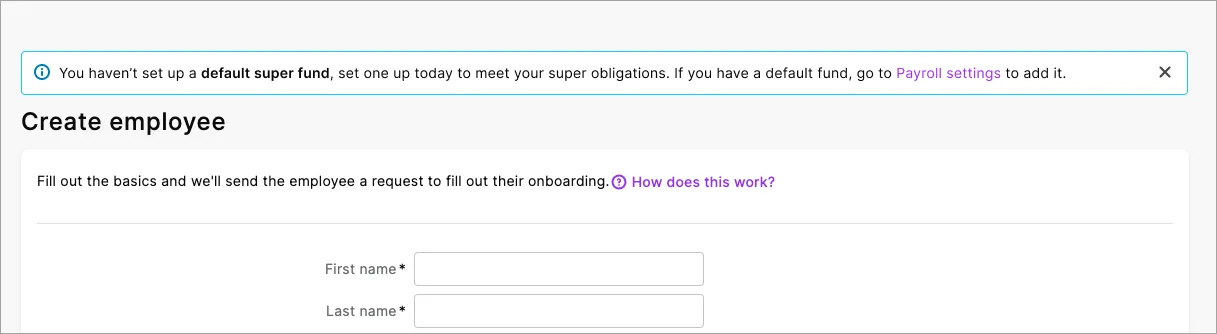


Sales
Easier to save and share invoices
We've moved the save and share options in invoices to the top of the screen. This simplified layout helps get your invoices created and sent faster.

May
New vertical menu and simplified language
We've moved the menu to the side and used simpler labels to make it easier to find your way around. We've also replaced a lot of technical terms with more familiar words. Discover all the changes.

Two-factor authentication enhancements
Avoid getting locked out by setting up another 2FA method
Give yourself more options to sign in by setting up more than one 2FA method. For example, you could set up SMS 2FA on your phone and the 2FA authenticator app on a tablet. Then, if you don't have your phone handy and can't receive SMS, you can still get your 2FA code using the authenticator app on the tablet.
Reset 2FA without having to contact MYOB Support
Once you’ve set up another 2FA method, you’re able to change your 2FA settings yourself:

In the Account security section of My Account, you can easily change your 2FA phone number for SMS 2FA, re-link or change your authenticator app, or set up authenticator app on a new phone.
Payroll
Easier final pays
We're working on a new final pay feature and the first stage is here. There's a new pay cycle called Final pay, and when you choose this you'll be guided through the payment of unused annual leave. Initially this is just for employees who are leaving voluntarily, but we'll add other final payment types, like unused long service leave, in future releases.

Bug fixes
In the Balance sheet report, if you click to view a category's transactions, the report date range is now remembered. Previously the transaction list was being dated from the first day of the current month – which may have resulted in no transactions showing.
In the General ledger report, inventory adjustments now show both the debit and credit amounts against the inventory asset account.
When submitting a request to self-onboard an employee, the Provide access to employee benefits option now only shows if you're not already signed up for employee benefits.
April
Payroll
Helping you stay compliant
When you add an employee, you'll now choose if they're permanent or temporary (which includes fixed-term roles). This ensures temp employees are provided the correct Fair Work Information Statement when they self-onboard or check their details.

Sales
Customise what you see in your invoice and quote lists

Use the new Column options button to show, hide and rearrange columns. Each user can save their own view so it's remembered each time they go to these pages.
Banking
Do more from the Bank transactions page
Many common banking functions, like Import statement and Bank rules, are now available from a quick access menu. Click the ellipsis button (...) to quickly access these tasks from the one place. We've also decluttered the page by moving the Reconcile account button to the top-right corner next to the quick access menu.

March
Payroll
Get new employees to check their details
If you've manually set up an employee, or an employee wants to update some details, you can now send them a secure request to review or update their details. Just click Request employee details in the employee's record. Any updates they make will be sent straight into your MYOB Business file. See how it works

Quicker access to super features
We've added a shortcut menu to the Super payments page for handy access to common things, like your employee list and pay super settings. Look for the ellipsis button (...) next to the Create super payment button.

Sales
Preview an invoice before downloading it
When you export or download an invoice PDF, you can now click View PDF to see a preview.

Banking
Quick access to banking features
We've added a quick access menu to the Bank transactions page, giving easy access to bank feed rules and reports. Just click the ellipsis button (...).

More flexible BAS report
Save a draft
If you need to stop doing a BAS report, just click Close to save it as a draft and come back to it later. When you reopen the draft you're prompted to review any changes that have been made that affect it.
Refresh the BAS report
If you make any changes to transactions while you've got a BAS report open, just click Refresh to update the report with your changes.
Usability improvements
Stay up to date when we release something new
When we've released an update for MYOB Business, you'll now see a red dot next to What's new in the help panel (displayed by clicking the question mark icon in the top-right corner).

February
Bug fixes
We fixed an issue that was causing help links to open on the same browser tab as MYOB Business. Now when you click a help link, it'll open on a new browser tab.
January
Usability improvements
Even more help where and when you need it
We've added more clickable help links where you might need a little extra info, like fixing a pay or an out of balance reconciliation. Look for the blue links with question marks.

Smarter searches
When you click the help icon and start typing a search, we’ve improved the list of keywords that are used to present matches to information or features that you're looking for. You can now open the search results in a new tab or window, which leaves your original search results available.
Clearer BAS processes
When you prepare your BAS, you'll see we've renamed Finalise to Save at the end. There's now also a clear message that reminds you to lodge the BAS. Also, during the BAS process you'll now see links to view or edit transactions so you can easily check or change things when preparing the reports.
Reports
New bank activity report
We've added the Bank activity report so you can see all transactions that have been allocated to bank or credit card accounts. All transactions are shown in the report regardless of how they've been entered. This is compared to the Bank transaction report, which only shows bank transactions entered via bank feeds or imported bank statements. This is handy if you haven't been using feeds or importing bank statements.
Spend less time filtering reports
We've improved filtering in reports so that the filters you choose are remembered in each report. The filters in one report won't affect the filters in another.
When you open the following reports for the first time, the filters are now set to the most commonly used settings, but you can change them if you like, and they'll be remembered:
Account list
Bank transaction report
Coding report
Bank reconciliation report
Statement of cash flow
Cash movement
Category general ledger
Sales
Attach files to sales
You can now attach PDF, TIFF, JPEG or PNG files to the Attachment section of invoices, sales orders, or quotes. Attached files are included if you email the sale.
Bug fixes
We fixed an issue on the Reconcile accounts page that was causing the amounts to be misaligned under Withdrawal and Deposit.
The running balance on the Bank transactions report now matches the last bank feed balance provided by your bank.
2023
December
Usability improvements
Quickly get to the tasks you need
When you open the help side panel, the search box now lets you go to the place in MYOB Business you're looking for. For example, if you're not sure where to record a customer refund, just type 'refund' in the search box.

If you want to search the help, there's also a link at the bottom of the results.
More help where and when you need it
We've added clickable help links in places where you might need more information, such as fixing a pay or an out of balance reconciliation. Look for the blue links with question marks.

Better guidance when editing the ABN tax code
We've added some text to explain the implications of changing Account for Withholding credits and Account for Withholding Payables for the ABN tax code.

Reports
Retain preferred filters on the Coding and Accounts list reports
When you change the filters on the Coding and Accounts list reports, they're now remembered for next time and not impacted by other report filters.
November
Payroll
More ways to engage and reward employees
When inviting an employee to self-onboard, you can give them access to employee benefits. You won't see this option if you've already set up employee benefits.
Helping you stay Fair Work compliant
When you set up a new employee, you'll now choose their Employment basis. This ensures that they're provided the correct Fair Work Information Statement when they self-onboard.
Invoicing
Print multiple invoices from one place
The new Print PDF button on the Invoices page lets you print multiple invoices at once. Not available in AccountRight browser
Quickly show all invoices
When viewing the Invoices page, you can now choose All time as the Period to show all invoices without having to set a date range.
Helping you avoid duplicate invoice numbers
When you create an invoice with an invoice number that's already been used, you'll now see a warning.
Dashboard
Choose whether amounts include GST
There's now a Dashboard option to show whether amounts are GST inclusive or exclusive in the Income, Expense and Financial position widgets.
Expanded insights for cash in and out
You can now choose to see the Last 6 months for the Income and Expenses widgets.
Usability improvements
You can now see what's new without leaving MYOB Business
Click the help icon and look for the What's new link at the bottom of the help panel.
Reports
Making sure GST calculates correctly in the Budget management report
If you run the Budget management report (Cash movement type) with Auto-calculate GST selected you'll be warned if the GST Clearing Account is inactive or has been deleted. You'll also see the steps on how to fix it.
Banking
Quicker access to the Bank reconciliation report
When you reconcile an account, you're now prompted to export the Bank reconciliation report from the Bank reconciliation page. Previously, you had to manually run the report and set the filters for the account you just reconciled.
Bug fixes
The GST Return summary now correctly omits the cents rather than rounding up or down to the nearest dollar. This is in line with ATO requirements.
The correct accounting method is now shown when viewing, printing or exporting the GST return report.
October
Dashboard
The new Dashboard is back
The revamped version of the MYOB Business Dashboard is being re-introduced, after being improved to address performance. See what's new.
Bug fixes
The Bank transactions report now only shows transactions from bank feeds or imported bank statements. Previously, it was also showing manually entered transactions.
We fixed an issue that was preventing dragging and dropping attachments into a transaction in the Bank transactions page.
September
Payroll
Easier access to an employee's pay slips
You'll now find each employee's pay slips on the new Pay slips tab in their employee record. This makes it easier to find, view, print or email their pay slips – all from one place.
Reports
View and print with one click
We've added a View and print button to reports to generate a PDF with a single click.
More meaningful PDF file names
Reports exported as PDFs now have a more meaningful name that include your business name and the report name, like My business Pty Ltd - ProfitAndLossReport.pdf
Choose your PAYG Withholding reporting frequency
If you use payroll and you're registered for GST, you can now choose your PAYG Withholding reporting frequency (Monthly or Quarterly) in the report settings. This is useful if you report GST and PAYG Withholding at different frequencies.
Usability improvements
We've made some design improvements on the Bank transactions page to make it easier to identify unallocated transactions.
Bug fixes
The column headings and amounts in the Payroll summary report now line up correctly when exported to PDF.
We fixed an issue that caused the same error to show multiple times when running a customised Balance sheet report outside the current financial year.
Performance improvements
We've improved how information is stored and handled in the pay run, making it quicker to do your payroll.
August
Activity statements
More control over your Activity Statement reporting
You can now accept or decline the suggested prior period adjustments when preparing in your BAS report.
Payroll
Easier to find an employee in a list
Employees are now sorted by their first names wherever they're listed, such as in a pay run and the Employees page. Previously they were sorted by their last names.
Bank transactions
Simplified matching of money transfers
When you create a transfer money transaction on the Bank transactions page, it will be automatically matched without needing to refresh the page.
More help at your fingertips
You can now click a link on the Rule type field when setting up a bank rule to display help content explaining the difference between an automated rule and an allocation template.
Keeping you informed about bank feed issues
If there's an issue affecting bank feeds, like a delay in receiving transactions, you'll now see a notification on the Bank transactions page detailing the issue. The notification is updated when the issue is resolved.
Reports
Easier to review trends across financial years in the Balance sheet report
You can now break down the Balance sheet report across financial years to compare data and show trends. Previously, you could only break down the report for one financial year.
Get a clearer break down of leave in the Payroll register and Payroll activity reports
The Payroll register and Payroll activity reports now display leave accrued and taken. Previously, these reports only had one Leave column and it wasn't clear to users what value it represented.
Bug fixes
When you sort the Users page, Remove access and Cancel/Resend invitation now works on the correct user.
You can no longer match or allocate transactions for a new bank feed until you've linked the bank feed to an MYOB Business account.
The Reconcile link on the Bank transactions page now displays correctly when you resize the page.
We've aligned columns in the GST report and General ledger report so that amounts line up with column headings.
Reports that are exported to excel or PDF now correctly show negative numbers in brackets if this option has been selected.
Performance improvements
We have removed an exception alert message that briefly appeared from the top of some reports, like the Balance sheet, Profit and loss and Unpaid bills reports. This will improve the loading time of these reports.
June
Online Invoice Payments
More payment options for your customers
Your customers can now pay your online invoices using PayPal or PayPal Pay in 4, which now appear as payment options in online invoices.
Sales orders
You can now email sales orders
Get your sales orders out faster by emailing them when you create them, or later. Just as with invoices, you can add attachments or email to multiple addresses.
Activity Statements
Complete your BAS faster with fewer errors
You're now stepped through completing your BAS report and you'll see transactions that were added, edited or deleted in the previous reporting period. These are now displayed in the new Prior period adjustments report, to help balance your end-of-year GST reconciliation.
Payroll
Keeping you compliant for the new payroll year
The tax tables have been automatically updated and will apply for pays dated 1 July 2023 onwards.
Helping you automate the super rate increase
Any super guarantee pay items with the calculation basis set to Minimum required rate will automatically update the super rate to 11% when you do your first pay run with a payment date on or after 1 July 2023.
Add a logo to brand your pay slips
If you have a business logo, you can upload it into MYOB so it appears on your employees' pay slips. Just click your business name and go to Business settings > Brand settings tab to upload your logo.
Clearer pay slips for casual employees
Annual salary no longer appears on pay slips for casual employees.
EOFY finalisation has been updated for STP Phase 2
Employee Gross YTD ($) values in the STP reporting centre now include all STP Phase 2 wage reporting categories (like Overtime and Bonuses). Previously for STP Phase 1, Gross YTD ($) only included wage pay items assigned the Gross Payments reporting category.
Usability improvements
You'll now see a message that customised and consolidated tax codes are not included when preparing the reports for your activity statement.
Clicking Overdue invoices in the Up next section on your Dashboard opens the Invoices page, which will now show just your overdue invoices.
Easily identify credit notes on the Invoices page with the new credit note icon in the Amount column.
When scrolling down the Bank transactions page, the column headings now remain visible, making it easier to identify the columns.
We've made the Possible match found text on the Bank transactions page more visible by changing the text to purple.
Bug fixes
The Trial balance report now shows the YTD column instead of the As at date when comparing periods.
We've temporarily removed the Superannuation and PAYE withholdings payable Dashboard widgets while we investigate why they were affecting performance.
Fixed an issue that was preventing report packs working if they included a Payroll summary or Payroll activity report.
Clicking Possible match found on the Bank transactions page now shows the Match transaction tab with a list of possible matches (instead of the Allocate tab).
Unnecessary horizontal scroll bar no longer appears when you expand a transaction on the Bank transactions page.
When you expand a transaction on the Bank transactions page the headings and contents of each column now align.
Performance improvements
To make the Dashboard load faster, Income and Expenses data for the last 6 months no longer appears.
May
Sales
See the activity of your sales orders
At the bottom of a sales order, you'll now see a More information section, showing the activity on a sales order, like when it was created and converted to an invoice.
Reports
Trial balance report now shows Year to Date (YTD) balances when comparing periods. When comparing periods, YTD debits and credits are combined into a single column.
Bug fixes
When you edit text in the Bank statement description field on the Bank transactions page, the edited description now changes to purple indicating that it's been changed. When you hover over the edited description, you can see the original text.
You'll no longer see an error message when editing header accounts.
Transaction reference numbers that are 13 characters long are no longer truncated when matching on the Bank transactions page.
Created from sales order no longer appears twice in invoice Activity history when you record a payment against a sales order in AccountRight desktop and then convert the sales order to an invoice in AccountRight browser. (AccountRight Browser)
When paying multiple Lump Sum E payments in a pay run, the $1200 threshold is now applied to the consolidated amount. Previously the threshold was being applied to each Lump Sum E payment.
April
Usability improvements
A refreshed look and feel
We’re rolling out a refreshed user interface that gives you a modernised user experience. It includes a new typeface and updated colour palette to improve accessibility with increased contrast and legibility, making it easier to complete your tasks.
More meaningful PDF filenames
Downloaded invoices, bills and quotes now have more meaningful names that include the reference number, like Invoice-00000328.pdf
Sales
Save time by setting a customer's default payment terms
When you set a customer's payment terms on an invoice, there's an option to Remember terms for this customer. This means you don't have to manually set the terms each time you create a customer's invoices.
Know straight away when you've emailed an invoice
When you email an invoice, the Activity column on the Invoices page now shows Sending immediately so you won't accidentally email the invoice again. Previously you had to refresh the page to update the status.
Clearer field descriptions
We've added a clear description of the Unit field in invoices and quotes. We've also made the description of the payment terms setting clearer in the sales settings.
Know if you're missing required unit details
You'll now see a warning message if the No of units or Unit price fields are blank but are needed to save the invoice.
Clearer invoices statuses
Unpaid invoices past their due date now show an Overdue status, and you can filter the Invoices page to show only overdue invoices.
Bills
Better management of bill attachments
Use the new Attachments panel to keep track of all the documents related to a bill. Upload multiple files straight into a bill, see what's attached, and download or delete existing attachments.
Reports
See unallocated bank transactions in the Bank transactions report
There's now an option to view unallocated transactions in the Bank transactions report. If you select this option, when you expand an account you'll now see unallocated transactions for that account. This means the true running balance of bank accounts is now displayed and can be compared to bank statements at any specific date.
eInvoices
You can now receive eInvoices with multiple attachments.
Bug fixes
When adding a new account via the Account dropdown list in the Create recurring transaction page for a general journal, the account now appears without needing to refresh the page.
Fixed an issue that was preventing the mapping of tax codes when exporting data in Sage Handiledger or Reckon APS formats.
Invoices with a balance of $0.49 or lower no longer show a status of Closed on the Invoices page.
When converting a quote to invoice, the invoice issue date is now set as today’s date instead of the quote's issue date.
Resizing the Notes to customer fields now works as expected.
Fixed a bug that could cause a "Something went wrong" error when trying to open the Invoices page.
You'll no longer see the Save invoice? prompt if you've made invalid changes to a closed invoice.
PDF invoices now correctly use the Feature colour you've set in the invoice template if the option Full width header image is selected for that template.
You can now successfully save a recurring invoice when there are more than 3 decimals in the unit price and there is more than one unit.
The invoice status now shows as expected on an invoice when the Due date is set to Prepaid or Cash on delivery.
March
Online Invoice Payments
Send invoices by SMS
When you email an invoice set up for Online Invoice Payments, there's now an option to also send an SMS with a link to the online invoice. Make sure your customers see your invoices and prevent them getting lost in a busy inbox.
The Dashboard
Clearer and more helpful information
We’re rolling out a completely revised and improved Dashboard. In the new Bank accounts section, you’ll see the last-synced bank feed date and unallocated transactions for each account. Cash received and spent is included in the new Income and Expenses sections. And if you’ve upgraded from MYOB Essentials, we’ve brought back some favourites.
Eventually, all MYOB Business and AccountRight browser users will have these and many other enhancements – find out about the new Dashboard.
Sales
Create sales orders to put items and services on order
Use sales orders to create a centralised record of your customer orders that you can pull up at any time, anywhere. When you enter a sales order for an inventoried item, it's marked as committed to customers, helping your purchasing department make informed inventory ordering decisions. You can use sales orders for both goods-based and service-based businesses. Learn more.
Bug fixes
Your chosen GST clearing account now appears on the Cash movement and Budget management reports.
Spend money attachments now show the correct file size.
When you add a new account while you're creating a recurring general journal entry, the new account now appears in the Account field.
February
Payroll
Temporarily assign a pay item during the pay run
When you do a pay run you can add any existing pay item to an employee's pay. The pay item will only apply for this pay.
Check employee leave balances during the pay run
During a pay run you can see current and projected leave balances by hovering over the information icon for any leave wage pay item.
See the hourly rate for wage pay items during the pay run
When you view an employee's pay details during the pay run, you'll see the hourly rate for each wage pay item in the Rate column.
Handling pay rate changes in saved pay runs
If a pay rate has changed since you saved a pay run, you'll see an alert icon against the affected pay item. Click the icon and then click Update to use the new rate, otherwise the original rate will be used.
Bank feeds
Clearer information and guidance when setting up bank feeds
There's more information during the bank feed signup process. When your bank feed is connected, you'll see a notification on your Dashboard telling you to link it to an MYOB account.
Dashboard
Refreshed the look of the getting started tasks you'll follow when setting up a new MYOB Business file.
Bug fixes
Pay run error messages are now displayed correctly.
We fixed an issue that caused some bank feed rules to result in an out-of-balance bank reconciliation.
Bank account number no longer appears blank in the Chart of accounts when setting up electronic payments.
We fixed an issue that was preventing some employees from being added to the MYOB Team admin portal.
Refund amounts applied to bills now display correctly in the Job profit and loss comparison report.
January
Bug fixes
Report PDF style templates with the page layout set to Landscape and Compact now display 12 columns correctly.
The Job profit and loss comparison report now only shows transactions related to the specified jobs.
You can now click the cost of sales account in the Profit and loss report to see the related transactions.
The reports in the default Management Report report pack now use the accounting method based on your report settings.
2022
December
Payroll
Easier leave setup
New MYOB Business files now come with default leave pay items for salaried and hourly-based employees. This ensures leave accrues and is paid out correctly for full time and part time employees. Learn more...
Bug fixes
The Balance sheet report now prevents you from using the Breakdown option when in Cash mode, preventing incorrect display of breakdown amounts.
You now receive a confirmation email when an item import has failed.
Trial users are no longer presented with a payroll onboarding task if they've indicated they have no employees.
The Cash movement report no longer displays an error when using the Compare to budget option.
You can now successfully open a copied budget if the Auto calculate bank accounts option has been selected.
November
Payroll
Improved error messages across a range of payroll workflows, including when:
entering employee payroll information such as pay slip email address and hours in a pay cycle
choosing the pay cycle in a pay run and no employees match that pay cycle
setting up and deleting pay items.
More help for rejected STP submissions
If an STP submission has the error CMN.ATO.GEN.XML03 due to missing or invalid information, you'll now see details of the field that's causing the issue and be directed to information to help you fix it.
Better guidance when paying super
We've improved the error message that shows while processing super payments if a selected super fund is no longer accepting contributions.
Reports
Clearer options in the Include items filter in the Stock on hand and Item list reports to better indicate what will be shown in the report.
You can now click into inventory adjustment transactions in the Balance sheet report to see details of the adjustment
Bug fixes
The Bank transactions page now allows account numbers to be found if they contain slashes (/).
The GST return and GST report in a report pack now shows the correct accounting method for cash/payments mode.
The General ledger report now shows correct amounts after applying multiple matching payment amounts to invoices and bills.
Users can now only access reports matching their permission level. (AccountRight Browser)
The General ledger report now shows the correct tax codes for invoices or bills containing items that have different tax codes.
The Balance sheet report now shows the correct Variance % when comparing values to last year.
The Balance sheet report now prevents you from using the Breakdown option when in Cash mode, preventing incorrect display of breakdown amounts.
You now receive a confirmation email when an item import has failed.
Trial users are no longer presented with a payroll onboarding task if they've indicated they have no employees.
October
Payroll
Save your progress when moving to STP Phase 2
If you get interrupted or need to check some details, you can keep what you've already entered so you don't have to start from scratch when you come back.
Find out how to fix rejected pays
If a pay is rejected by the ATO, you'll see clearer info i n the STP reporting centre that tells you how to fix it.
Pay slip email addresses are filled in automatically
When entering a new employee, the email address you enter on their Contact details tab is automatically added as their pay slip email address on the Payroll details tab.
Clearer message when resuming a pay run after changing employee pay items
If you've saved a pay run then change the pay items for an included employee, you'll now see an error message explaining that you can't resume the pay run but will need to create a new pay run instead.
More guidance when paying employees aged under 18
If a pay run includes an employee aged under 18, regardless of pay frequency you'll be reminded to confirm their hours worked, helping you stay on top of your super obligations.
Improved super calculations
Super guarantee amounts are now calculated only on the current pay cycle. If a threshold is set in a super expense pay item category (not super guarantee) the super calculation only includes previous pay periods if the threshold is exceeded.
Easier to expand an employee's pay during a pay run
You can now click anywhere in the row to view or change the details of that employee's pay. Previously you could only click the dropdown arrow to do this.
Extra information about sending an update event
We've improved the description of the Send update event button to make it clearer that using it will create a zero dollar pay run to update the ATO with your employees' latest year-to-date figures.
More help for rejected STP submissions
If a pay run is rejected by the ATO for errors SBR.GEN.AUTH.006, SBR.GEN.AUTH.008 or CMN.ATO.PAYEVNT.EM99507, you'll see details of the rejection and be directed to information to help you fix it.
Ensuring an employee's default pay item matches their pay basis
You can now only remove an employee from the Base Hourly or Base Salary pay item if the employee's pay basis (hourly or salary) is different to the pay item's pay basis. For example, you can't remove an hourly paid employee from the Base Hourly pay item.
Inventory
Include all your inventory items in reports
You now have the option to show items with a zero quantity or value in your inventory reports. This gives you a more complete view of your inventory.
An item name is no longer mandatory when creating an item.
The current value of inventoried items is now shown in your items list.
Inventory - account info message has been updated on invoice screen. Account info message has been updated on invoice screen for creating and updating invoices.
Reports
Clearer report names and descriptions
The Receivables with tax and Payables with tax reports are now called the Receivables reconciliation with tax and Payables reconciliation with tax reports. We've also improved the descriptions of these reports, along with the descriptions for the Unpaid invoices and Unpaid bills reports.
Banking
Transactions from the previous financial year will now be included when you import a bank statement.
Bug fixes
If you're missing a linked account and trying to create an invoice or bill, you'll now see a clear message guiding you to set the linked account.
When creating a purchase order via the reorder report, the item name now appears as expected in the Description field of the purchase order.
Fixed an issue in the Banking reconciliation report that was incorrectly assigning cheques and deposits, causing the Expected balance on statement to be calculated incorrectly.
A user with the Purchases role can no longer access the prepare electronic payments feature. This removes the possibility of a user without payroll access seeing employee pay amounts.
Fixed an issue that was causing exports for accountants to include transactions for the day after the specified date range.
Fixed an issue that could cause an error when processing future-dated pays.
If you've processed a super payment including a negative value, for example after reversing a pay, you'll no longer see duplicated amounts in the General ledger report.
Improved the error message shown if you try to delete an inventory item which has stock on hand.
September
Payroll
STP 2 is back and better
In July we paused transitions to STP Phase 2 to improve the in-product experience. But the wait is over – you can now make the move to STP Phase 2. Find out how...
Better guidance when completing the move to STP Phase 2
It's now clearer that you need to send your latest payroll info to the ATO in order to finish the move to STP Phase 2.
Improved STP reporting centre for mobile devices
The STP reporting centre now displays better on a range of mobile device screen sizes.
Quickly solve "Cessation Reason Code" errors in STP reports
We've made it clearer how to fix STP reports with a status of Accepted with errors if a terminated employee's termination reason is missing.
Employee ordering in the YTD verification report now matches the order in pay runs
Employees are now sorted alphabetically by last name, making it easier to compare the report with your pay transactions and other reports.
Making sure your ETPs are reported correctly
If you need to undo a pay that contains an employment termination payment (ETP), you'll now only be able to reverse it instead of delete it. This makes sure the reversal is reported properly to the ATO.
Smoother switch to STP Phase 2 for "Other" type employees
Employees whose Employment basis is set to Other aren't included in your STP reporting, so the details of these are employees are no longer checked during the move to STP Phase 2.
Bank feeds
Easily tell when your bank hasn't sent an account balance
When your bank doesn't send an account balance with your bank feed, the Bank feed balance now shows $-- instead of $0.
Sales
Save time when entering invoices
You can now choose a default Notes to customer when entering an invoice.
Easier note management
Save changes to a Notes to customer when entering an invoice.
Reports
Easier to read exported reports
When you export a report to Excel or PDF, unexpanded rows are no longer bolded. Only the totals are bolded making them easier to read.
Quickly see if there are customised GST codes in your GST return report
You'll be warned that these GST codes won't be included in the report.
Bug fixes
Transactions dated earlier than the opening balance date in your business settings no longer show in reports, regardless of the date range filters.
Bank rules with multiple conditions no longer display display a separate rules on the Bank rules page.
The full rate of a Tax code is now displayed on the Tax codes page. Previously the decimal places were hidden.
If your MYOB business is not set up for GST, you'll no longer see the tax options when setting up a general journal recurring transaction.
Bill payments with discounts or that were applied from supplier returns can now be opened via the bill's activity history.
You'll no longer get an error when trying to duplicate a quote which has been converted to an invoice.
MYE exports are no longer missing journals from the last day of the period being exported.
STP reports that contain only hourly wage pay items are now correctly sent to the ATO as a pay event instead of an update event.
The superannuation calculation for employees aged under 18 no longer includes previous pays.
Resuming a saved pay run now remembers the employees who were selected for the pay run when it was saved.
August
Employee self-onboarding
Send new employee self-onboarding requests via SMS
Enter a mobile phone number if you want to send your new employee a self-onboarding request via an SMS message as well as by email.
Single touch payroll
Easier previous year reporting
The Send update event button is now available for previous payroll years, so you no longer need to record a $0 pay to send updated information to the ATO.Improved instructions when setting up STP
When you're moving to STP Phase 2, it's clearer that MYOB Business is only showing how your ATO reporting categories are assigned for STP Phase 2, but not checking if they meet the ATO's requirements.
Also, if you're moving to MYOB from different software, it's now clearer that you only need to transfer your BMS ID if you've used the other software to report via STP in the current financial year.Easily see if you're on STP Phase 1 or 2
You'll now see which STP phase you're reporting on at the top of the screen in the STP reporting centre.More help available when finalising
Click the info icon on the EOFY finalisation tab to see details of what happens when you finalise an employee or remove their finalisation.
Sales
Edit customer note templates directly from invoices
You can now save any changes you make to customer notes while working on an invoice. Previously you could only do this in your sales settings.
Inventory
Export your items so you can update them in bulk
You can now export the details of your items. This is a quick way to bulk update your items by editing the exported file in Excel and importing the changes back into MYOB.Include freight costs in sales and purchases
There's a new Freight field in invoices, quotes, bills, purchase orders, supplier returns and customer credits to record associated freight costs.More streamlined item ordering
When you print or email a bill or purchase order, the Supplier item ID will appear on the PDF (if you've enter it in the item), making it easier for your supplier to identify their item.Quickly duplicate items
If you need to create similar items, duplicate an existing item then customise it as required.Always use the right account for your items
When adding an item to a sale or purchase, the income or expense account you've set for the item will always be used. If you need to change this account you'll need to do it in the item.
Tax codes
More flexibility in your Tax codes
You can now change the GST type in your GST codes.
Reports
Quickly see how much super your employees have accrued and how much you've paid
The Superannuation payments report shows the super amounts your employees have accrued in their pay runs, and the super amounts you've paid to their super funds. This is a great way to see any amounts you're yet to pay to a super fund.Smarter GST reporting
The GST report and GST return report are now automatically filtered according to the accounting method and frequency chosen in your GST report settings.Quickly see if there are consolidated or customised tax codes in your GST return report
You'll be warned that these tax codes won't be included in the report.All super payment details in one place
You can now click the super accrued and super paid amounts in the Superannuation payments report to see details of the associated pay runs and Pay Super transactions.Include inactive employees in the Superannuation payments report
When choosing the employees to show in the Superannuation payments report, you can now include inactive employees. This ensures that all superannuation records will be shown for the specified date range.More complete Pay run history report
The Pay run history report now shows pay runs that include pays and pay items that total to zero for the specified date range. The report now includes all relevant pay runs and only excludes pay runs where all the pay items are zero.Improved security
Users can now only see the reports they're permitted to see based on their user access settings.Find the right report faster
The search function in the reports list now looks at report descriptions and not just report titles.Consistent headings in exported reports
When a report is exported to PDF or Excel, the column headings match those shown in the report in MYOB.
Bug fixes
The chosen accounting method now displays correctly in the Balance sheet and Profit and loss reports.
Files exported for accountants no longer cause an out of balance when imported.
Fixed a bug that was causing incorrect year-to-date figures to show in STP reports for previous payroll years.
Fixed an issue in invoice and quote PDFs that caused the Unit column to be missing and the number of units and amounts for lines where the unit price is $0.
Fixed an issue that resulted in incorrect line amounts when changing the Tax inclusive/exclusive option and the tax rate was negative and larger than 100 (such as setting ABN tax code to -147%).
Tax amounts are no longer duplicated in the Customer sales (detail) report where an invoice has multiples lines.
Editing detail accounts no longer changes the parent header account. (AccountRight browser)
Fixed a bug that was causing STP Phase 1 figures to show in the YTD verification report for businesses who had moved to STP Phase 2.
Amounts no longer show more than 2 decimal places on the EOFY finalisation tab in the STP reporting centre.
July
Reports
Quicker payroll reconciliation
The Payroll advice report has been renamed the Pay run activity report and now includes:a grand total of pay amounts within the selected payment date range, showing totals for Gross pay, PAYG, Deductions, Net pay and Superannuation. This means you'll be able to match these amounts more easily against your bank statements. Filter by employee to see these totals for a single employee.
the ability to generate the report by Payment date or Pay period, giving you more flexibility when reviewing your employees' pay history.
Payroll
View past pay runs directly from your Dashboard
Click View pay runs on your Dashboard to open the Pay runs page, where you can see all of your past pay runs.Automatically keeping you compliant with super for under 18s
Employees aged under 18 who are paid weekly and have worked less than or equal to 30 hours in the week will no longer have super calculated in their pay.If you have inactive or terminated employees, you'll be compliant if you move to STP Phase 2
Inactive and terminated employees (paid in the current payroll year) will now be included in the employee details check when moving to STP Phase 2. You'll be prompted to send an update event after moving to STP Phase 2 to ensure the ATO has your employees' latest year-to-date payroll information. Also, whenever you send an update event, the year-to-date payroll totals for inactive and terminated employees (paid in the current payroll year) are now included.Identify negative ETP amounts more easily in STP reporting
The YTD verification and Summary of payments reports now show which ETP amounts are negative.
Banking
Quickly identify hidden bank feed transactions (AccountRight browser)
You can now view bank feed transactions you've hidden in your AccountRight desktop software.
Tax codes
It's easier to keep your tax codes list tidy
You can now delete tax codes that haven't been used in transactions, accounts, items or contacts. Find out more
Bug fixes
The Coding report no longer shows duplicates of some matched transactions. The totals on this report now match those on the Bank transactions page.
The Bank reconciliation report now shows the outstanding deposits and withdrawals, as well as the expected balance, for liability accounts like credit cards and loans.
Only the Advisor user from a practice will appear in the Users list after upgrading. Other users from that practice will now always be hidden if they have the same practice email domain name. (MYOB Essentials upgraders)
You can now export the Job profit and loss comparison report as a PDF or Excel file when you choose a single job or select the Consolidate jobs option.
If you invite another advisor with the same email domain, it will no longer be duplicated on the Users page.
When you create an item with the Buying price is option marked as Tax exclusive and include it in a purchase order it now calculates the price correctly.
June
Payroll
Keeping you compliant for the new payroll year
The tax tables have been automatically updated and will apply for pays dated 1 July 2022 onwards.Avoid mistakes when fixing termination payments
You'll now be prevented from entering negative Employment Termination Payment (ETP) amounts to fix a previously recorded ETP pay, and you’ll be prompted to reverse the incorrect pay instead. Learn about fixing ETPs.Helping you stay compliant with super for under 18s
If a pay run includes an employee aged under 18, an alert now appears advising you to check how much super you need to pay them. Learn about paying super for under 18s.Helping you automate the super rate increase
If you're currently paying 10%-10.5% super guarantee, when you do a pay run dated 1 July 2022 or later the new calculation basis of Minimum required rate will be automatically selected in your super guarantee pay items and the super amount will be updated to the new required minimum rate of 10.5%. You can also select this calculation basis manually if you need to. Once it's selected, any future rate increases will be handled automatically. Learn how to stay compliant with super increases.
Tax/GST codes
Easier to track the taxes that apply to your business
You can now create new tax codes (except consolidated ones) to suit your business needs. Find out more
Reports
More useful GST reporting. In the GST return report the W2 label now includes ETP tax withholding amounts. Also, if you've moved to STP Phase 2, the W1 label on the report now includes STP Phase 2 amounts.
Easier to read exported reports. If a report is exported to PDF and has more than one page, the column headings now appear on all pages. Also, wrapped text in longer columns will now start on a new page, to keep the related info together.
More efficient report packs. If a custom report is included in a report pack, the date range for the report pack is used for all reports in the pack – including the custom report.
Quickly identify if the exported Balance sheet is using the Cash accounting method. If you export the Balance sheet report for the Cash accounting method, the report will display Cash mode in the PDF or Excel file.
Contacts
Save time entering CC email addresses every time you email
You can now save one or more CC Email addresses in your customer and supplier contact records.Avoid errors when entering email addresses in contacts
If you accidentally put a space at the start of an email address, this will no longer cause and error. You'll quickly see if you've entered the same email address twice.
Sales
Keep your customer notes list free of duplicates
If you try to create a note that has the same note name or note text as an existing note, you'll see a message and won't be able to save it. This keeps your notes list easier to manage.
Bank transactions
Easier to match bank transactions
If a close match isn't found when matching a bank transaction, you can see other transactions you can match to without having to change the Show filter.
Bug fixes
Fixed an issue where the 3-letter code in an edited Tax code wasn't being saved as capitalised.
When you export the General ledger report, the option to display accounts with zero balances now works as expected.
Changes to the Description of transaction for an allocated bank transaction on the Bank transactions page are now saved.
When viewing transactions in the Balance sheet and Cash movement reports, super payment transactions are now displayed correctly in the Debit and Credit columns and are included in the ending balance.
The following changes have been made to the Year-to-date verification report in the STP reporting centre, making it easier to reconcile with the Payroll summary report when finalising your payroll
salary sacrifice amounts are now excluded from total salary and wages
reportable employer super contributions (RESC) and salary sacrifice amounts have been removed from STP Phase 2 W1 deductions
ETP taxable component amounts are no longer doubled for STP Phase 2
May
Superannuation
Helping you automate the super rate increase. A new option has been added to your super guarantee pay item to automatically increase the rate to 10.5% for pays dated 1 July onwards Understand your next steps...
Simplifying super calculations. The $450 super earnings threshold is automatically removed from super calculations for pays dated 1 July onwards Learn more...
Helping you stay compliant with ATO super reporting. The correct ATO reporting category is now set as the default for all super guarantee pay items Learn more...
Sales
Send all your invoices at once
Select multiple invoices on the Invoices page and email them in bulk. This is great if you use recurring invoices or if you like to send your invoices in a batch on a particular day of the week.
Reports
Easier STP reconciliation. An STP Category column has been added to the Payroll activity and Payroll summary reports, so you can compare an employee's ATO reporting category amounts in MYOB Business to what's been reported to the ATO. The Payroll summary report also now has subtotals for each ATO reporting category.
Helping you avoid errors when running business reports. If you click an account total in the Profit and loss, Balance sheet or Cash movement reports and change the Date from field to before the opening balance date of your business you now receive a warning message.
Usability improvements
Know when you've reached the character limit in employee notes. The Notes field now prevents you from entering more than 255 characters, saving you time and effort redoing changes.
Bug fixes
Fixed an issue that made it possible to skip reporting a previous BMS ID (Business Management Software Identifier) when setting up STP Phase 2.
When you create a note in a new or existing invoice, unsaved changes to the invoice will not be lost.
You can now add a new line to existing general journal or spend money recurring transactions.
When you click an account total in the Profit and loss report using the Cash accounting method, the opening balance now resets in the first financial year following the opening balance date year and displays accurate beginning and running balances.
When you click an account total in the Profit and loss report using the Accrual accounting method, the opening balance now resets without you needing to start a new financial year and displays accurate beginning and running balances.
When you select all transactions at once when matching banking transactions, the Match amount and Subtotal now show the expected amounts.
April
Electronic payments
Quickly enable ABA files for an account when processing electronic payments
If the account you've chosen when creating a bank file doesn't have ABA files enabled, you'll see a message that something's missing. Clicking the message shows the account details with the option I create ABA bank files for this account automatically selected. Once you've confirmed and saved the account details, you'll be able to create ABA files using this account.
Sales
Access customer details straight from the Invoices page. When viewing your list of invoices, you can now click a customer's name to check or edit their details.
Avoid mistakes in customer email addresses. If you enter an invalid email address in a customer's record, you'll see a warning.
Reports
Easily see the accounting method when viewing an account's transactions in the Profit and loss, Balance sheet or Cash movement reports.
Easier transaction review in the Profit and loss, Balance sheet and Cash movement reports. We've added the Tax amount and Balance columns when you expand these reports to view transactions.
Bug fixes
All menu items now show consistently when accessed from the reports area
Exports for accountants in the format of MYOB AE MAS now include quantities
If you've moved to STP Phase 2, the Payrun activity report now shows the correct ATO reporting categories
You can now successfully set or update the linked contact in a tax code
The Balance sheet report, when viewed in cash mode, is now showing correct balances for the GST account if multiple credit or debit notes have been applied to an invoice or bill
You now see the correct Beginning balance when viewing an account in the Profit and loss, Balance sheet or Cash movement reports even if there are no recorded transactions in the selected date range.
The Favourite reports tab now shows your favourite reports when you open it for the first after logging in
Rounding amounts in invoices no longer causes the error, 'An unbalanced transaction may not be recorded'
You no longer receive the error, 'Accounts_IndustryShouldNotBeEmpty', when creating an account on the Bank transactions page or when entering an invoice or bill (MYOB Essentials upgraders)
March
Single Touch Payroll Phase 2
Easily move to STP Phase 2
Ready to make the move to STP Phase 2? We'll step you through the process and let you know if anything needs fixing so you stay compliant. You've got until the end of 2022 so you can make the move when it suits you.
Sales
Declutter your invoice PDFs
If you're not giving a customer a discount, the Discount column won't show when you download, print or email a PDF of your invoice.
Banking
More accounts eligible for bank feeds. You can now apply for a bank feed when your bank account number is longer than nine digits.
Fewer errors when entering bank account details. The bank code now defaults to uppercase (for example, 'anz' is now automatically changed to 'ANZ'), meaning you won't get an error.
Quickly identify and add missing account details when creating bank (ABA) files. The link to add missing details is now easier to find.
Edit bank accounts without disrupting your workflow. When you have to add or edit bank details when creating bank (ABA) files, you can now do this without having to leave the current page.
Reports
Tailor the General Ledger report to reflect your accounting method. Choose Cash as the accounting method to see your General Ledger report calculated on a cash basis.
Better understand your GST Return report. A new disclaimer outlines what information is and isn’t included in the report.
Usability improvements
Spend less time puzzling over errors and warnings. We've improved lots of messages in the product to make them more meaningful and helpful.
Clearly distinguish between multiple email addresses in a contact. When you enter an email address, it's shown as a tile so that it's easier to see multiple email addresses.
Bug fixes
When you update a recurring transaction template the tax inclusive/exclusive setting is now remembered
Saving new default payment terms in an invoice no longer clears all payment options in your sales settings
Receive money transaction line amounts now display correctly based on the tax inclusive/exclusive setting
The linked account for customer payments now appears by default when recording a customer payment
The Balance sheet report, when viewed in cash mode, is now showing correct balances for payables and receivables accounts
You can now create a new budget or open an existing budget if it contains inactive parent header accounts
When creating a general journal transaction, you can now successfully prefill from a recurring transaction template
February
Electronic payments
Quickly identify and add missing account details when creating bank (ABA) files
You'll see an indicator confirming if the bank details are complete in the account you're paying from. If something's missing, you can easily add it.
Sales
Email invoice PDFs
When you email an invoice, a PDF version is automatically attached.Set and forget invoice options
MYOB Business remembers whether or not your invoice amounts are tax inclusive and whether you email a copy of the invoice to yourself. Next time you create an invoice, it will use the same settings.Duplicate or email an invoice from a locked period, without having to change lock date settings.
Find your eInvoices quickly (Early adopters only)
Filter by invoice type when viewing the Invoices page.
Reports
Quickly see if you owe money to the ATO, or if you'll get a refund
The GST Return report now shows Payment or Refund in the Total column.Know who owes you money and how much is due
Expand the Receivables with tax report to see the transactions that make up each customer's balance, along with their ageing periods. Reconcile your receivables more easily using the Receivables account and Out of balance amounts.See who you owe money to and how much is due
Expand the Payables with tax report to see the transactions that make up each supplier's balance, along with their ageing periods. Reconcile your payables more easily using the Payables account and Out of balance amounts.
Bug fixes
Clicking Prefill from recurring in a receive money transaction now works as expected.
The beginning and ending balances in the Balance Sheet, Profit & Loss and Cash Movement reports are now correct when viewing in cash mode.
Each tax code in a consolidated tax code is now displayed separately in the GST report. This makes it easier to report these amounts to the ATO.
If you changed the tax amount for a transaction before upgrading MYOB Essentials, or in the AccountRight desktop app, the correct amount of tax is now shown and the transaction is marked as read only. (MYOB Essentials upgraders) (AccountRight browser)
Each month we release improvements, new features and bug fixes to AccountRight desktop software. Listed below are releases from previous months. If you want to find out about more recent releases, see what's new in AccountRight.
2026
2026.2 (March 2026)
2026.2.1.12 - released 30 March
This patch fixes an issue that was preventing multiple users accessing AccountRight on the same computer at the same time. It also fixes an issue that could cause AccountRight to crash during online backups and restores.
Smarter workflows with AI (AccountRight browser only)
From creating invoice reminders, simplifying bank reconciliation and to business insights that transform – AI is bringing in a new era for small businesses.
These AI features are currently in beta and will roll out gradually in the browser version of AccountRight.
AI Business Insights (Beta)
AccountRight browser only
AI Business Insights (Beta) is an AI‑powered experience that helps you understand what’s happening in your business. It highlights key insights and trends about your income, expenses, cash management and profit. This helps you (and your advisor) quickly see what’s going on in your business without running multiple reports.
About AI Business Insights
Smart Reconciliation (Beta)
AccountRight browser only
Smart Reconciliation is the new reconciliation experience coming to MYOB. In phase 1, you get a redesigned bank transactions page, automatching to categories using high-confidence logic, clear method labels so you can see how each match was made, and bulk accept to review and approve multiple transactions at once.
More of the matching work happens in the background, while you stay in control of the review - helping reduce manual effort and making it easier to keep your books accurate and up to date.
Smart Invoice Reminders (Beta)
AccountRight browser only
Smart Invoice Reminders (Beta) is the new AI-powered feature that helps you get paid on time, while keeping your customer relationships on track. With intelligent insights and suggested actions, the painful admin disappears while you stay in full control. Scheduling, and personalisation are all under your command - so it's always authentic and easy, with the support of automation.
Smart Invoice Reminders is currently in beta with a handful of Australian businesses. We'll gradually roll it out to more businesses over the coming months.
Banking
Australia only
Open Banking: Australia's new standard for bank data sharing (online files - Australia only)
Open Banking is now available, rolling out in stages starting with new customers at major banks and progressively expanding to all participating banks and existing customers.
This becomes the primary connection method, when connecting your bank to MYOB. Open Banking is a government-regulated standard for bank data sharing – meaning faster setup, fewer manual steps, and clear controls over what data is shared and for how long. Your existing bank feeds are unaffected and will continue to run as normal.
To connect via Open Banking, you'll need two things in place before you start:
A valid ABN entered in MYOB
A nominated representative enabled on your bank account – this is set via your bank's online portal, not in MYOB
Sign-in improvements: AccountRight Single Sign On
We’ve temporarily turned off Single Sign On
Our team are investigating a bug that could cause a sign-in loop. We also acknowledge that some customers were concerned about the new sign on experience.
We’ll turn the feature back on again once we've fixed the bug. We’ll also take time to address any concerns to ensure a better experience.
Access AccountRight desktop and web seamlessly – sign in once, work everywhere. No more re-entering credentials when switching between platforms.

When you sign in to an online company file, AccountRight will open the MYOB sign-in page in your default web browser. Enter your email and password as you normally would. Once signed in, your company file will open in AccountRight desktop – and then you'll be able to switch beetween desktop and browser (and vice versa) without having to keep signing in.
Key features
Streamlined authentication
Email addresses auto-fill on the sign-in screen
Password managers are now supported for faster access
Session persistence across desktop and web (until timeout)
Supported browsers: Chrome, Firefox, and Edge
Available for online files only – your file must be online to use this feature
Seamless transitions
Deep links enable smooth navigation between desktop and browser
Automatic authentication when moving between platforms
Enhanced security
Modern single sign-on technology provides enterprise-grade protection
Secure browser-based authentication
Other things to note
Inactivity timeouts apply to browser sessions – you'll be signed out after 30 minutes of inactivity
You can still log in to multiple files if you're logged in as the same user. However, you cannot open multiple files under different logged-in users on the same computer
Restore from an online backup
Automatic and manual online backups
Online company files are automatically backed up to the cloud each week, and you can also create your own point-in-time online backups whenever you need. Online backups are stored securely for 6 months.Self-serve restores from online backups
If something goes wrong, like an import that doesn't go to plan, you can restore your online company file back to an earlier point in time – without needing to contact support.Choose your backup preference
If your company file is online, there's a new preference that controls whether you want to backup and restore online or offline (Setup menu > Preferences > Security tab).
More about backing up and restoring
Manage app connections
If you've connected a third-party app to AccountRight, we're rolling out the ability to manage those connections on the App Connections page. Just go to the Services menu > Connected Apps. Until we finish rolling this out, not all apps will be available to manage – but it won't be too far away.

More about managing app connections
MYOB Assist mobile app
Australia only
MYOB Assist, the companion app for MYOB Business and AccountRight, keeps getting better.
Use a passcode to get into MYOB Assist faster
You can now use a 6-digit passcode to sign in quickly and securely without having to re-enter your email and password each time you re-open the app throughout the day. Stay signed in to get into the app faster, or sign out if you need to login with a different email address. You can change your passcode anytime via the app settings in the More hub.
Coming soon – invoice and quote attachments
Soon you’ll be able to attach files to your invoices and quotes (like images, PDFs and other supporting documents). When you send the invoice or quote, you can choose which attachments to include. This will make it easier for your customers to see all the details in one place and help you keep better records.
2026.1 (February 2026)
2026.1.1.11 - released 2 March
This patch fixes an issue that could cause AccountRight to crash for Australian users when reporting payroll via STP.
Banking
Faster bank transaction review
We’ve improved the performance of bank transaction matching so loading and updating your matched and unmatched transactions is faster and smoother – especially for busy files with lots of banking activity. This doesn't change how you work, it's just a snappier experience.
MYOB Assist mobile app
Australia only
MYOB Assist, the companion app for MYOB Business and AccountRight, keeps getting better.
Duplicate invoices and quotes to quickly create new ones
Instead of creating new invoices and quotes from scratch every time, you can now duplicate existing ones. This copies all the details into a new invoice or quote so all you need to do is make any required changes then save and send. Update to the latest version of the app to see this feature (if auto-update is turned off).
AccountRight bug fixes
We’ve fixed an issue that could cause matched transactions to be removed when you unmatched or rematched a bank transaction. Now, only transactions that were created by the match will be removed when you unmatch or rematch.
Coming soon...
If your company file is online, there are some exciting things just around the corner. When AccountRight 2026.1 is released, the following features will be going to a small group of users as part of our testing, but they'll soon be rolled out to everyone.
Automatic and manual online backups
Online company files are automatically backed up to the cloud each week, and you'll soon be able to create your own point-in-time online backups whenever you need. Online backups will be stored securely for 6 months.Self-serve restores from online backups
If something goes wrong, like an import that doesn't go to plan, you'll soon be able to restore your online company file back to an earlier point in time – without needing to contact support.Spend less time signing in and more time getting stuff done
Soon, you'll no longer need sign into AccountRight browser separately when you are already signed into the AccountRight desktop app (and vice versa). Once you’re signed in, you’ll stay connected across platforms without needing to re-enter your details (unless your software times out after inactivity).Open Banking (progressive rollout - Australia only)
From early March 2026, Open Banking will roll out in stages in the browser version of AccountRight, starting with new customers at major banks and progressively expanding to all participating banks and existing customers. Note, if you set up bank feeds via Open Banking, you'll need to provide a valid ABN and enable a nominated representative via online bank permissions. Keep an eye out for further communications.
2025
2025.11 (December 2025)
Payroll
More control over employee self-onboarding (Australia only - released on 2 December)
When you set up new employees, by default they'll be sent an invitation to self-onboard to submit their own details into AccountRight. This means all you need to do is add their payroll info. But if you prefer to manually add an employee and enter all of their details yourself, we've added a new setting under Setup > General Payroll Information you can turn on to allow this. More about self-onboarding

Banking
More secure online bank feed connections
To connect a bank or credit card account, your company file must be online. This allows a more secure and streamlined connection process through the web browser version of AccountRight. It all happens in the Banking hub – where you'll also get better visibility of your connected accounts. More about the Banking hub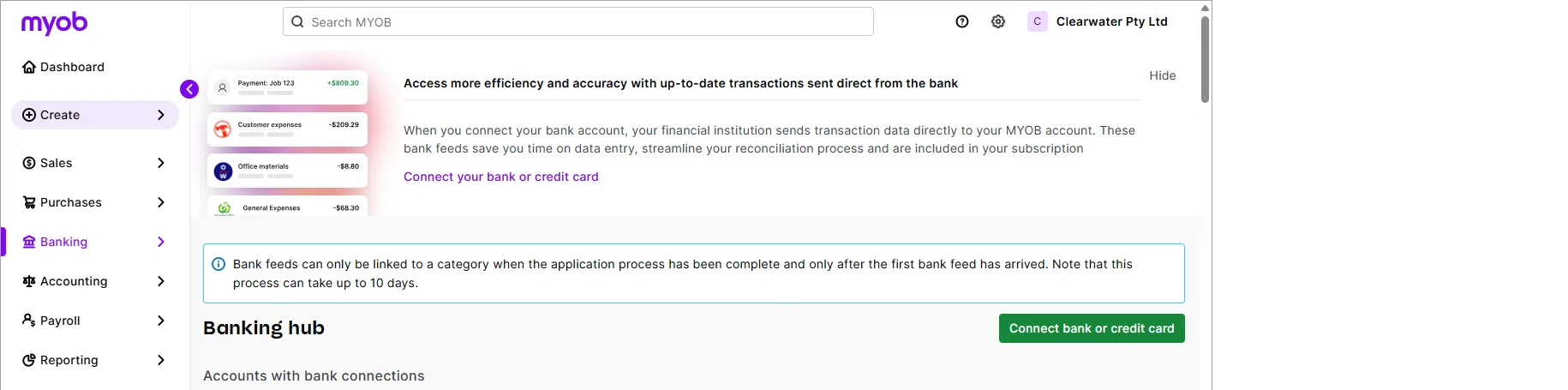
An improved, smarter banking experience (AccountRight browser users only)
If you use AccountRight in a web browser, we've finished rolling out the updated Bank transactions page in the browser. The refreshed design has several time-saving improvements, like artificial intelligence to learn from how you categorise transactions to help suggest more accurate category suggestions the next time similar transactions comes in. This saves you from searching for a category to match it to. More about working with bank transactions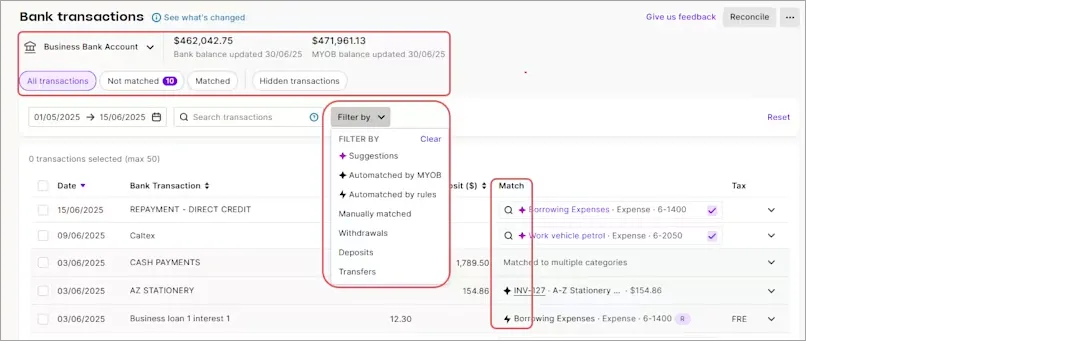

MYOB Assist mobile app
Australia only
MYOB Assist, the companion app for MYOB Business and AccountRight, keeps getting better.
Let your team upload expenses – without full file access
You can now use the Cards role in AccountRight to let team members only capture and upload expenses using MYOB Assist, without giving them full access to your company file. This helps keep your reports, financials and other sensitive data protected.Quotes are now available
You can now create, send, and manage quotes on the go in the MYOB Assist app. This makes it easier for you to start a job in the field, send a quote straight from your phone, and turn it into an invoice when the work’s approved — all without leaving the app.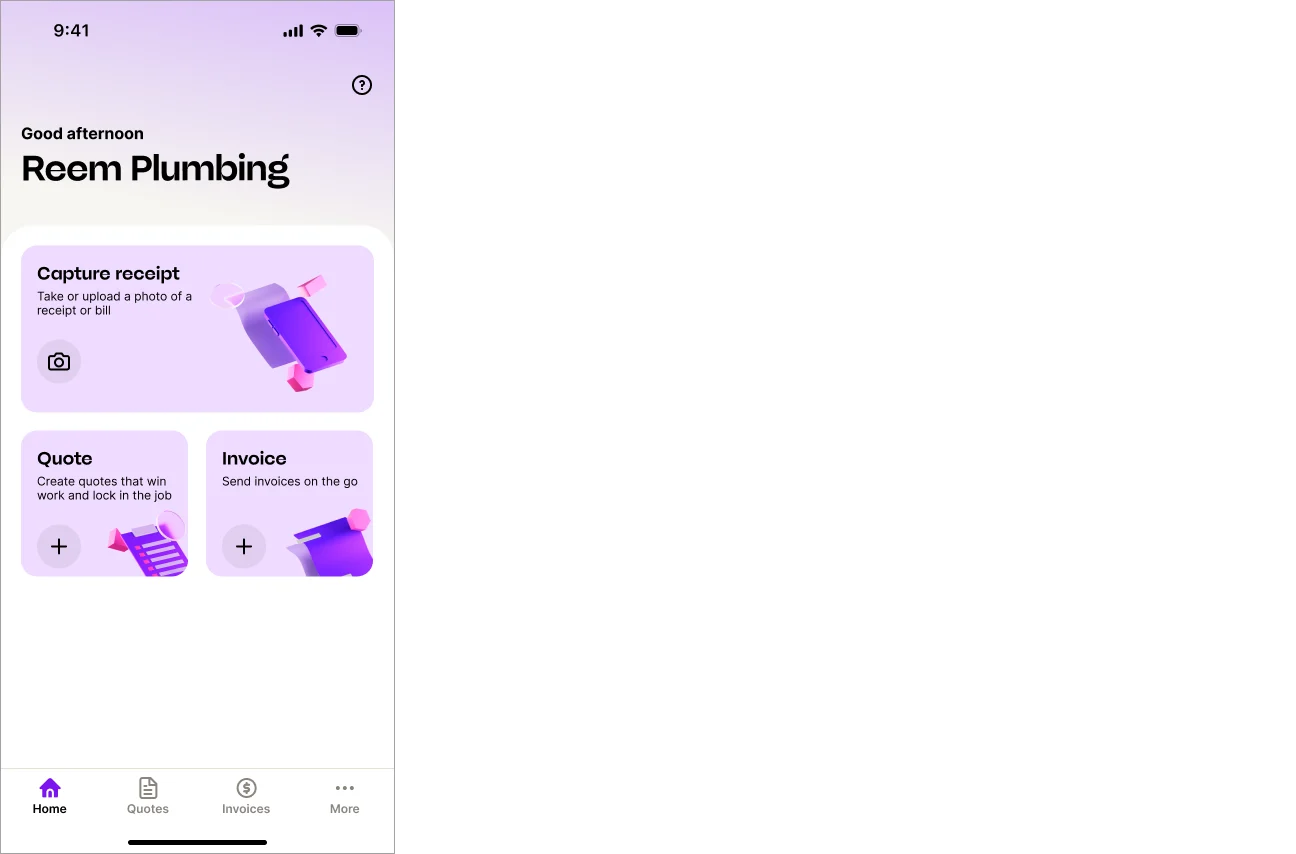
v19 (and earlier) upgrade
As part of the decommissioning of AccountRight Classic (v19 and earlier), we're removing the Upgrade a company file feature from the Welcome to AccountRight window:

If you want to upgrade, you'll need to set up a new MYOB subscription and complete a migration form.
AccountRight bug fixes
(Australia only) We fixed an issue that prompted users to turn on the timesheets option when it was already on.
We fixed bugs that could cause AccountRight to crash when working with invoices and when reconciling or allocating transactions.
We fixed a bug affecting documents automatically attached to sales emails. Attachments that were in JPG, JPEG, PNG, TIFF, or TIF file format couldn't be opened by the recipient.
We've fixed an issue that was causing a blank page to show when clicking the Invoice Reminders button.
Coming soon...
These are some things we're working on that will be rolled out soon:
A smoother, less repetitive login experience is on the way, making it easier to move between browser and desktop without constantly proving who you are.
Backups are getting a refresh – automated weekly backups stored safely in the cloud, with you still firmly in the driver’s seat when it comes to restoring your data.
Invoice reminders are making their return to Desktop with a more intelligent, more personalised experience that lets you tailor messages and follow clear, suggested next steps.
2025.10 (November 2025)
2025.10.1.5 - released 26 November
This patch fixes an issue that was preventing auto-attachments (other than PDFs) from being opened when emailed with sales transactions.
Document attachments, tracked and stored in AccountRight desktop
You can now:
Attach documents to sales and journals
You've always been able to attach documents to bills. You'll now be able to attach documents to sales transactions (quotes, orders, invoices) and general journals. This keeps your documents in one handy, secure space, helping you to meet your record-keeping requirements.Auto-include attachments when emailing a sale
By default, all documents attached to a sales transaction will be included if you email the sale, but you can remove them if you like.Email multiple documents
Attach multiple documents to a sale quote, order, invoice, or purchase bill email (up to 25MB). This means you can include things like an updated price list or promotional material when sending an invoice.
See how easy it is to send attachments when you email a sale:
More about attaching documents
MYOB Assist mobile app
We're refining the app to make it even easier to use. You can now:
Introducing Service invoices
If your business provides services rather than products, you can now choose a Service layout when creating an invoice. This layout is designed for service-based work, where you bill for time, labour, or descriptions of work instead of items or quantities. These invoices are editable within AccountRight desktop and MYOB Business.
Set your default invoice layout (Services or Services & Items) from the More menu.
(Online invoicing users) Send invoices with a payment link via SMS
If you use online payments, you can now send your customers a secure payment link by SMS — not just a PDF attachment. This makes it easier for customers to view and pay directly from their phone. You can send the SMS from the Save menu or by turning on the SMS option when emailing an invoice.
Automatically open your last business file
Save time every time you log in — the app now remembers the last business file you used and opens it automatically. If you usually work from one business file, you no longer need to select it from the list each time you sign in. Just select Open last business on login on the Switch business page, and each time you log in, you’ll go straight into the business file you last used.
You can still switch files anytime from More > Switch business..
AccountRight Bug fixes
Resolved a bug that resulted in an information icon appearing next to Total Received in the Receive Payments window.
Fixed a crash that could occur during bank reconciliation or in purchase transactions.
Coming soon...
You’ll soon be able to create, send, and manage quotes on the go in the MYOB Assist app — using the same Services and Services & Items layouts available in MYOB Business. This makes it easier for you to start a job in the field, send a quote straight from your phone, and turn it into an invoice when the work’s approved — all without leaving the app.
2025.9 (October 2025)
MYOB Assist mobile app
Capture multipage documents
When you take a photo of an invoice or receipt, you now have the option to capture up to 20 additional pages.

Already have the app? Depending on your phone settings, you may need to redownload the latest version of MYOB Assist to get this update (version 1.1.1).
Bug fixes
We fixed an issue that caused AccountRight to crash when removing an attachment from an invoice. This only affected those on the early access program for document attachments.
Coming soon
Document attachments
Document attachments are now available for early adopters and will be generally available soon. This means you'll be able to:
Attach documents to sales and journals
You've always been able to attach documents to bills. We're getting ready to switch on the ability to add attachments to sales transactions (invoices, quotes, sales orders) and general journals. This keeps your documents in one handy, secure space, helping you to meet your record-keeping requirements.Auto-include attachments when emailing a sale
By default, all documents attached to a sales transaction will be included if you email the sale – but you can remove them if you like.Email multiple documents
You'll soon be able to attach multiple documents to a sale or purchase email (up to 25MB). This means you'll be able to include things like an updated price list or promotional material when sending an invoice.
MYOB Assist
In the MYOB Assist app, you'll soon be able to:
Get paid faster by sending an invoice link via SMS (only available if you're using online payments): Send a customer a link to their invoice via SMS directly from MYOB Assist. The link opens the secure online invoice, giving customers a fast checkout experience and helping you get paid sooner.
Create quotes: You’ll soon be able to create quotes in the app. More details to come.
Use service layout invoices: We’re introducing support for service layout invoices in the app, making it easier for service-based businesses to create and edit AccountRight invoices in the app and vice-versa.
2025.8 (September 2025)
2025.8.1.14 – released 29 September
This patch fixes an issue we found in the previous patch. Early access participants can now attach documents to sales and general journals, and email documents directly from quotes, invoices and sales orders. Check out the ‘Coming soon’ section below for more details.
The MYOB Assist mobile app is here
This app is now live in Australia and replaces the existing Capture and Invoice apps, MYOB Assist helps you to unlock better cash flow. With the new app, you can:
Capture expenses – snap a photo of a bill or receipt and send it straight to your AccountRight In Tray (or Uploads in the browser).
Create invoices – create, edit and send professional invoices in just a few taps – all synced in real-time with your online company file.
Bug fixes
You'll no longer see a message about online access when removing an offline file user.
Coming soon
Document attachments
Attaching documents to sales and journals
You've always been able to attach documents to bills. We're getting ready to switch on the ability to add attachments to sales transactions (invoices, quotes, sales orders) and general journals. This keeps your documents in one handy, secure space, helping you to meet your record-keeping requirements.Attachments auto-included when emailing a sale
By default, all documents attached to a sales transaction will be included if you email the sale – but you can remove them if you like.Emailing multiple documents
You'll soon be able to add multiple documents when you email a sale or purchase (up to 25MB). This means you can include things like an updated price list or promotional material when sending an invoice.
2025.7 (August 2025)
Emailing attachments
Attach larger documents to emails
We've increased the size of documents you can attach to emails sent from AccountRight – from 6MB to 10MB.
Bug fixes
We fixed a bug that caused AccountRight to crash when sending emails.
If you create an invoice via a third-party app and no payment settings are specified by the app, your default payment settings will now apply on the invoice
Under the hood
We're always working on things behind the scenes that you might not see (or might not see yet), but lead to new time-saving features, better security, or improved performance. Here are some examples:
Attaching documents to sales transactions
You've always been able to attach documents to bills. Soon, you'll also be able to attach documents to your sales transactions, such as invoices, sales orders and quotes.MYOB App is coming for online company files
Send invoices and upload images of purchase receipts, anywhere, anytime on your phone with this handy new mobile app. Data will be synced in real-time with your online company file. The app is currently part of an early access program.
2025.6 (July 2025)
Account management
Easier MYOB account update processes
We've made it easier to update the relationship your business has with MYOB, whether you want to:
Clearer change of details forms and help topics guide you through what to do and what supporting documents you may need to provide.
Bug fixes
We fixed a crash that could occur when working in the Find Transactions window.
If you upload a document to the browser and then link it to a transaction, the count of documents in the In Tray shortcut in the Banking or Purchases command centres now updates correctly.
We fixed an issue that was causing some buttons to be obscured in transaction windows.
We fixed some crashes that could occur when emailing or printing from AccountRight.
We've removed the Prepare Payment Summaries option from the Payroll command centre menu. With Single Touch Payroll, there is no longer a need to prepare payment summaries.
API improvements
We fixed a discrepancy between AccountRight and the Public API when reporting inventory values involving received items. The current value and average cost calculations are now the same between the two systems.
2025.5 (June 2025)
Payroll
Helping you stay compliant for the 25/26 payroll year (Australia only)
We've got you covered this EOFY by taking care of all these changes for the 2025/26 payroll year:
Tax tables – the 2025/26 tax tables have been automatically updated and will apply for pays dated 1 July 2025 onwards. You'll see the new tax table date when you do a pay dated 1 July or later.

Super rate increase to 12% – the super guarantee rate goes up to 12% from 1 July, but there's an easy way to automate super rate increases.

Lump sum E threshold removal – From 1 July, any payment of back pay is considered a lump sum E. Previously this only applied to back pay exceeding $1200. More about lump sum E payments


Undo manual changes to pay history (Australia only)
An employee's pay history shows what they've been paid in pay runs, so should never be tampered with. We've added an Undo Manual Changes button to the Pay History to easily undo any changes that have been entered manually (maybe trying to fix a pay). Previously you needed to contact us for help to undo these changes.

Bug fixes
We fixed a bug that was affecting some users where the count of In Tray documents on the command centre was inaccurate.
We fixed some crashes that could occur when starting AccountRight or switching between the Banking, Sales and Purchases command centres.
(AccountRight Basics only) You'll no longer see an arrow temporarily appear above the Spend Money button on the Banking command centre.
The Print/Email Statements button no longer temporarily appears too narrow on the Sales command centre.
The Help button in offline company files no longer flickers when you hover over it.
We fixed a visual glitch that could occur on disabled shortcut tiles on the command centre. Previously, if a tile was disabled for a user, a small portion of the tile appeared to be clickable, but clicking it did nothing.
Field validation error messages now display correctly.
Under the hood
We're always working on things behind the scenes that you might not see (or might not see yet), but lead to new time-saving features, better security, or improved performance. Here's an example:
If you access your company file in a web browser, an early access program (EAP) has been launched for changes to the Bank transactions page to make matching faster, smarter and far less manual. A small cohort has been added to the EAP to try this new feature before it's rolled out to everyone. More about this EAP
2025.4 (May 2025)
2025.4.1 – released 28 May
This patch includes these improvements:
-
Scroll bars now display when needed if a command centre is maximised.
-
The command centre window has been returned to its original size, so all buttons show properly when using the recommended display settings.
-
The Print/Email Remittance Advices buttons on the Banking and Purchases command centres have been simplified to Send Remittance Advice.
And these bug fixes:
-
We fixed an issue that could cause AccountRight to crash in a few places, including the Find Transactions window.
-
The command centre shortcut tiles now display correctly after they've been clicked for the first time.
If you're having any issues with the command centre, see our support page or book a one-on-one call with our team.
Refreshed command centre (online company files only)
A sleek new look
We've modernised the look for online files but kept the same layout – so there's no change to how you work. The order and placement of the buttons is the same, so you'll still find what you need in the same place.

You won't see these changes in offline company files or backups restored locally or in a network.
Get things done faster
Instead of wondering where to look or what needs attention, you'll now see important updates and tasks at the top of each command centre. This lets you take action without spending time clicking through different screens. If you've taken action, use the refresh button to update the numbers.

Instantly access key info and tasks
No more digging through menus to find key reports or complete a common task. The information you need has been brought to the front, just one click away.

Payroll
Helping you stay compliant with self-managed super funds (Australia only)
To pay contributions to a self-managed super fund (SMSF) from AccountRight, your STP reports must have been successfully accepted by the ATO. This confirms your business is verified with the ATO and helps ensure SMSF payments are only made by legitimate, registered employers.
Bug fixes
We fixed an issue that was preventing the File menu from displaying for some users.
Negative amounts can now be used in general journal entries.
If you use online payments in New Zealand, you'll now see the appropriate payment icons in invoices (Visa, Mastercard, Apple Pay and Google Pay).
When you email a recurring sale from the To Do List, the email variables now work correctly.
Under the hood
We're always working on things behind the scenes that you might not see (or might not see yet), but lead to new time-saving features, better security, or improved performance. Here's an example:
Trying to fix an employee's pay (in Australia) by tinkering with their pay history causes reporting issues and requires a complex resolution. Not ideal – especially at EOFY. (The right way to adjust pay amounts is through a pay run). So we're adding a button to undo manual pay history changes. This means if you've incorrectly changed an employee's pay history, you'll be able to fix it with one click, without needing tech support.
2025.3 (April 2025)
Payroll
Simplifying STP compliance (Australia only)
When you create a new company file, the ATO Reporting Category is now set for you in these payroll categories:
Base Hourly
Base Salary
Annual Leave Pay
Personal Leave Pay
Overtime (1.5)
Overtime (2x)
This speeds up the STP setup and prevents these payments being reported incorrectly to the ATO.

Bug fixes
The <Tab> key now works properly in the Date field when entering transaction lines in some sales and purchases.
AccountRight no longer crashes when recording an invoice from the To Do List or a recurring transaction.
We fixed an issue in sales numbering that could result in the 13 character limit being exceeded.
Under the hood
We're always working on things behind the scenes that you might not see (or might not see yet), but lead to new time-saving features, better security, or improved performance. Here's an example:
Trying to fix an employee's pay (in Australia) by tinkering with their pay history causes reporting issues and requires a complex resolution. Not ideal – especially at EOFY. (The right way to adjust pay amounts is through a pay run). So we're adding a button to undo manual pay history changes. This means if you've incorrectly changed an employee's pay history, you'll be able to fix it with one click, without needing tech support.
2025.2 (March 2025)
2025.2.1.15 – released 31 March
This patch fixes a couple of display issues that affect a small number of early adopters in the Command Centre uplift project:
-
(Server Edition users) The Command Centre now displays correctly
-
Command Centre height and width have been updated for improved accessibility.
Sales
Easier to identify different types of sale
You can set up a different prefix and numbering sequence for your invoices, quotes and sales orders.

Banking
Smarter matching of transfer money transactions
AccountRight bank feeds now uses the bank description, amount and date to help identify and match money transferred between accounts, reducing the need to find and match transactions manually.
Bug fixes
Online payments settings are now remembered when you copy or use a recurring invoice.
We fixed a couple of appearance issues. Command centres are now aligned correctly when AccountRight is maximised. Also, we’ve made the appearance neater by matching the border colour to the command centre background.
Under the hood
We're always working on things behind the scenes that you might not see (or might not see yet), but lead to new time-saving features, better security, or improved performance. Here's an example:
AccountRight Command Centre is receiving an uplift to make it easier for you to see what tasks are up next and help you get to where you need to go with fewer clicks. The early access program will be starting shortly for a limited number of customers.
2025.1 (February 2025)
Payroll
Helping you stay compliant with Single Touch Payroll Phase 2 (Australia only)
STP Phase 1 will be switched off 27 February. So, if you haven't switched to STP Phase 2, you need to do so now to continue reporting to the ATO. How to move

Suppliers
Wise bank account numbers are now supported for suppliers (New Zealand only)
You can now enter a Wise bank account number in the Payment Details tab of a supplier card.
Usability improvements
If you sort company files in the Library Browser window by clicking the Version column, the company files are now sorted correctly.

(Online Payments, Australia only) You can now enable or disable BPAY payments on recurring invoices.


Bug fixes
We fixed an issue that could cause AccountRight to crash when you close the Library Browser window.
Under the hood
We're always working on things behind the scenes that you might not see (or might not see yet), but lead to new time-saving features, better security, or improved performance. Here's an example:
We'll be making it easier to identify different types of sales transactions by giving you the ability to set up a different prefix and numbering sequence for your invoices, quotes, and sales orders.
2024
2024.11 (December 2024)
Version 2024.11.1 – released 7 January
This patch fixes a bug that caused a crash for some users when they clicked the Sales Register in the Sales command centre.
Payroll
Helping you stay compliant with Single Touch Payroll Phase 2 (Australia only)
If you still report payroll using Single Touch Payroll (STP) Phase 1, you'll receive a reminder that STP Phase 1 is being retired and you'll need to move to STP Phase 2, including a link for more information:

Why you need to move to STP Phase 2
Banking
Smarter matching of transfer money transactions
To be available shortly after the release of 2024.11
AccountRight bank feeds now uses the bank description, amount and date to help identify and match money transferred between accounts, reducing the need to find and match transactions manually.
Bug fixes
We've fixed a bug that caused AccountRight to crash when you tried to delete an online payment. You're now prompted to delete the associated fee transaction first.
2024.10 (November 2024)
Version 2024.10.1 – released 21 November
This patch fixes two bugs that:
-
prevented emailing remittance advices in bulk after making selections in the Advanced Filters window
-
resulted in users having to complete a 2FA check every time they opened AccountRight (2FA checks are only required at least once every 24 hours when you're working in AccountRight).
Online company file usability improvements
Easier access to online company files
As most AccountRight users work with online company files, we’ve made it simpler to open them. The sign-in for online company files is now the first option you’ll see in the Open a company file window:

Online company file options are also now the first options you’ll see when you create a new company file, restore a backup file or upgrade a file:


Bug fixes
When you try to open a company file that was created in a decommissioned version of AccountRight, you're now prompted to upgrade it to the current version.
(Online payments) Surcharging is now correctly selected on invoices created from a recurring invoice template.
Fixed an issue that sometimes prevented the Easy Add button from appearing from the Supplier list when entering a purchase.
2024.9 (October 2024)
Payroll (Australia only)
More control when updating hourly employees
When you update an hourly employee's pay rate or pay cycle and it affects their standard pay hours, you can now choose to revert or keep their current standard pay hours. For example, if you've set their standard pay hours to 0 (because they're a casual employee with varying hours), you can keep this if you change their pay cycle.

Helping you stay STP compliant
If you're still reporting to the ATO via STP Phase 1, when you start a pay run you'll now see a helpful reminder to move to STP Phase 2. Support for Phase 1 is ending soon and you'll need to make the move to continue reporting your pays – and avoid an ATO fine. Make the move to STP Phase 2.

Banking
Smarter automatic matching of supplier bills
AccountRight bank feeds now uses supplier names and invoice numbers to make automatic matching more efficient and accurate, further reducing the need to manually match transactions.
Under the hood
We're always working on things behind the scenes that you might not see, but lead to new time-saving features, better security, or improved performance. Here's an example:
From next month, all AccountRight users* will have access to Priority Support. This gives you access to priority phone support and 1 to 1 bookings with a dedicated team member, so you can get the help you need faster. You'll be able to access Priority Support by quoting your Client ID when calling support, or book a time in My Account.
*This is available to AccountRight Plus and Premier customers paying directly only. Customers paying via their accountants or bookkeepers will continue to have access to our exclusive partner support team.
2024.8 (September 2024)
Helping you stay compliant with super guarantee rules
The ATO requires every business to have a default super fund. If you don't have one set in AccountRight, when you send a new employee a self-onboarding request you'll now see a more prominent message to set your default super fund.
This feature was released 3 September 2024.

Bug fixes
We fixed an issue that prevented bank transactions showing in the Bank Feeds window.
API improvements
When you rename custom Price Levels in AccountRight, the updated names can now be retrieved through our Public API. We've built a new endpoint for customised price list names, allowing third-party developers to access this information directly. Find out more at the API support centre
Under the hood
We're always working on things behind the scenes that you might not see, but lead to new time-saving features, better security, or improved performance. Here's an example:
We’re working on a message to prompt you to either keep an employee’s current Standard Pay hours or revert them to the default hours per pay frequency when you change their pay rate or frequency in the Payroll Details > Wages tab. This is for Australia only and will keep you aware of how changes in wages affect Standard Pay and give you greater control when updating hourly employees.

2024.7 (August 2024)
Payroll (Australia only)
Even easier final pays
Previously, we released the ability to pay unused annual leave in an employee's final pay using AccountRight in a web browser. Now, you can also pay unused long service leave for employees who are leaving voluntarily.Faster SMSF confirmation email
We've improved the delivery speed of the email that's sent to the company file owner when they set up a self-managed super fund.
Online payments (Australia only)
More control with online payment surcharging
All fees associated with online payments (the 25c transaction fee + 1.8% of invoice value) can now be surcharged to the customer (excluding BPAY)
You can choose to exclude BPAY as a payment option on your online invoices. Doing this means that if you surcharge your customers, you can now pass on all of your online payment transaction fees.
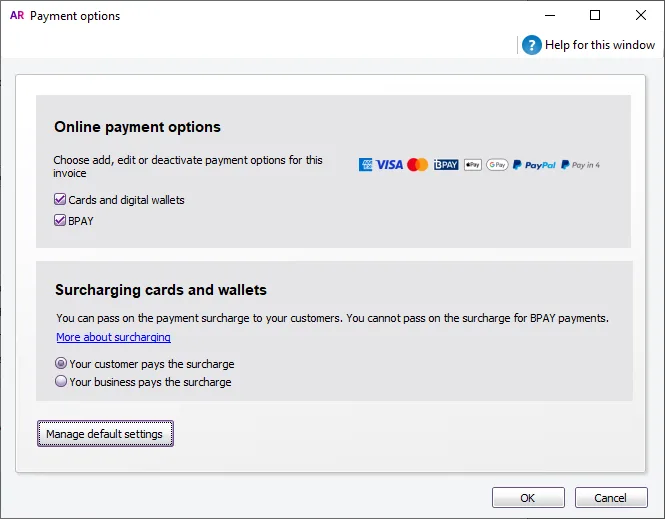

Bug fixes
Fixed a bug that caused an unnecessary message to appear when online invoice payments settings for an invoice was updated. This bug also prevented users from printing or emailing an invoice in a locked period.
Under the hood
We're always working on things behind the scenes that you might not see, but lead to new time-saving features, better security, or improved performance. Here are some examples:
Along with bug fixes, our developers are continuing to identify and fix other areas of AccountRight where crashes have been reported.
It's an ATO requirement in Australia that every business must have a default superannuation fund that new employees can choose to join. To keep you in the good books with the ATO, if you haven't set a default super fund in AccountRight we're introducing a more prominent message to set one up when you add an employee. This change is coming soon.
2024.6 (July 2024)
Bank feeds
Smarter way to get bank transactions
As bank feeds saves you time on data entry and importing bank statements, you're now prompted to connect your bank accounts when you import a bank statement, or add bank account information. You can choose not to get these prompts again for 90 days.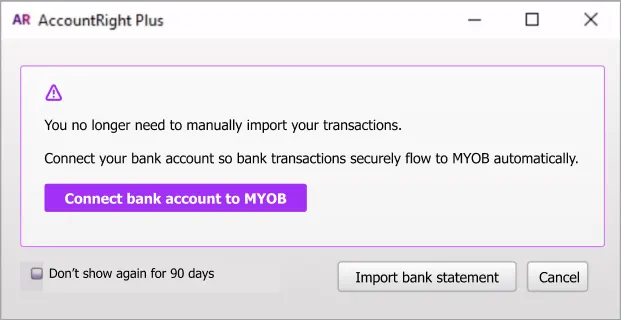
Easier bank feed management
If your company file is online, you'll now set up and manage bank feeds in the web browser version of AccountRight instead of my.MYOB. This is a simpler, more streamlined process to connect and manage your bank accounts.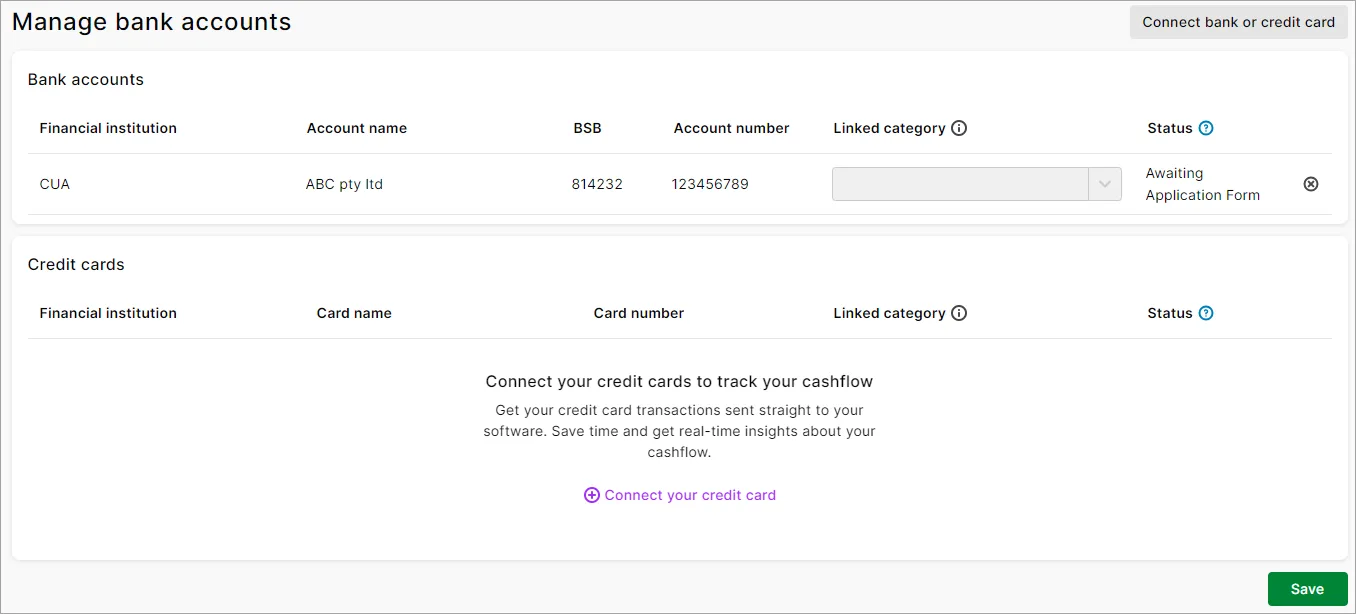


Usability improvements
Clearer cost centre messaging
We've updated 'category' to 'cost centre' in the message that appears prompting you to assign a cost centre to a transaction (if you use cost centres).Tidying up some old messages
We've removed an outdated message about super guarantee increases that used to appear when you started a pay run in the new financial year. (Australia only)
Bug fixes
We've fixed a few issues that could cause AccountRight to crash. These issues could occur when you create a purchase or spend money transaction, switch the company file you were using, or filter the Sales Register window.
We've removed the prompt to set up bank feeds if you're using a trial version of AccountRight
We've removed an incorrect bank feeds support number from the Cannot get bank feeds error message
Under the hood
We're always working on things behind the scenes that you might not see, but lead to new time-saving features, better security, or improved performance. Here are some examples:
Along with the bug fixes above, our developers are continuing to identify and fix other areas of AccountRight where crashes have been reported.
We're also putting the finishing touches on the final pay enhancements for Australia which will help pay out long service leave. You'll hear more about this in a future release.
It's an ATO requirement in Australia that every business must have a default superannuation fund that new employees can choose to join. To keep you in the good books with the ATO, if you haven't set a default super fund in AccountRight we're introducing a more prominent message to set one up when you add an employee. This change is coming soon.
2024.5 (June 2024)
Payroll (Australia only)
Keeping you compliant for the new payroll year
The tax tables have been automatically updated and will apply for pays dated 1 July 2024 onwards.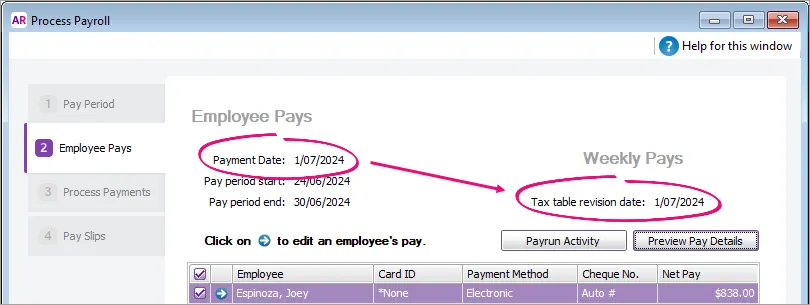
Helping you automate the super rate increase
Any super guarantee payroll categories with the calculation basis set to Minimum Required Rate will be automatically updated to 11.5% when you do your first pay run with a payment date on or after 1 July 2024.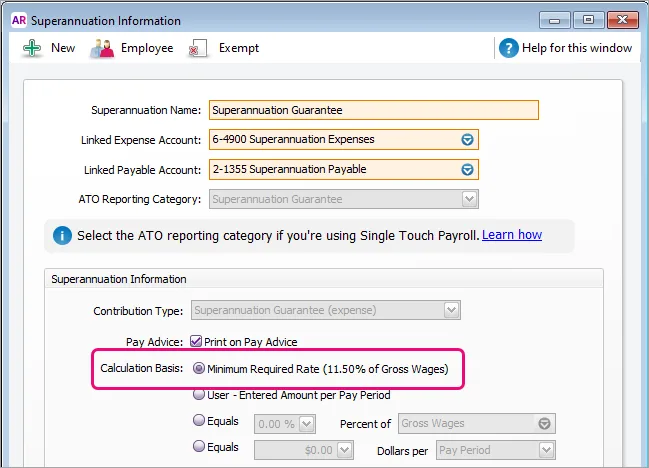
Easier Fair Work compliance
If your business isn't covered by the Fair Work System, you can now choose to prevent new employees being provided the Fair Work Information Statement (FWIS) when you invite them to self-onboard.


Cost Centre reports
Following on from the recent name change of Categories to Cost Centres in AccountRight, we've made the same changes in the cost centre reports. These reports no longer refer to categories in the column headings and report filters.
Bug fixes
We fixed an issue that could cause AccountRight to crash when entering an ABN for a Self-Managed Super Fund (SMSF). (Australia only)
We fixed a bug that could cause AccountRight to crash in the Find Transactions window.
Under the hood
We're always working on things behind the scenes that you might not see, but lead to new time-saving features, better security, or improved performance. Here are some examples:
Along with the bug fixes above, our developers are continuing to identify and fix other areas of AccountRight where crashes have been reported.
We're also putting the finishing touches on the final pay enhancements for Australia which will help pay out long service leave. You'll hear more about this in a future release.
2024.4 (May 2024)
2024.4.0 patch was released 30 May to fix an issue that caused AccountRight to crash if a tax code was changed on an invoice (if you use Online Invoice Payments).
Payroll (Australia only)
Easier final pays
We're working on a new final pay feature for online company files, and the first stage is here. With this release, there's a new pay frequency called Final Pay. This opens the web browser version of AccountRight and guides you through the payment of unused annual leave – initially for employees who are leaving voluntarily. We'll add other final payment types, like unused long service leave, in future releases.

Sales
If you're using online invoice payments with surcharging enabled, you'll now see a warning if an invoice contains a consolidated tax/GST code.

Security enhancements
Avoid getting locked out by setting up another 2FA method
Give yourself more options to sign in by setting up more than one 2FA method. For example, you could set up SMS 2FA on your phone and the 2FA authenticator app on a tablet. Then, if you don't have your phone handy and can't receive SMS, you can still get your 2FA code using the authenticator app on the tablet.
Reset 2FA without having to contact MYOB Support
Once you’ve set up another 2FA method, you’re able to change your 2FA settings yourself:
In the Account security section of My Account, you can easily change your 2FA phone number for SMS 2FA, re-link or change your authenticator app, or set up authenticator app on a new phone.
Faster and clearer account update alert
We've improved the content and delivery speed of the email that's sent to the company file owner when one of your employee's bank account details are added or updated.
Bug fixes
We fixed a broken help link on the Employee Self-Onboarding window (Australia only)
We fixed an issue that could cause AccountRight to crash when switching between online and offline files.
Under the hood
We're always working on things behind the scenes that you might not see, but lead to new time-saving features, better security, or improved performance. Here's an example:
Our developers are looking into the diagnostic data that gets generated if AccountRight crashes or times out. This helps them work out why crashes happen so they can fix the root cause. It's slow going as there are lots of variables and tons of data to go through. But it's worth it.
2024.3 (April 2024)
Categories are now Cost Centres
We've updated the language in AccountRight to use more natural words you're familiar with. So, in this release we've renamed 'categories' to 'cost centres'. Most businesses use this feature to keep track of departments or cost centres, so this makes it a good fit.

Payroll
Helping you stay compliant (Australia only) When you add an employee, you'll now choose if they're permanent or temporary (which includes fixed-term roles). This ensures temp employees are provided the correct Fair Work Information Statement when they self-onboard or check their details.

Security enhancements
We've improved the content and delivery speed of the email that's sent to the company file owner when one of your supplier's bank account details are added or updated.
Bug fixes
We fixed an issue that caused AccountRight to crash in a few places, like when printing an invoice or removing an attachment from the In Tray.
Backordered items in foreign currencies are no longer showing in local currency when previewing the invoice.
Under the hood
We're always working on things behind the scenes that you might not see, but lead to new time-saving features, better security, or improved performance. Here are some examples:
We'll continue fixing parts of AccountRight where crashes have been reported. We fixed a few of these in this release, but there's a couple of trickier ones that we'll keep working at.
(Australia only) We're continuing our work on a better final pay experience for online files to help you pay out employees when they leave your business. Initially it'll help you create a final pay for voluntary termination paying out unused annual leave only, but we'll keep working on it to include other payment types, like long service leave. This will be a big time-saver and you'll hear more about it closer to its release.
2024.2 (March 2024)
Usability improvements
We've removed the error message that shows if you haven't specified a linked account for late fees and surcharges that you manually add to invoice payments. This avoids confusion with online invoice payment surcharging, which is a separate feature.
Under the hood
We're always working on things behind the scenes that you might not see, but they lead to new time-saving features, better security, or improved performance. Here's an example:
(Australia only) We're working on a better final pay experience for online files to help you pay out employees when they leave your business. We've laid the groundwork in this release and started our testing. Initially it'll help you create a final pay for voluntary termination paying out unused annual leave only, but we'll keep working on it to include other payment types, like long service leave. This will be a big time-saver and you'll hear more about it closer to its release.
2024.1 (February 2024)
Payroll (Australia only)
Get employees to check their details (available from 6 Feb)
If you've manually set up an employee (instead of self-onboarding) you can send them a secure request to review their details. The employee can then submit any changes straight into your AccountRight company file. Here's all the details.
Bug fixes
We fixed an issue that was resulting in an error message when you attempted to close some popup messages in AccountRight.
2023
2023.11 (December 2023)
Payroll
Get employees to check their details AUSTRALIA ONLY
If you've manually set up an employee (instead of self-onboarding) you can send them a secure request to review their details. They can submit any changes straight into your AccountRight company file.
Bug fixes
Resolved an issue where some clients who had upgraded from AccountRight v19 were not receiving a message to do some additional upgrade tasks.
2023.10 (November 2023)
Usability improvements
If you create a new employee from the Pay Liabilities window or the Easy Setup Assistant, you'll now have the option to invite the employee to self-onboard. AUSTRALIA ONLY
Bug fixes
Fixed an issue where some invoices were not appearing on customer statements on the last day of the reporting period.
2023.9 (October 2023)
Payroll AUSTRALIA ONLY
Employment Basis added to new employee creation
When you add a new employee, you'll now choose their Employment Basis at the start of their setup, such as full time, part time or casual. This is required for STP reporting, and if the employee self-onboards it ensures they're provided the applicable Fair Work Information Statement.Give new employees access to benefits
When you're inviting a new employee to submit their own details via self-onboarding, you can now choose to give them access to employee benefits. If you’ve already set up employee benefits you won’t see this option as your employee will already get access to benefits once they’ve completed entering their own details.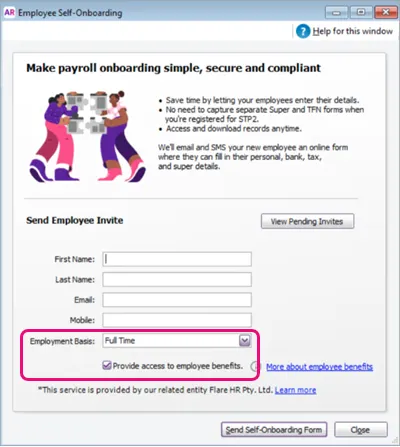

Usability improvements
If you create a new employee from the Enter Timesheet window, you'll now have the option to invite the employee to self-onboard. AUSTRALIA ONLY
Bug fixes
We've removed the Employee Self-Onboarding button from AccountRight Basics and Standard. This is a payroll feature that's only available for AccountRight Plus and Premier. AUSTRALIA ONLY
2023.8 (September 2023)
Online invoice payments – available for New Zealand from 14 September!
Online invoice payments is a secure payment service that gives your customers an easier and faster way to pay you. Your customers can pay your invoices online anywhere, anytime, using their preferred payment method (VISA, Mastercard, Apple Pay or Google PayTM).

Simplified employee self-onboarding AUSTRALIA ONLY
When you create a new employee card (from the Cards List window), you now see a clear option to invite the employee to fill out their own details. This option is selected by default when you enter an email address, but you can deselect it if you prefer to manually enter all of the employee's details yourself.

2023.7 (August 2023)
Online Invoice Payments AUSTRALIA ONLY
It's easier to identify Online Invoice Payments in AccountRight
When Online Invoice Payments funds are disbursed into your settlement bank account, 'Online Payments' will appear in the Memo for the automatically created bank deposit.

Employee benefits and salary packaging AUSTRALIA ONLY
Be prompted to complete employee benefits tasks
You are now prompted to complete any tasks for setting up or managing employee benefits.

Just click View task to find out what you need to do.
Be alerted to complete salary packaging tasks
When you have any employee salary packaging setup tasks to complete, such as for novated car leasing, the New task to complete button in the Payroll command centre will indicate the number of tasks. Just click the button and you'll be guided through each step of the setup.
2023.6 (July 2023)
(AccountRight Server Edition only) Version 2023.6.1 – released 18 July
This release fixes an issue that affects a small number of AccountRight Server Edition users who open a decommissioned online file from the AccountRight client on their workstations.
Superannuation (Australia only)
We've removed the Threshold field from superannuation payroll categories where the Contribution Type is set to Superannuation Guarantee (expense). This is because from 1 July 2022, the Australian Government removed the $450 per month threshold for super guarantee eligibility (that's the amount an employee can earn in a calendar month before you have to pay them super). You don't need to do anything, we've just removed this field as it's no longer needed.
Here's what it used to look like:

Bug fixes
The help search field in command centres now works (no longer results in a 403 error).

2023.5 (June 2023)
Payroll (Australia only)
Keeping you compliant for the new payroll year
The tax tables have been automatically updated and will apply for pays dated 1 July 2023 onwards.Helping you automate the super rate increase
Any super guarantee payroll categories with the calculation basis set to Minimum Required Rate will be automatically updated to 11% when you do your first pay run with a payment date on or after 1 July 2023. Learn more...
Online Invoice Payments (Australia only)
More payment options for your customers
Your customers can now pay your online invoices using PayPal or PayPal Pay in 4, which now appear as payment options in online invoices.
Usability improvements
If you open a version of AccountRight that we've retired and a new version is available, you'll see a more helpful message that prompts you to update. When you click Update now in the message, AccountRight restarts and completes updating.
When you email an Online Invoice Payments invoice via Microsoft Outlook, you now have the option to not show the confirmation message again. (Australia only)
API improvements
Implemented changes to better identify deleted transactions from the Public API, resulting in faster calls and better performance.
2023.4 (May 2023)
Payroll (Australia only)
Helping you avoid pay history errors
Information and a help topic link have been added to the Payroll details > Pay history tab of an employee, explaining how to use pay history to enter opening balances for employees who start part-way through the year and how to adjust the next pay to fix pay history errorsClearer pay slips for casuals
If you use the default pay slip form, Annual Salary no longer appears on pay slips for employees with an Employment Basis of Casual. This doesn't affect customised pay slip forms.
Online Invoice Payments (Australia only)
You can activate Online Invoice Payments for imported invoices
If you use Online Invoice Payments, you can activate them on imported invoices (as well as the option to pass on the surcharge). When you email these invoices, they reflect the settings you've chosen. Online Invoice Payments options have been added to the Match Fields step of the Import and Export Assistant.Improved experience with SMS
We've improved the design of error messaging and added more helpful information in the SMS section of the Email Information window.
Usability improvements
Links to support pages have been added to the Activation/Confirmation assistant. If you're not able to activate or confirm online, you can now click a Contact us link to start a live chat session with our team or submit a support request via My Account.
More helpful error message when emailing. If you try to email a transaction such as an invoice, and the Selected Form field of the Email Information window is blank, you're now prompted to chose a form.
As we've mentioned previously, if you open a version of AccountRight that we've retired and a new version is available, you'll see a more helpful message that prompts you to update. When you click Update now in the message, AccountRight restarts and completes updating. This new messaging takes effect from the decommission of 2023.3.
We've added a tasks to complete notification in the Payroll command centre. For now, this notification displays No tasks to complete and will be functional in a future release. (Australia only)
Bug fixes
Fixed an issue that resulted in an error when a customer tried to view an online invoice when the default customised form for the invoice had been deleted. The online invoice now opens in a standard AccountRight template.
When paying multiple Lump Sum E payments in a pay run, the $1200 threshhold is now applied to the consolidated amount. Previously the threshhold was being applied to each Lump Sum E payment. (Australia only)
2023.3 (April 2023)
Online Invoice Payments (Australia only)
When you email an invoice set up for Online Invoice Payments using AccountRight's email service, there's now an option to also send an SMS with a link to the online invoice. This helps your customers see your invoices and prevents them getting lost in a busy inbox.
Usability improvements
If you open a version of AccountRight that we've retired (from the decommission of 2023.3 onwards) and a new version is available, you'll see a more helpful message that prompts you to update. When you click Update now in the message, AccountRight restarts and completes updating.
Bug fixes
We fixed an issue that affected some businesses when a pay run with paid liabilities is reversed. The liability reversal is now correctly reflected in Pay Liabilities and Pay Super.
2023.2 (March 2023)
Payroll (Australia only)
More help for fixing STP submission errors
If your last STP report was rejected by the ATO or contained errors, when you start a pay run you'll now see clearer messaging about it and what you need to do.Helping you to set up leave correctly
You are now warned if you haven't linked a wage payroll category to a leave entitlement payroll category (if the Calculation Basis in the leave entitlement payroll category is set to Equals XX Percent of XX). This will ensure leave is paid out correctly when an employee takes leave.
Usability improvements
If you email invoices via Microsoft Outlook, you'll no longer see the Invoice sent message after each send.
Performance improvements
We've improved performance for bank reconciliations.
Bug fixes
Fixed an issue in imported invoices with Online Invoice Payments enabled that was preventing the Pay now button appearing. (Australia only)
Fixed an issue in bank feed rules that could result in an out-of-balance amount when reconciling.
Fixed an issue that sometimes caused an error when deleting general journals.
2023.1 (February 2023)
Online invoice payments (Australia only)
Your customers can now pay your online invoices using Google Pay on their Android devices, so Google Pay now appears as a payment option in the Sales window, in field help, invoice PDFs and on invoice emails sent from Microsoft Outlook.
We'll provide links to relevant updated help topics when these changes are released.
Performance improvements
We've improved performance for creating, editing and deleting General Journals.
API improvements
Contract documentation has been updated with the new Journal Transaction History endpoint.
You can now create, update or delete build transactions created through the adjustment endpoint.
For more information about our API improvements, visit the API Support Centre.
Bug fixes
We've fixed an issue that prevented users seeing the View PDF or View completed super choice PDF buttons.
The correct set up, payment or view invoice options now appear in the Sales window, depending on whether Online Invoice Payments has been applied for or enabled.
Fixed a FK_BusinessEventLine_BusinessEventOriginal exception error that occurred when deleting a General Journal.
2022
2022.11 (December 2022)
Payroll (Australia only)
Easier leave setup
When you set up a new company file, AccountRight now comes with a default set of annual and personal leave payroll categories (for salaried and hourly pay basis) which you can assign to your employees, making it easier to set leave up and ensure it's accrued and paid out correctly.Leave accrual balance is now set to print on pay slips by default
As employees want to keep track of their leave balances, the Show leave balance on pay slips option (previously called Print on Pay Advice), is now selected by default when you create a new leave entitlement payroll category.Helping you to set up leave correctly
You are now warned if you haven't linked a wage payroll category or an exemption to a leave entitlement payroll category (if the Calculation Basis in the leave entitlement payroll category is set to Equals XX Percent of XX). This will ensure leave is paid out correctly when employee takes leave.Super fund details are protected from accidental changes
When you open an employee's super fund information (Cards List > Employees > Employee > Payroll Details tab > Superannuation > Superannuation Fund), the details in the Superannuation Fund Information window are no longer editable, preventing accidental changes to funds that affect all employees. You can still change the fund details from the List menu > Superannuation Funds.Helpful reminder to move your business to STP Phase 2
If you haven't yet moved your business to STP Phase 2, you'll get a reminder to do so when you complete a pay run, enabling you to start the move or learn more about it.Avoid employment termination payment (ETP) reporting errors
If you've moved to STP Phase 2 and you've saved a payroll category that has been assigned an ETP reporting category, this reporting category can no longer be changed. This prevents errors in reporting ETP.
We'll provide links to relevant updated payroll help topics when these changes are released.
Customer payments
More streamlined bulk invoice emailing
When using Online Invoice Payments and emailing invoices in bulk via Microsoft Outlook (from the Review Sales Before Delivery window > To be emailed tab), the Set up payment notifications reminder now only appears once.As we discontinued the MYOB Direct Debit service from 20 September 2022, we've removed the Direct Debit Requests button from the Sales command centre.
Company file information
Avoid errors when entering the company file email address
When you create a new company file (using the New Company File Assistant), the email address you enter is checked for the correct format.
API improvements
We've optimised the GET /Sale/Invoice/* endpoint to retrieve only relevant information from the database.
You're now able to create, edit or remove a Bill of Materials (BOM) definition when you call the endpoint to create items.
Fixed a bug that occurs when creating a supplier payment on a purchase using a Hybrid layout via the API.
The cash method for the balance sheet is now available via the API.
For more information about our API improvements, visit the API Support Centre.
Bug fixes
The Pay now button in invoices now works for online invoice payments sent via Microsoft Outlook. When Online Invoices Payments is switched off for an invoice, or the service has been cancelled, View invoice appears instead, enabling users to view the invoice online.
You no longer receive a 404 error when you click View invoice, Pay now, or View full invoice detail in an invoice sent via Microsoft Outlook that uses a form with the # or & character in the form's name.
Fixed timeout errors when running the Auto-Build Items report.
2022.10 (November 2022)
Online invoice payments (Australia only)
More flexible and convenient online invoice payments
You can now use Microsoft Outlook to send your online invoices to allow your customers to pay you online — you no longer need to be sending those invoices directly from AccountRight.Easier to find Online Invoice Payments settings
We've added an Online Invoice Payments button to the Sales command centre, making it easier to set up online invoice payments or edit your online invoice payment settings.Apple Pay mobile payment option is now visible in invoices
As your customers can now pay your online invoices using Apple Pay on their iPhones or other Apple devices, Apple Pay now appears as a payment option in the Sales window and on invoices sent from Microsoft Outlook.
We'll provide links to updated online invoice payments help topics when these changes are released.
Payroll (Australia only)
Helping you fix rejected STP reports
If you're doing a pay run and your previous pay submission has the ATO error CMN.ATO.GEN.XML03, you'll see a message alerting you to this. You can click from the message to the STP reporting centre to view the reason the pay was rejected and how to fix it.
API improvements
Users can now retrieve build transactions.
We've improved response times for sales invoice endpoints to reduce 504 Gateway timeout errors.
For more information about our API improvements, visit the API Support Centre.
Bug fixes
Resolved an issue that prevented sending emails from AccountRight when the email address contained an apostrophe.
You no longer receive multiple Choose Profile prompts when sending an email via Microsoft Outlook when it's closed. (Australia only)
When the Online Payments option is deselected in an invoice, the Pay now button no longer appears in the online invoice when sent via Microsoft Outlook — View invoice appears instead. (Australia only)
Fixed an issue that was preventing businesses moving to STP Phase 2 if they had more than 200 employee cards. (Australia only)
2022.9 (October 2022)
Payroll (Australia only)
STP 2 is back and better
In July we paused transitions to STP Phase 2 to improve the in-product experience. But the wait is over – you can now make the move to STP Phase 2. Find out how...Helping you fix rejected STP reports
If a report is rejected by the ATO, depending on the reason, you’ll now see a message about it the next time you start a pay run.
We've also improved the messaging in the STP reporting centre to help fix some rejected reports.Quicker employee setup
A new employee card is now created as soon as a self-onboarding invitation is sent, allowing you to enter employee payroll information straight away. You can also quickly check the status of the employee's self-onboarding in the Profile tab of their employee card.More guidance when paying employees aged under 18
If a pay run includes an employee aged under 18, regardless of pay frequency you're reminded to confirm their hours worked. This helps you stay on top of your super obligations.Improved super calculations
Super guarantee amounts are now calculated only on the current pay period.
If a threshold is set in a super expense payroll category (not super guarantee) the super calculation will only include previous pay periods if the threshold is exceeded.
Online invoice payments
Fast, secure and convenient mobile payments with Apple Pay
Your customers can now pay your online invoices using Apple Pay on their iPhones or other Apple devices. Apple Pay now appears as a payment option on your online invoices.
Security enhancements
A user with the Purchases role can no longer access the prepare electronic payments feature. This removes the possibility of a user without Payroll access seeing employee pay amounts.
2022.8 (September 2022)
Payroll (Australia only)
Easily check employee self-onboarding details
You can now download a record of your employee's submitted details (employee Card information window > Payroll details tab > Personal details > View PDF button). Learn more...Quick download of completed Super Choice form
You can now download the completed Superannuation Choice form for self-onboarded employees (employee Card information window > Payroll details tab > Superannuation > View completed super choice PDF button). Learn more...Improved employment termination payment (ETP) handling
If you're reporting via STP, pays that include an ETP can now only be reversed and not deleted. This ensures your AccountRight payroll information matches the ATO records.
Bug fixes
Fixed an issue that could cause AccountRight to crash when paying an under 18 employee. (Australia only)
Resolved an issue that could cause AccountRight to crash when adding an employee. (Australia only)
Fixed the super guarantee calculation for under 18 employees so it only calculates on the current pay period. (Australia only)
Fixed an issue that was causing hourly wage categories to be checked incorrectly for STP compliance during a pay run. (Australia only)
Fixed a Balance Sheet issue that could occur if a header account was changed to a detail account.
Fixed an issue that was preventing the use of $ and & in email addresses.
API improvements
Fixed an issue that was causing a 409 error on POST requests on endpoints.
For more information about our API improvements, visit the API Support Centre.
2022.7.1 patch was released to fix a bug that caused AccountRight to crash when recording general journal transactions from a recurring transaction. This occurred when the recurring transaction had a frequency set to Never.
2022.7 (August 2022)
Employee self-onboarding (Australia only)
More streamlined employee self-onboarding
You're prompted to send an employee self-onboarding request when creating an employee card.Send new employee self-onboarding requests via SMS
Enter a mobile phone number if you want to send your new employee a self-onboarding request via an SMS message as well as by email.Easily track employee self-onboarding requests
We've added a button to the Employee Self-Onboarding window to display a list of employee self-onboarding invitations and their status.
Loans and finance (Australia only)
Quick access to business loans and invoice financing
We've added a Loans and Finance button to the Banking command centre. This gives you access to tailored business loans with Valiant and invoice financing with Butn.
Bug fixes
Fixed a bug that was causing incorrect year-to-date figures to show in STP reports for previous payroll years. (Australia only)
2022.7.1 patch was released to fix a bug that caused AccountRight to crash when recording general journal transactions from a recurring transaction. This occurred when the recurring transaction had a frequency set to Never.
2022.6 (July 2022)
Payroll changes (Australia only)
Helping you stay compliant with super for under 18s — Employees aged under 18 who are paid weekly and have worked less than or equal to 30 hours in the week will no longer have super calculated in their pay.
Improved transitions to STP Phase 2 — Inactive and terminated employees (paid in the current payroll year) will now be included in the employee details check when moving to STP Phase 2. You'll also now be prompted to send an update event after moving to STP Phase 2 to ensure the ATO has your employees' latest year-to-date payroll information.
Better reporting for STP Phase 2 — When you send an update event from the STP reporting centre, the year-to-date payroll totals for inactive and terminated employees (paid in the current payroll year) are now included.
Performance improvements
More accurate general journals — foreign currency general journal transactions are now checked for missing details
Save time entering transactions — we've improved the response time to display information when creating sales and purchases, such as supplier or item details
Bug fixes
Fixed a bug that was causing the custom library location to be reset when updating AccountRight.
Fixed a bug that closed AccountRight when updating account details.
Fixed a bug that caused an incorrect opening balance for some foreign currency accounts.
Fixed a bug in AccountRight Server Edition that sometimes resulted in duplicate payments when entering pre-paid invoices.
General Ledger report (Summary and Detail) now balances correctly when spanning multiple financial periods. This issue affected the Current Year Earnings and Retained Earnings accounts.
Converting a purchase order with a 100% discount to a bill no longer causes AccountRight to crash.
2022.5 (June 2022)
Payroll changes (Australia only)
Helping you stay compliant with super for under 18s — If a pay run includes an employee aged under 18, an alert now appears advising you to check how much super you need to pay them. Learn about paying super for under 18s
Avoid mistakes when fixing termination payments — You'll now be prevented from entering negative Employment Termination Payment (ETP) amounts to fix a previously recorded ETP pay, and you’ll be prompted to reverse the incorrect pay instead. Learn about fixing ETPs
Helping you automate the super rate increase — Any super guarantee payroll categories set to 10-10.5% of Gross Wages will be automatically updated to 10.5% when you do your first pay run with a payment date on or after 1 July 2022. Learn more...
Usability improvements (Australia only)
Added Employee Self-Onboarding button to the Card File command centre. This button is now available in both the Card File and the Payroll command centres. Learn about employee self-onboarding
Performance improvements
Improved the response time of the Sales Register and Items Register windows, and when opening item sales.
Bug fixes
We fixed a bug where incorrect COGS amounts were being applied to edited sales. Now, if you edit an item sale, the item's average cost and associated cost of sales are no longer affected. Learn more...
Resolved an issue where incorrect COGS amounts were being applied to returned goods. Now, if you sell multiple items as a unit, like a box or case, and some of those items are returned, the unit's average cost and associated cost of sales are calculated correctly. Learn more...
Fixed a display issue that did not affect calculations, but appeared to show an incorrect calculation basis in non-superannuation guarantee payroll categories. (Australia only)
AccountRight Server Edition - reminder
Never manually update your network again — If you're using AccountRight 2022.4 Server Edition, the 2022.5 update will download and install automatically. So that's less downtime for your business and more frequent improvements to AccountRight. Learn more...
2022.5.1 patch was a minor update to fix the following bugs:
-
You'll no longer get an error if you try to change the details of an account that's linked to a card.
-
We've re-introduced a safeguard to stop you changing an account to a header account, or changing the account subtype, if the account has been used in a sale or purchase.
2022.4 (May 2022)
Superannuation changes (Australia only)
Helping you automate the super rate increase — a new option has been added to super guarantee payroll categories to automatically increase the rate to 10.5% for pays dated 1 July onwards Learn more...
Simplifying super calculations — the $450 super earnings threshold is automatically removed from super calculations for pays dated 1 July onwards Learn more...
Helping you stay compliant with ATO super reporting — the correct ATO reporting category is now set as the default for all super guarantee payroll categories Learn more...
AccountRight Server Edition
Never manually update your network again — once you update to AccountRight 2022.4 Server Edition, all future updates will happen automatically. So that's less downtime for your business and more frequent improvements to AccountRight. Learn more...
API improvements
Bill of Materials endpoint now allows querying of a single item
For more information about our API improvements, visit the API Support Centre.
Bug fixes
We fixed a bug that prevented you from printing a receipt for a payment recorded from a bank feed transaction
Fixed a DataInvalid error that prevented you from editing or deleting transactions
Performance improvements
Improved the response time of the Items Register window
2022.3 (April 2022)
What's new
Save time and minimise STP ATO rejections — your payroll details are checked each time you do a pay run and you're advised if anything needs to be fixed Learn more...
Better reporting for Single Touch Payroll Phase 2 — the Payrun Activity [Detail] report within the payrun now includes STP Phase 2 ATO reporting categories
More personalised invoice emails — if you've set up a new file and use AccountRight in a web browser, the default invoice email now pulls in customer information, such as customer name and invoice number
API improvements
API can now retrieve the Bill of Materials (Auto-Build list) for an item
2022.2 (March 2022)
What's new
You can now move from STP Phase 1 to STP Phase 2 — you'll see a prompt in the STP Payroll Reporting Centre and you'll be guided through the move. See Getting ready for STP Phase 2.
See what information needs to be fixed when sending an employee self-onboarding invitation email, with an improved Failed to send message
Increased character limit in employee self-onboarding fields (First name, Last name and Email)
Bug fixes
Fixed the ORMDataException error which occurred when transactions were failing to record in a network environment
Resolved an issue preventing you from saving changes to sales or purchases containing inventory items with zero on hand
Fixed an issue that was causing an incorrect prompt for double authorisation on super payments
2022.1 (February 2022)
New features
Employee Self-Onboarding button added to the Payroll command centre to make it easier to add employees — learn more
Employee self-onboarding contact details are checked to make sure they're complete and in the right format
Pay Super users (AccountRight Plus and Premier, Australia only)
SuperChoice Clearing House now processes all super payments, reducing payment times
There's a new Product Disclosure Statement and a new Direct Debit Agreement
Bug fixes
Resolved scenarios where incorrect COGS inventory values were calculated and used in transactions
Plus we've tidied up the look and performance of specific windows in AccountRight, and added other general performance improvements.
2022.1.1 patch was released to AccountRight PC Edition users to fix an issue that was causing an incorrect prompt for double authorisation on super payments. For Server Edition users, this fix will be included in the 2022.2 release due on March 16.
2021
2021.8 (December 2021)
New features
When using AccountRight in a web browser, you can now:
Re-download a bank file from the electronic payment transaction
Enter up to 255 characters in the Customer PO number field in invoices (previously, 18 characters)
API improvements
Resolved an issue where AccountRight API used incorrect pricing on an item
STP Phase 2 (AccountRight Plus and Premier, Australia only)
We're continuing to get AccountRight ready for STP Phase 2
If you're setting up STP after installing 2021.8, you'll be setting up for STP Phase 2
The ETP Benefit Type button appears when you process a pay with ETP payroll categories that use STP Phase 2 reporting categories
2021.8.1 update (January 2022)
This is a minor update containing performance improvements.
2021.7 (November 2021)
New features
(When using AccountRight in a web browser) Invoices now support longer alphanumeric invoice prefixes in invoice numbers
Performance improvement to the Adjust Inventory window
Bug fixes
Fixed an error causing AccountRight to close when recapping Transfer money
Fixed an error causing AccountRight to close when deleting a Receive money
Plus we've added general performance improvements and we're continuing to get AccountRight ready for STP Phase 2.
2021.6 (October 2021)
New features
Can now assign Lump Sum E reporting category and associated year for STP Phase 2. If you've paid a lump sum E payment this financial year, you'll need to assign a financial year to it. Learn more
Bug fixes
(When using AccountRight in a browser) Bank feed transactions no longer get stuck as "matched"
(When using AccountRight in a browser) E-invoices with blank lines can now be emailed
Online Invoice Payments (OIP) feature on invoices no longer displays after cancelling the OIP service
Purchases with 0 quantity items now total correctly in the Item Register
General performance improvements
API improvements
Fixed an issue with # of selling units
Plus we're continuing to get things ready under-the-hood for STP Phase 2.
2021.5 (September 2021)
(Australia) Last financial year-to-date amounts are now correctly sent to the ATO.
An extra page no longer prints when printing invoices.
An error no longer occurs when previewing or printing sales.
New features
Get ready for STP Phase 2 with new fields and reporting categories
Bug fixes
Newly invited users can now access online AccountRight files in a web browser
Users can now import QIF Files containing transactions dated in previous financial years
NullReferenceException error no longer appears when recording spend money transactions
System.IndexOutOfRangeException error no longer appears when recording transactions
ItemTotalAmountUnBalanced error no longer occurs when entering data on quotes and orders
Item Register values are now correct when an item is used more than once on an inventory adjustment
API improvements
The character limit in the Customer PO field has increased to 255 for ARL Public API - Sales & Purchases endpoints.
2021.4 (July 2021)
New features
Implemented the ability to select a form when sending an invoice to disk
Added a new Direct debit requests button to the Sales command centre that opens a hyperlink to the Direct Debit portal in the user’s default Web browser (Australia only)
Bug fixes
Resolved a recently introduced issue where receipts incorrectly show as unprinted in Sales > Print Receipts
Resolved an issue with Profit and Loss [Cash] report not calculating correctly for imported transactions
Resolved an issue where AccountRight was not remembering window sizes and locations from prior versions after being upgraded automatically
Resolved an issue where AccountRight was incorrectly removing previous version information after automatically updating
Resolved multiple issues with linked accounts on newly created files affecting both Accounting & pay runs (Australia only)
Fixed an issue where an error was displayed for some users when processing your first payroll for 2022 financial year (Australia only)
Improved handling of employee names on payslips (Australia only).
API / Developer General Improvements and fixes
API / Developers: Add Attachment endpoints to the AccountRight SDK
Public API / Developers: Added validation on Deposit to account for receive payments transactions.
2021.4.1 update (August 2021)
This is a minor update containing performance improvements
2021.3 (June 2021)
e-invoicing improvements
We're continuing to improve the functionality and ease of use of e-invoicing in AccountRight’s browser interface.
Find e-invoices easily: You can now filter your invoice list to show only e-invoices, and there’s an icon to show which of the invoices in the list are e-invoicing enabled.
Improved Tracking: You can now track the status of your e-invoice as it moves through your customer’s accounts payable process. You can see the status on the invoice list and the activity history on the invoice itself. A full list of the statuses can be found on this help page.
To see these e-invoice statuses in MYOB, your customer’s software must be enabled to send them.
Payroll improvements (Australia only)
We're rolling out a few changes to provide better coverage in more tax scenarios as well as helping your business make the transition to paying Superannuation at the new rate of 10% from July 1.
STSL Tax tables: For employers who have employees undertaking higher education and training programs we previously had separate tax scales for FS / HELP / FS + HELP, these have now been combined into one table called STSL.
Working Holiday Maker - Not registered Tax scale: For Employers who have not registered for paying working holiday makers, we have added a new tax scale to support Working Holiday Maker - Not registered.
Default Superannuation % change from 9.5% to 10%: The Super Guarantee (SG) rate goes from 9.5% to 10% as of July 1, for all new files created post-July 1 we will be defaulting the SG to 10%.
General improvements and fixes
Fixed an issue causing documents to sometimes not upload when dragged and dropped from Microsoft Outlook
Addressed a bug with some new company files being created with incorrect linked accounts
Fixed an issue with Profit and Loss [Cash] not reporting correctly for imported transactions
Fixed an issue causing AccountRight to crash when opening
Resolved an error when the 'Update Now' button is clicked
2021.2 (April 2021)
Information for Server Edition users
We found a bug in the pre-release version of AccountRight 2021.2 (released earlier this month) that affects what's shown in PDF versions of bills. AccountRight 2021.2.1 fixes this.
If you installed the earlier 2021.2 Server Edition, you'll need to uninstall it and install 2021.2.1 (available from my.myob: Australia | New Zealand).
To check your current version, open AccountRight and go to the Help menu > About AccountRight.
AccountRight 2021.2.1 is now available
Information for PC Edition users
We've had some reports of a System.AggregateException error occurring when starting AccountRight.
We're releasing a minor update that'll be automatically downloaded to fix this issue, so you might be prompted to restart AccountRight to complete the installation.
AccountRight 2021.2.1 has arrived and brings with it a powerful new way to send transaction information to customers using e-invoicing, as well as smaller fixes and enhancements.
This is also the first AccountRight release that will be delivered via the new automatic update experience for PC installer users.
Sending e-invoices will be available in AccountRight 2021.2.1 within the web browser interface. This allows the seamless exchange of transaction data between buyers and suppliers with compatible software.
Reporting enhancements we’ve removed the date range restrictions on more reports, allowing you to run multi period balance sheet and profit and loss reports across unlimited date ranges.
Reminder for Server Edition users if you’re accessing offline company files across a local network using AccountRight Server Edition, you need to make sure that all installations of AccountRight are also the Server Edition version.
As always, we've also included some general improvements and fixes.
Sending e-invoices
E-invoicing is a government-backed initiative that allows invoices to be exchanged directly between buyers and sellers’ accounting software. This will not only cut down on manual data entry, but reduces the risk of human error and helps businesses get paid faster.
In AccountRight 2021.2.1, users in both Australia and New Zealand will be able to send e-invoices to customers using the service. Currently, this is mainly government agencies and large businesses, but the network of users is growing continuously.
Find out more about eInvoicing.
Reporting enhancements
We've removed the data range restrictions on more reports in AccountRight 2021.2.1. Now the multi period profit and loss, the multi period balance sheet and the profit and loss (with year to date) reports can be run over unlimited financial year periods provided there’s data available to report. Previously these reports were restricted to being run one year forward or back from the current financial year set in your business.
Reminder - changes for AccountRight Server Edition users
If you’re using AccountRight Server Edition to share offline files across a network, you’ll need to make sure that all users accessing those files are also using Server Edition, including those workstations accessing the server.
This is to make sure that all versions of AccountRight across your network stay the same, since any PC Edition installer versions will automatically update while the server version won’t. Learn more about updating an AccountRight network.
General improvements and fixes
We’re always working to make AccountRight faster and more reliable and 2021.2.1 is no exception. We’ve made some further performance optimisations in this version and fixed a couple of bugs that were causing AccountRight to crash when an update was installed in the background.
API Improvements and fixes
New endpoint alert!
You can now POST to the /{cf_uri}/Purchase/Bill/{Layout}/{PurchaseTxnId}/Attachment endpoint, enabling you to insert bill attachments via the public API as you can with spend money transactions (via the /{cf_uri}/Banking/SpendMoneyTxn/{Spend_Money_UID}/Attachment endpoint).
For more information, head to the MYOB Developer Centre.
2021.1 (February 2021)
This release will save you time and effort when it comes to how you install and manage your software.
Automatic updates Having to manually install software is so 2020. With automatic updates, your software will update to the latest version in the background without you needing to do anything.
Superannuation status improvements (AU only) We’ve improved how superannuation lodgement status is labelled to make things clearer and prevent overpayment.
Bug fixes and stability improvements As usual, there are plenty of under-the-hood improvements to make your experience using AccountRight better than ever.
To find out about previous AccountRight releases, see Previous releases.
Automatic updates for AccountRight
We’ve had feedback from you that the process for updating AccountRight isn’t always easy.
Having to download and manually install updates can be time consuming, especially if you have multiple PCs in your business using AccountRight. We want to keep our promise to deliver you more value more regularly, without creating extra effort for you to manage updates.
AccountRight 2021.1 will check for available updates, download them and update you to the latest version automatically. This means no more having to pick a time to stop your business using the software, downloading and installing the update and upgrading your file. When a new version is available, the next time you open AccountRight it will be on the latest version – just like that!
Automatic updates are only available for the AccountRight PC installer (which is the vast majority of users). If you’re using AccountRight server edition, automatic updates will be available for you later this year. For more information on how this impacts AccountRight server edition, see below.
Some things to note about automatic updates
The shortcuts for the 2021.1 release look different. Use the new shortcuts to distinguish the silent installer edition from other PC/SE installed versions.
Desktop icon:
Start menu icon

Automatic updates are available for all PC Edition users whether their company file is online or offline. Only an internet connection is required for automatic updates to work.
After installing AccountRight 2021.1, AccountRight will prompt the user when an update is downloaded and ready to install. The update is triggered when AccountRight restarts. The user can choose whether to restart AccountRight now or do it later.
Customers using both PC and Server Edition on their network will get out of sync. To prevent this, we recommend customers using AccountRight in a network install Server Edition on all PCs needing access to the company file. See the information for Server Edition users below.
We'll still need to decommission versions until all users have access to automatic updates. This includes those customers using Server Edition. Automatic updates for Server Edition will be available later in 2021.
Once you've installed AccountRight 2021.1 and upgraded your company files, you can uninstall older AccountRight versions. If you don't need to open files in older versions of AccountRight, it's a good idea to remove them.
Clearwater sample files are no longer supplied with AccountRight. You can however download sample files that will work with AccountRight 2021.1. See Using the sample company file (Clearwater).


We'll update relevant online topics with information about automatic updates once we start to make AccountRight 2021.1 generally available to customers.
If you're using on offline file and access third party apps using the Add-on connector, you'll need to restart the Add-on connector after installing 2021.1. For information on how to do this, see Add-ons.
Changes for AccountRight server edition users
If you’re using AccountRight Server Edition to share offline files across a network, you’ll need to make sure that all users accessing those files are also using Server Edition, including those workstations accessing the server. This is to make sure that all versions of AccountRight across your network stay the same, since any PC installer versions will automatically update while the server version won’t.
To check if you're using the Server Edition, look for SE in your desktop shortcut description.
Here's an example:

If there's no SE, you're using the PC edition.
Reminder – support for Windows 7
Microsoft discontinued support for Windows 7 on January 4th, 2020. MYOB ended its extended support of AccountRight on Windows 7 on March 31st, 2020.
If you’re using Windows 7, it’s important that you upgrade to a supported operating system to keep your system secure and operating reliably.
For more information, check out the Windows 7 end of support page from Microsoft, or speak to your IT provider.
Superannuation status for reversed pay runs
We’ve improved the statuses of superannuation payments to make it clearer when a payment has been reversed. Previously, when you reversed a superannuation payment transaction, the status did not update to reflect that the transaction had been reversed. This meant another user might not realise the transaction was reversed and authorise the payment to the fund.

Now, when a payment is reversed, the status will update to Reversal completed, alerting all users that the payment has been reversed to prevent payment being completed.

Now when payments with the following statuses are reversed, the status will change to Reversal completed:
Pending authorisation
Partial authorisation
Payment failed
Withdraw failed
Reversal required
General improvements and fixes
That’s not all! We have the usual enhancements and fixes to make your experience using AccountRight even better in 2021.1.
Job number character limit We’ve extended the character limit for job numbers from 15 to 30 characters
Importing and exporting journals in foreign currencies You can now export your foreign currency general journal transactions, extending the functionality of the recent foreign currency general journal release
Importing activity slips with decimals in the ‘units’ field This is now supported when a payroll category is allocated (AU only)
Bug fixes and stability improvements No release of AccountRight would be complete without squashing some pesky bugs. We’ve improved support for transactions entered via AccountRight’s browser interface as well as smaller bugs using foreign currencies, printing reports and more. And of course, we’ve given AccountRight further tune ups to make it faster and more reliable than ever.
API Improvements and fixes
‘Custom list’ endpoints The custom list feature allows you to set up lists of predefined attributes and assign them to your items and contacts to enhance and organise your data. You can now read the custom lists and their values via the API.
2020
2020.4 (December 2020)
A new release of AccountRight, 2020.4.2, is now available. This release addresses an issue discovered in testing of 2020.4 that prevents some users from printing a remittance advice on a customised remittance template. AccountRight 2020.4.2 is now available at my.myob AU | NZ and will be rolled out to users via in-product messages soon.
AccountRight 2020.4 promises to be one of our biggest releases yet, giving you access to an entirely new way to work with AccountRight, along with further enhancements to reporting, multi-currency and more.
Access AccountRight via a web browser You can now access your online AccountRight files through a web browser interface, giving you the best of AccountRight anywhere on any internet-connected device.
Pass online invoicing card transaction fees to customers When your customers pay you with debit or credit cards using online invoice payments, you can pass along the 1.8% card transaction fee to them. And, we've made reconciliation of online invoicing payments easier.
Multi-currency enhancements We've made more improvements for users working in multiple currencies. You can now create general journals for more account types and we now support foreign currency remittance advices.
Reporting improvements We've removed date range restrictions, allowing you to run key reports across an unlimited period.
Bug fixes and stability improvements We’ve continued the stability and performance focus from AccountRight 2020.3 into this release, with further crash and bug fixes making this release even more reliable and easy to use.
Access your AccountRight file via your web browser
You can now access your online AccountRight file via your web browser. This allows you to perform your most common tasks from any online device, including mobile and tablet devices.
Send an invoice on site, code your bank transactions on the train, check your business performance in the coffee queue – browser access for AccountRight brings new levels of flexibility to the power of the AccountRight platform.
Find out more about working with AccountRight in your browser.
Only online files with a current subscription can be accessed from your web browser.
Just open your AccountRight company file as you normally would and click the Open in web browser button.

Online invoice payments (Australia only)
2020.4 is a big release for online invoice payments users, with the top two feature requests making their way to AccountRight.
Pass on card transaction fees (surcharging): In AccountRight 2020.4, you can pass along the 1.8% card transaction fee to your customers. The surcharge will be added to the invoice total and settled to your account after payment. Surcharging is only applicable to invoices paid with credit or debit cards (AMEX, Mastercard and Visa). BPAY fees cannot be passed on.
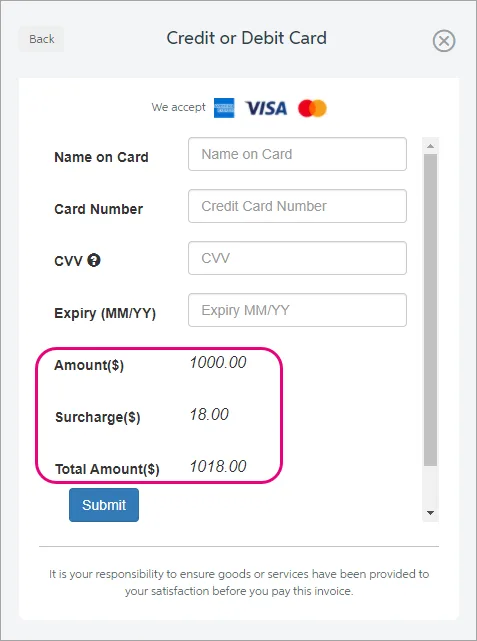
Easier payments reconciliation: When funds from online invoice payments are settled into your account, AccountRight can automatically create a bank deposit transaction and clear the corresponding transactions from undeposited funds. This will save considerable time previously spent allocating the settlement amount to the individual payments.

Multi-currency improvements
This release improves the functionality of foreign currency general journals, introduced in AccountRight 2020.3:
You can now post general journals in foreign currencies to other asset and other liability account types (this was previously limited to bank and credit card accounts)
Foreign currency remittance advice is now supported for pay bills and spend money transactions.
Reporting improvements
AccountRight 2020.4 builds on the previous release by removing date range restrictions on more key reports, allowing you to run reports across unlimited periods that would have previously required you to restore a backup of that financial year.
You can now run the profit and loss statement and balance sheet reports across unlimited periods.
The date restrictions on the ‘send to accountant’ (.MYE export) functionality have also been removed.
Exporting the profit and loss and balance sheet reports to Microsoft Excel has been improved, providing better formatting within the workbook.

Defect and crash fixes
We improved stability in AccountRight 2020.3 by over 60% and we’re continuing this focus with further crash and bug fixes, making 2020.4 the most reliable release yet.
When importing activity slips with decimals in the unit column, the payroll category wasn’t importing correctly. This has been resolved.
Fixed display issues with longer item numbers
We’ve also fixed the most common crashes that happened when
Processing payroll
Adding/removing attachments to transactions
Resizing or closing multiple windows.
API Improvements and fixes
New BalanceSheetSummary endpoint
API users currently call the {cf_uri}/GeneralLedger/AccountRegister endpoint to retrieve the data they require from ARL to calculate an Account Balance which carries a number of limitations, particularly around dates. These limitations required manual calculation work which is cumbersome and can be inaccurate.
The new BalanceSheetSummary endpoint allows users of the API to quickly and easily retrieve account balances for balance sheet accounts as at a date for postable accounts. This endpoint will return accrual balances.
API bugfixes
The incorrect order type was being returned from Sales and Purchases when performing a GET on the Sales Order and Purchase Order endpoints.
The default Price Level field in the Company Preferences endpoint was returning an incorrect value.
The Item Price Matrix endpoint was returning a 404 not found when retrieving items that were created using the API.
To download older AccountRight versions, visit our downloads page.