From 2026, you can create and lodge FBT returns only in Practice Compliance.
2025 and prior can be created in both AE/AO and Practice Compliance. Historical data for 2025 and prior FBT returns will be available in AE/AO.
Add FBT from Practice Compliance
Before you begin
Make sure you've setup tax agent and authorised MYOB to lodge the forms.
The tax agent details in Practice Compliance match what's entered in ATO Access Manager.
You have authorised MYOB to lodge forms you prepare in Practice Compliance.
To add a new FBT return for a client, select Tax in the top menu and then Add new.
Select Fringe Benefit Tax from the drop-down, then select the year.
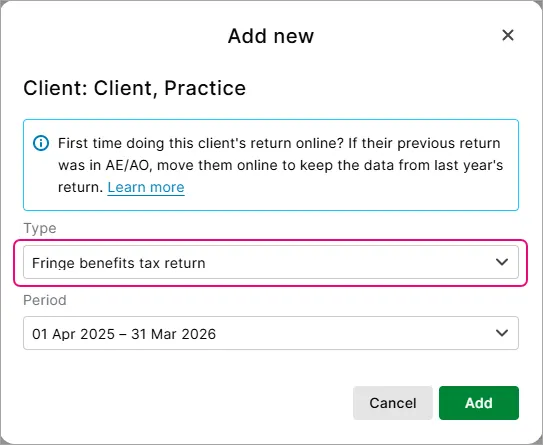
Click Add to prepare and complete the FBT returns.

Add an FBT from AE/AO
This is only available for 2025 and prior tax years.
Log in to AE/AO and go to the Tax Returns tab.
On the top of the window, select Create FBT return online link. This will open Practice Compliance. You may need to enter your login details if you haven't already logged in.
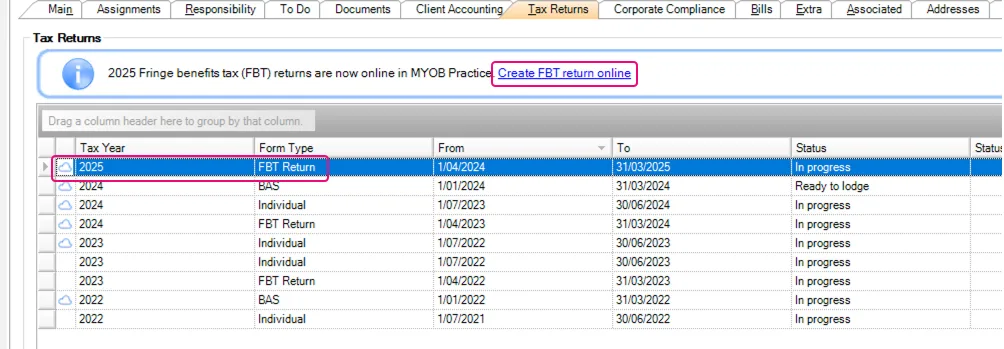
In Practice Compliance, prepare and complete the FBT returns.
A cloud icon will indicate any returns that are prepared and lodged in Practice Compliance. The Return Details section will display the due dates, revision, and tax payable/refundable details.

Complete FBT return
Most of the client details in the FBT are populated from AE/AO. If you need to change details like TFN, edit them in AE/AO.
At Item 9, you can add details from contacts or associations so you don't need to manually enter the data.