You can download a PDF copy of the tax return, schedules, worksheets and the tax estimate.
On the right of the tax return, click Preview (PDF).
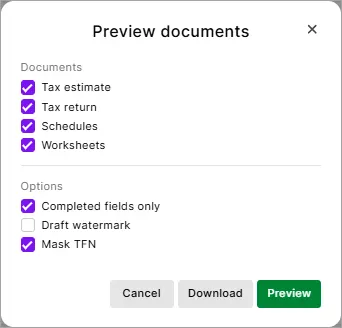
In the Preview documents, you can select documents like the tax estimate, tax return, schedules, and worksheets separately, and apply options such as Completed fields only, Draft watermark, and Mask TFN.

Documents
Tax estimate: The tax estimate for individual and company returns only.
Summary of taxable income section in the tax estimate PDF. This section provides a breakdown of the income that makes up your taxable income, making it easier for you and your clients to see how it’s calculated and quickly confirm that everything is correct.
Tax return: the Entire tax return including all the labels.
If required, select print completed fields only, or have a draft watermark or hide the TFN.Schedules: Any completed worksheets attached to the tax return.
Worksheets: Any completed worksheets attached to the tax return.
Options
Completed fields only: Prints only the fields that have an amount. Can be selected if you've selected tax return, schedules and worksheet.
Draft watermark: If you select this option, the word DRAFT will appear across the page when previewing and printing.

Mask TFN: Select this option to hide the TFN in the tax return. The preview and a downloaded copy will show Recorded in the TFN field.


Download: Click to download a pdf copy of the documents.
Preview: Click to preview the document in another tab. Use the download arrow to download a PDF copy of the document.