AccountRight desktop, online company files only
Online company files are backed up automatically each week, provided there has been some activity in the company file since the previous online backup. You can also <link>manually create an online backup<link> at any time.
Online backups can’t be downloaded. Instead, they're available in case you need to restore your online company file to an earlier point in time. You might do this if something unexpected or unwanted has happened in your company file, like a failed import.
More about backing up and restoring
Do you just want to view historical data?
To view historical data, run reports. Some AccountRight reports, like Profit & Loss, can display data for multiple periods or be used to compare data for the same period in different financial years.
Restoring an online backup overwrites your company file
If you restore from an online backup, you'll lose any work you've done in your company file since the online backup was created. It's permanent, so once you've restored an online backup you can't undo it.
Check your backup setting
There's a setting in AccountRight that controls the ability to restore online backups.
Go to the Setup menu and choose Preferences.
Click the Security tab.
Deselect the preference Enable Offline Backups and Restore.
Click OK.

We'll still automatically back up your online company file
Regardless of this setting, MYOB will still automatically back up your online company file each week (provided there has been some activity in the file). However, to access your automatic backups you'll need to deselect the setting.
Restore your online company file to an earlier point-in-time
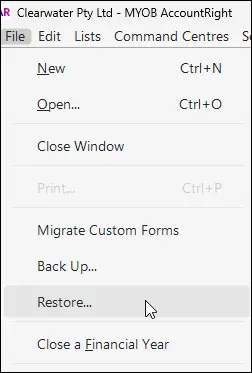
Go to the File menu and choose Restore.
Click the backup to restore then click Restore.
Read the displayed info to ensure you understand the consequences, then click Restore.
At the success message, click Close. You're returned to the Welcome to AccountRight window.
Open your restored online company file.
