Key points
-
Allowances are extra payments made to employees for things like travel, meals, tools or particular skills
-
To add an allowance to an employee's pay, set up the allowance and assign it to the employee
-
To check which allowances your employees might be entitled to, the Fair Work website is a good place to start.
The specifics of each allowance might vary, but the steps to create them in MYOB are the same. You can create one allowance and assign it to multiple employees, or you can create separate allowances for different employees.
Setting up an allowance
Go to the Payroll menu and choose Pay items.
Click the Wages and salary tab.
Click Create wage pay item.
Enter a Name for the allowance.
If you'd like a different, more personalised, name to show on pay slips for this allowance, enter a Name for pay slip, such as "Evening Meal Allowance". If you leave this blank, the pay item Name will display instead.
Choose the ATO reporting category. If you're not sure, check with your accounting advisor or the ATO. Learn about assigning ATO reporting categories for Single Touch Payroll.
If assigning Allowance - other as the ATO reporting category, make sure the name of the allowance adequately describes what the allowance is for, e.g. general, home office, non-deductible, transport/fares, uniform or private vehicle. This will help the ATO assist your employees to complete their tax returns. Learn more...
For the Pay basis, choose Hourly (regardless of whether the employee is paid on an hourly or salaried basis).
Choose the Pay rate:
If the allowance is a fixed amount per unit (per hour, per day, per KM, etc.), choose Fixed hourly rate of and enter the rate. For example, if it's a daily tool allowance, enter the daily rate. If the allowance amount varies each pay, leave the amount as zero and you can enter the amount each time you pay the employee.
if the allowance is based on the employee's regular pay rate, choose Regular rate multiplied by and enter the multiplier. For example, if it's an hourly allowance that's paid at double the employee's regular pay rate, enter 2 as the multiplier.
(Optional) If you want to track these allowance payments through a separate account, select the option Override employees' wage expense account and choose the override account in the field that appears. Need to create a new account?
Under Allocated employees, choose the employees entitled to this allowance.
Under Exemptions, choose any deductions or taxes that shouldn't be calculated on these allowance payments. For example, it's this is a pre-tax allowance, select PAYG Withholding. If you're not sure, check with your accounting advisor or the ATO.
When you're done, click Save.
Here's our example meal allowance pay item:

Assigning an allowance to an employee
As shown above, when you set up an allowance you'll assign it to the relevant employees so it appears on their pays. But you can add or remove the employees assigned to an allowance at any time.
Go to the Payroll menu and choose Pay items.
Click the Wages and salary tab.
Click to open the allowance pay item.
Under Allocated employees:
add an employee by choosing them from the list
remove an employee by clicking the delete icon for that employee
When you're done, click Save.
Paying an allowance
OK, you've set up an allowance pay item and assigned it to the relevant employees. Now when you process the employee's next pay, the allowance will be included.
Go to the Create menu and choose Pay run.
Choose the Pay cycle and confirm the pay dates.
Click Next.
Click the down arrow for the employee to open their pay.
Enter the Hours or Amount of the allowance being paid. If you set up the allowance to be paid on a per-unit basis (per hour, per day, per KM, etc.), enter the number of units being paid in the Hours column. For example, if it's a daily meal or tool allowance, enter 1 in the Hours column and confirm the Amount.
Here's our example $20 daily meal allowance: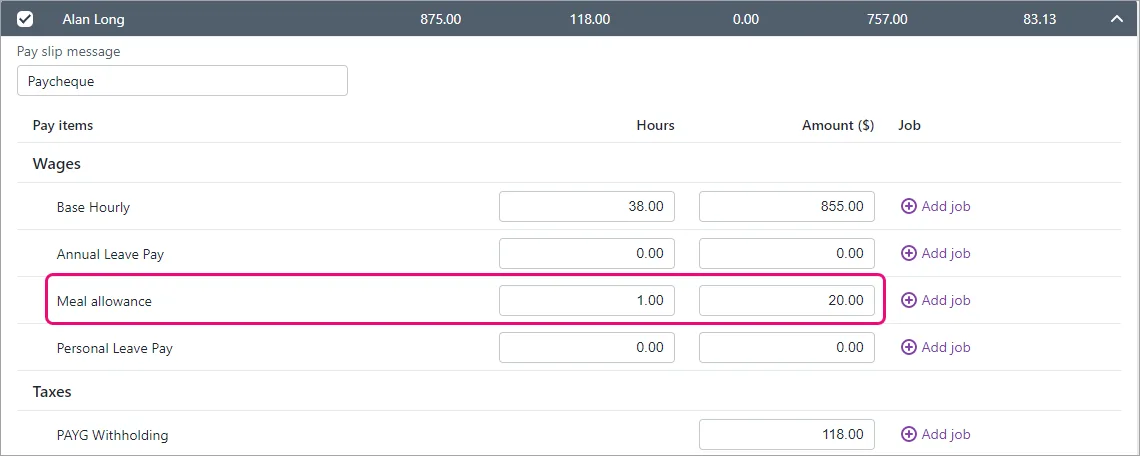
Continue processing the pay as normal. Need a refresher?

FAQs
How do I set up a per KM travel allowance?
When setting up an allowance pay item, the Pay rate can also be used for any cumulative unit, such as per KM travelled. You can then enter the value per KM in the next field.
Here's an example pay item where an allowance of 72c is paid for each KM travelled.

To pay the allowance, simply enter the number of KM travelled in the Hours field on the employee's pay. Here's an example showing an allowance for 50 KM (50 x 0.72 = $36).

Does super or leave accrue on an allowance?
When you create an allowance, by default it'll accrue superannuation and leave entitlements. If you're not sure if an allowance should accrue these entitlements, check with your accounting advisor or Fair Work.
To prevent super or leave accruing on an allowance, open the super or leave pay item and select the allowance pay item under Exemptions. For example, go to Payroll > Pay items > Superannuation tab > click to open the applicable super pay item > select the allowance under Exemptions > Save.
How do I pay different allowance amounts to employees?
To pay different allowance amounts to employees, you can either:
set custom amounts for each employee, or
enter or change the allowance amount when you pay the employee.
Can I set up an “all-purpose allowance"
Historically, an all-purpose allowance may have been added to an employee’s base hourly rate and used for calculating things like allowances, overtime and other types of payments.
But to meet the requirements of the ATO’s STP Phase 2, your employees' base hourly pay must be reported separately from allowances. MYOB does this using the ATO reporting category you assign to your pay items.
Therefore you can’t set up all-purpose allowances in MYOB. Instead, you’ll need to set up pay items for each allowance you need to pay and assign the applicable ATO reporting category to those allowances.
Example
Before STP Phase 2, an employee might have been paid an all purpose allowance which combined the following:
a base hourly rate
an industry allowance (for difficult tasks)
a tool allowance
Now, under STP Phase 2, the industry allowance and tool allowance would need to be set up as separate allowances and the employee's base hourly rate reduced accordingly.
AccountRight Plus and Premier only
Employees might be paid an allowance as part of an award, agreement, contract or other condition of their employment. An allowance might be a set amount each pay, like a meal allowance, or it might vary like a per-KM travel allowance.
Whatever the allowance is for, the same approach can be used for setting it up and paying it.
Setting up an allowance
1. Create a wage category
Go to the Payroll command centre and click Payroll Categories.
Click the Wages tab and then click New.
Name the new category, for example Travel Allowance.
Set the Type of Wages option to Hourly.
Choose the applicable ATO Reporting Category. If unsure, check with your accounting advisor or the ATO. Learn more about assigning ATO reporting categories for Single Touch Payroll reporting.
If assigning Allowance - other as the ATO reporting category, make sure the name of the allowance adequately describes what the allowance is for, e.g. general, home office, non-deductible, transport/fares, uniform or private vehicle. This will help the ATO assist your employees to complete their tax returns. Learn more...
For the Pay Rate select the Fixed Hourly Rate of option and enter the appropriate rate in the field.
If the rate isn’t time based, for example, it's a travel allowance paid by kilometre, then enter the relevant rate (eg amount paid for each kilometre). Or if it’s a fixed amount per pay period, enter that amount.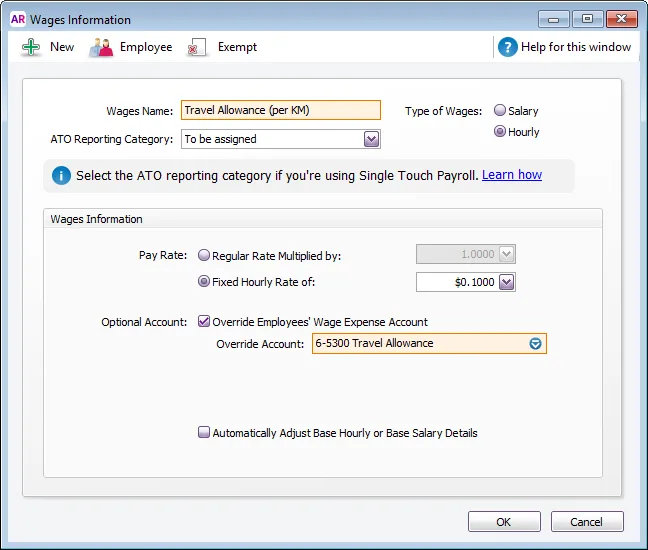
If you want to track the allowance using a different expense account to the employee’s base hourly or salary account, select the Override Employees’ Wage Expense Account option and select the account you want to use.
For example, you might have a Travel Allowances expense account in your Accounts List that you want to use to track the amounts paid. Or you can create an account for this purpose.Click Employee, select the employees who are eligible for the allowance, then click OK.
If the allowance is exempt from tax, click Exempt and select the PAYG Withholdings category. If you’re not sure about this, check with your accountant or the ATO.
Click OK to save the allowance.

2. Exempt the allowance from super calculations
If the allowance isn't included in Superannuation Guarantee calculations, (check with the relevant workplace authority if you're not sure) do this:
Go to the Payroll command centre and click Payroll Categories.
Click the Superannuation tab.
Open the Superannuation Guarantee category.
Click Exempt, select the allowance that shouldn’t be included in the super calculation, then click OK.
Click OK to save your changes.
3. Exempt the allowance from leave calculations
If you have entitlement categories based on a percentage of gross hours worked, you need to exempt the allowance from this calculation:
Go to the Payroll command centre and click Payroll Categories.
Click the Entitlements tab.
Open the entitlement category you need to edit, for example, Annual Leave Accrual.
Click Exempt, select the allowance that shouldn’t be included in the leave accrual calculation, then click OK.
Click OK to save your changes.
Repeat for any other entitlements.
Paying the allowance
When the time comes to process the employee's pay, enter the number of units (hours, kilometres, fixed amounts) in the Hours column for the relevant wage category.
Here's a few examples of what you'd enter in the Hours column:
8, if the rate is per hour, and you need to pay 8 hours worth of allowance
1000, if the rate is per kilometre, and the employee travelled 1000km
1, if the rate is a fixed amount of $200 per week, and the employee is paid weekly.

Paying the same allowance each pay
If an employee is paid the same allowance each pay, like a tool allowance, add it to their standard pay (Card File > Cards List > Employee tab > open the employee's card > Payroll Details tab > Standard Pay). Enter the number of allowance units in the Hours column.

The allowance amount will now appear automatically on each of the employee's pays.
FAQs
What if an allowance is taxed at a flat rate?
If you need to set up an allowance which is taxed at a flat rate, here's how:
Set up the allowance wage category as described above.
Set up a deduction payroll category for the flat rate of tax (Payroll > Payroll Categories > Deductions tab > New).
Choose the applicable ATO Reporting Category. If unsure, check with your accounting advisor or the ATO. Learn more about assigning ATO reporting categories for Single Touch Payroll reporting.
For the Calculation Basis, specify the flat tax rate and select the allowance wage category created earlier.
Click Employee and select the employees associated with this allowance.
Here's an example of a travel allowance deduction category with a 5% flat tax rate: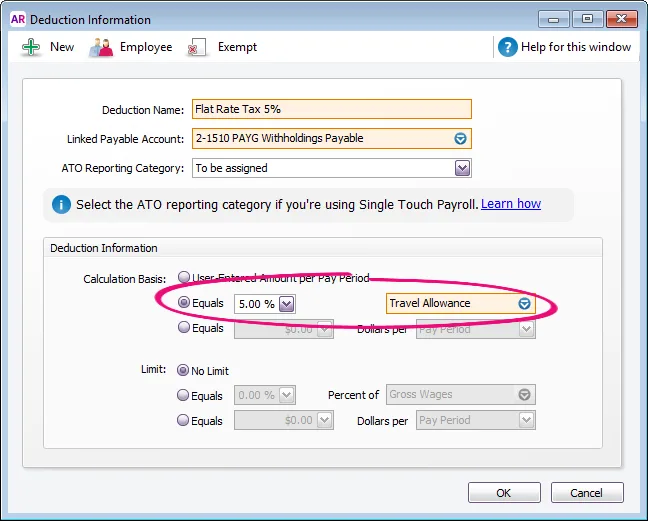
Pay the employee as usual.

How do I exempt an allowance from tax for one employee but not another?
If an allowance is exempt from tax for one employee but not another, you'll need to:
Set up separate allowance wage categories.
Exempt one of the wage categories from tax (click Exempt on the Wages Information window (see above), then select the PAYG Withholding category).
Assign the applicable wage categories to the employees.
Can I set up an “all-purpose allowance"
Historically, an all-purpose allowance may have been added to an employee’s base hourly rate and used for calculating things like allowances, overtime and other types of payments.
But to meet the requirements of the ATO’s STP Phase 2, your employees' base hourly pay must be reported separately from allowances. AccountRight does this using the ATO reporting category you assign to your payroll categories.
Therefore you can’t set up all-purpose allowances in AccountRight. Instead, you’ll need to set up wage categories for each allowance you need to pay and assign the applicable ATO reporting category to those allowances.
Example
Before STP Phase 2, an employee might have been paid an all purpose allowance which combined the following:
a base hourly rate
an industry allowance (for difficult tasks)
a tool allowance
Now, under STP Phase 2, the industry allowance and tool allowance would need to be set up as separate allowances and the employee's base hourly rate reduced accordingly.