You can bring information into MYOB (known as importing), or get some information out of MYOB (known as exporting).
When it comes to importing, it's best to enter the information you want to import into a sample file. This ensures the right information is captured and imports successfully.
We've created some sample files for you and they're available in your software. For details on how to use them, see these topics:
Also find out how to export data for your accountant or export items.
Get started by clicking the settings menu (⚙️) and choosing Import and export data.
You can also export data by running a report then exporting it to Excel. See Exporting reports.
Using an import template
There are import templates in MYOB Business you can use to simplify your imports.
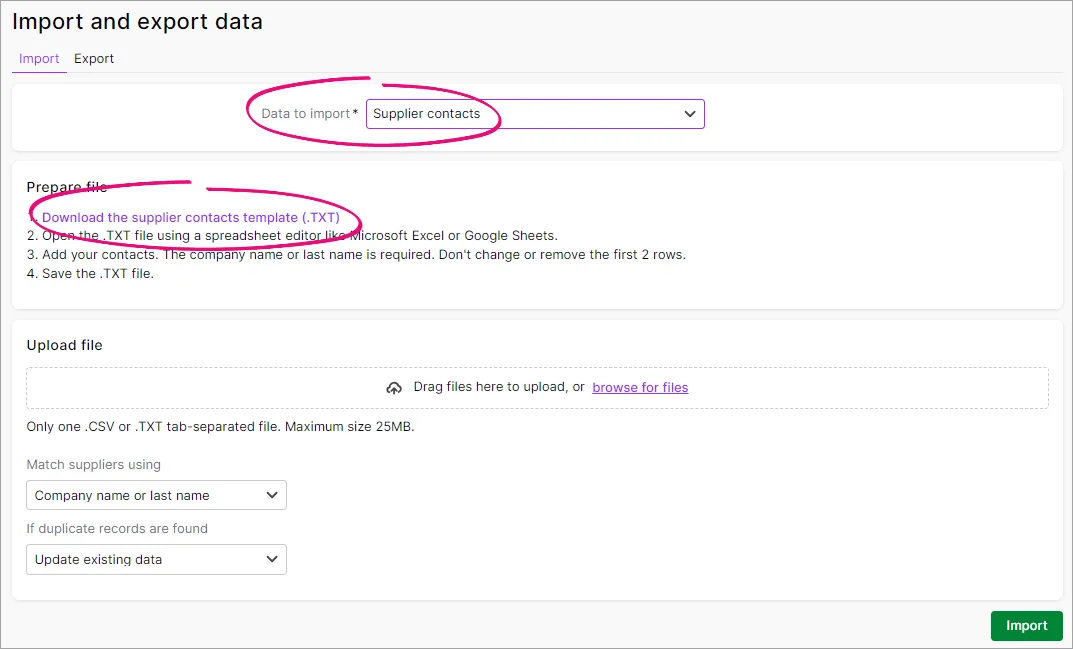
Click the settings menu (⚙️) > Import and export data.
On the Import tab, choose what you want to import.
Click to download the import template.

You can take data entered in your company file and use it in other software or in other company files. This process is called exporting data. You can also take data entered in other software programs and incorporate it into your company file, or incorporate information from one company file into another company file. This process is called importing data.
What can be imported and exported?
The following table lists the record types that you can import and export, along with the field specifications for the different types of records.
Need to import/export customised forms? See Sharing forms with other company files.
Record types | Field specifications | Notes |
|---|---|---|
Accounts
|
| |
| ||
Activities | Plus, Premier only | |
Activity slips | Plus, Premier only | |
Cards |
| |
Contact logs |
| |
Custom lists |
| |
General journal entries | Including Tax/GST information and BAS/GST reporting | |
Inventory adjustments | ||
Items |
| |
Jobs |
| |
Pay bills | Can only be imported | |
Purchases | ||
Receive payments | Can only be imported | |
Receive money |
| |
Sales |
| |
| ||
| ||
| ||
| ||
Spend money |
| |
Tax/GST code list |
| |
Timesheets | Plus and Premier, AU only | |
Transaction journal entries | Excluding Tax/GST information and BAS/GST reporting. |
Import/export FAQs
How do I import or export data?
When you're ready to go, see the Importing data or Exporting data topics.
How do I import from Retail Manager?
We've put together the Accounting Integration Guide to step you through integrating MYOB RetailManager and MYOB accounting software.
The Guide includes:
required setup
the integration process
troubleshooting integration issues.
What is the required import file format?
AccountRight can import comma separated or tab delimited text files (.txt). The best way to ensure an import file is in the right format, create an import template.
You can create an import template by exporting data from AccountRight's sample company file. For example, to create an import template for sales data, simply export sales data from AccountRight's sample company file. The export file becomes your template. All you need to do is open the export file and replace the contents with your data, ready for importing.
For more details, see Using an import template.
How do I troubleshoot an import issue?
If you're getting errors or warnings when importing, check the import log.