Every user can view and edit their own user details. Users with Administrator access can also change the access level for any user. For more information about user access levels, see Manage users.
Need to change your MYOB subscription, invoices and payment details? You can change these in My Account.
To change your login email address
Sign in to My Account with your current email address and password.
Click the dropdown menu in the top-right corner and choose Account security.
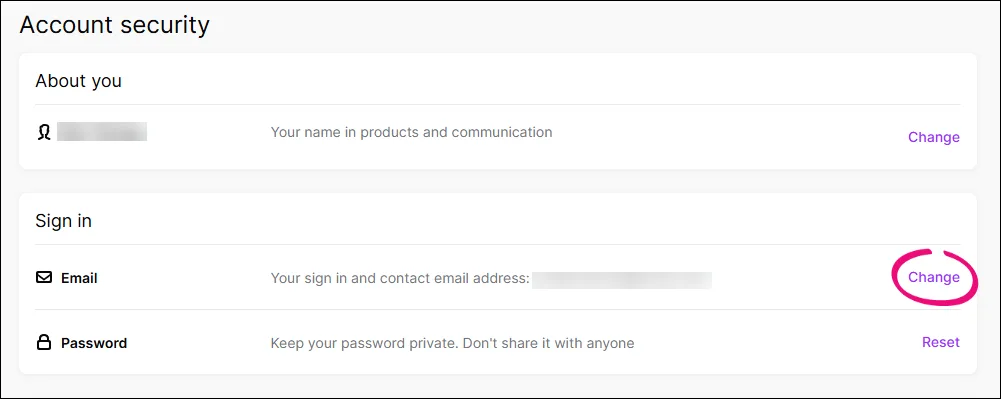
In the Sign in > Email section, click Change.
If prompted, complete two-factor authentication.
In the Change your email address page, enter the new email address.
Click Save.
Log in using the new email address.

FAQs
How do I change or reset a password
Sign in to My Account with your current email address and password.
Click the dropdown menu in the top-right corner and choose Account security.
In the Sign in > Password section, click Reset.
In the message that appears, click Reset password. An email is sent to the email to the email address you sign in with.
Click here in the email and follow the onscreen prompts to reset your password.
Every user can view and edit their own user details. Users with Administrator access can also change the access level for any user. For more information about user access levels, see Manage users.
Need to change your MYOB subscription, invoices and payment details? You can change these in My Account.
To change your login email address
Sign in to My Account with your current email address and password.
Click the dropdown menu in the top-right corner and choose Account security.
In the Sign in > Email section, click Change.
If prompted, complete two-factor authentication.
In the Change your email address page, enter the new email address.
Click Save.
Log in using the new email address.
FAQs
How do I change or reset a password
Sign in to My Account with your current email address and password.
Click the dropdown menu in the top-right corner and choose Account security.
In the Sign in > Password section, click Reset.
In the message that appears, click Reset password. An email is sent to the email to the email address you sign in with.
Click here in the email and follow the onscreen prompts to reset your password.